
Introducing: Prospecting Powered by Real Buyer Signals
TL;DR: Sales Engine now delivers end-to-end account management with automated prospecting, engagement health tracking, and product configuration capabilities. This release transforms how revenue teams prioritize accounts, discover contacts, and maintain relationship momentum—all without the manual data burden.
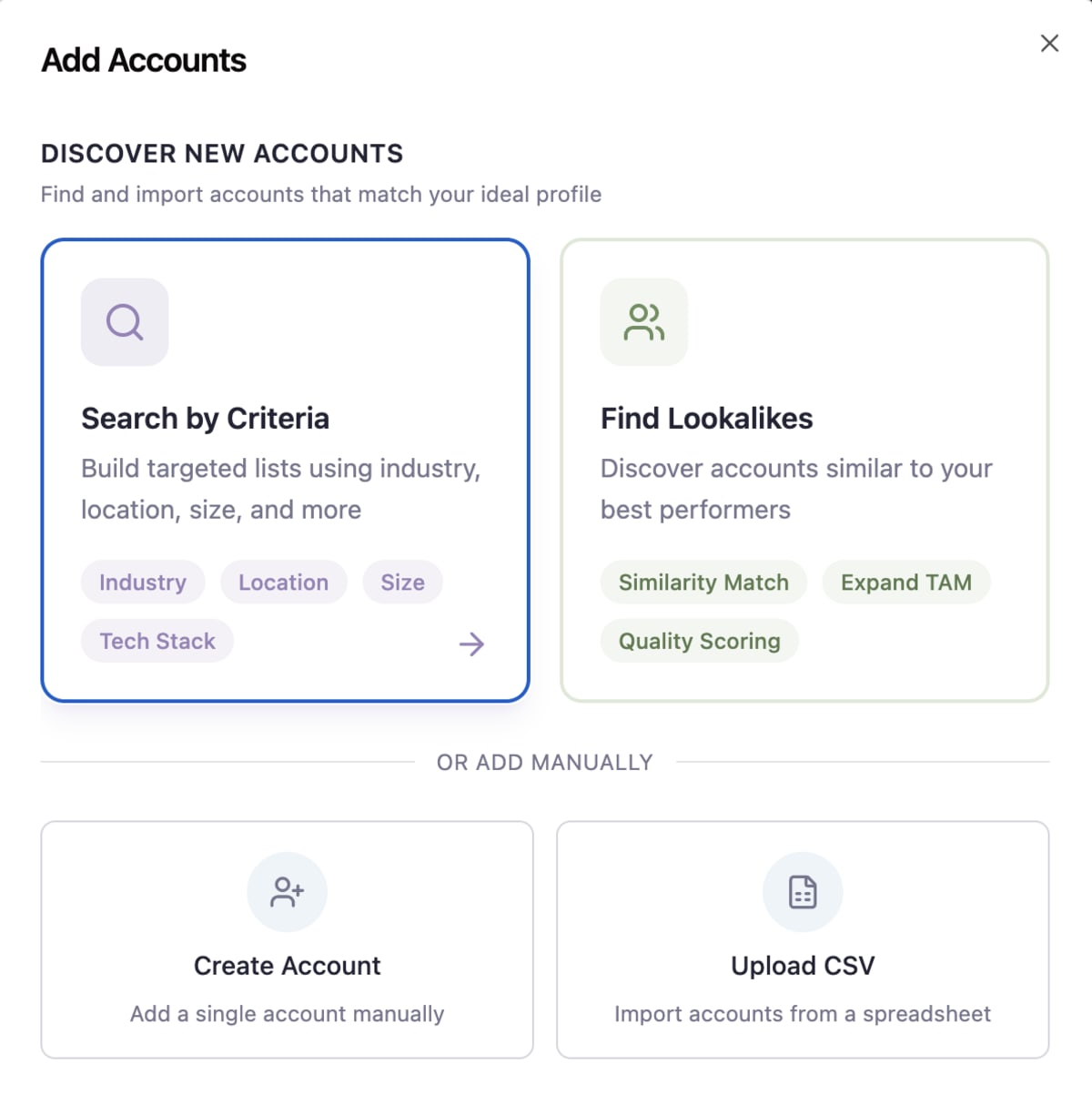
1. Signal-Driven Prospecting: TAM-Powered Account Discovery
TL;DR: Find your next best customer without leaving your workflow. Identify and import new accounts through lookalike modeling, TAM criteria filtering, or bulk CSV import. No more toggling between LinkedIn Sales Navigator, spreadsheets, and your CRM.
HOW IT WORKS
- Select existing high-value accounts to find similar companies
- Filter prospects based on your configured product/service TAM criteria
- Import account lists via CSV when working with marketing
- Automatically classify accounts as prospects, customers, partners, or investors
WHO BENEFITS
- Sales reps save 3-5 hours weekly on manual prospect research.
- Sales leaders gain visibility into territory expansion without requesting custom reports.
- RevOps can ensure new accounts align with defined ICP criteria.

2. Customer Enrichment: The Right Buyers, Auto-Discovered & Enriched
TL;DR: Find the right people at target accounts without manual research. Account-based contact discovery automatically identifies key stakeholders and enriches their profiles with contact details and social information.
HOW IT WORKS
- Select an account to discover associated contacts
- System automatically enriches contacts with phone numbers, email addresses
- Run bulk workflows to initiate outreach sequences to new contacts
WHO BENEFITS
- SDRs spend less time researching and more time engaging.
- AEs quickly expand their reach within accounts.
- RevOps eliminates the constant battle for clean contact data.
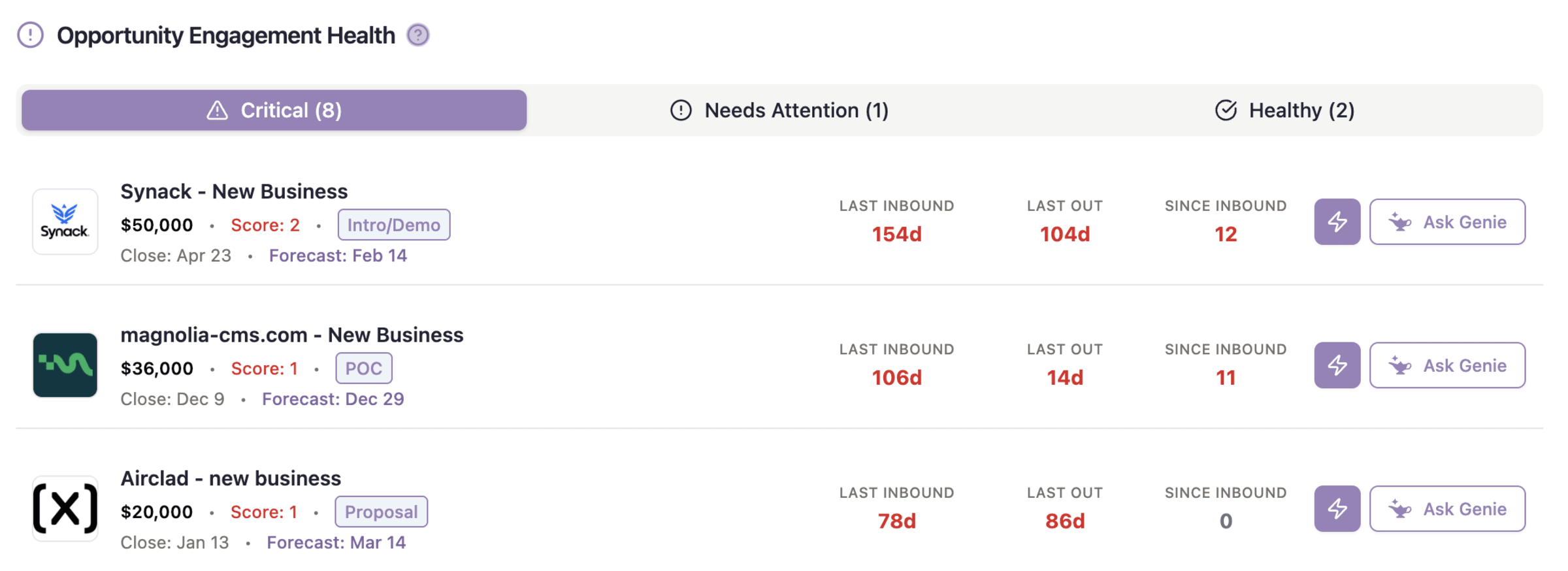
3. Engagement Intelligence: Spot Risk Before Relationships Go Dark
TL;DR: The new Engagement Health Tracker monitors communication patterns across your accounts, highlighting those requiring immediate attention based on communication gaps—no more deals lost to simple follow-up oversights.
HOW IT WORKS
- Dashboard categorizes accounts by engagement status:
- Critical (no communication in 2+ weeks)
- Needs attention (no communication in 7-14 days)
- Healthy (communication within the last week)
- Click the “Ask Genie” button for AI-generated, contextual re-engagement messages
- View all account communications in the new Activity Records center
WHO BENEFITS
- AEs can prioritize their day based on relationship risk.
- Sales managers gain early warning signals for deals in jeopardy.
- CROs see relationship health across the entire customer base without manual reporting.

GTM Strategy, Executed: Turn your Product Strategy Into your Prospecting context
TL;DR: Define your products, services, target companies, and buyer personas as structured data that powers your entire revenue operation. This transforms abstract GTM strategy into actionable intelligence that drives daily sales activities.
HOW IT WORKS
- Configure products with detailed profiles including value props, pricing, and competitive positioning
- Select from standard sales methodologies (Medic, Medpick, Vant, Spiced) or create custom frameworks
- Use these configurations to power account discovery and prospecting
WHO BENEFITS
- Revenue leaders gain alignment between strategy and execution.
- Sales enablement teams can ensure product positioning is consistently available to reps.
- RevOps can build workflows that adapt to different products and buyer journeys.
The Bottom Line: Smarter Prospecting, Faster Growth
These features are live in your GTM Engine environment now. For teams looking to maximize value from the new account discovery capabilities, we recommend starting with product configuration to ensure your prospecting aligns with your current go-to-market strategy.
Want a personalized walkthrough of how these features can transform your specific workflows? Schedule a 15-minute walkthrough with our team.
Holiday break? Not for us; here’s the full list of what we shipped:
AI & Workflow Enhancements
- Added input validation on workflow inputs/changes
- Added tool toggle for workflows to mark a workflow as a tool for use in agents
- Easier promotion of workflows to system workflows and agents to system agents
- Added backward compatibility for legacy variable naming
- Enhanced variable validation with detailed error messages
- Improved tooltips to show specific reasons and suggestions for fixing broken variable references
- Added flexible matching for task names to prevent false positive validation errors
- Added “Deleted Fields” section in workflow task modals
- Workflow enqueue improvements with multi-step validation
- Added Bulk Record Update workflow task
- Added Request Task and Run Code Task
- Workflow past runs indexing for performance
- Breadcrumbs on workflow editor page
- Added ability to check/uncheck records when bulk-running workflows
- RevOps role can now bulk-run workflows on records pages
- Auto un-checking duplicate records on CSV upload
Agents & AI Assistants
- Improved Agents layout and customization for system agents
- Genie now available on Account, Contacts, and Dashboard pages
- Added ability for Agents to use workflows as tools
- Added Genie output visibility (tool call results)
- Credits system introduced for Finding Accounts/Contacts (expandable for research and enrichment)
- Added backend Queue for managing large agent or workflow batches
- Added context variables for executing workflows directly on Account pages
- Implementing auto-dismissal of user tasks
CRM Hygiene, Records & Data Management
- Adding CRM links to record pages
- Added “Deleted Fields” section for record update modals
- Added review step on record import
- Added secure /api/users/nango-session route for user-specific Nango sessions
- Add “is Unnamed Account” filter to account records page
- Add data model for picklist fields
- Add batching to weekly syncs
- Add pagination safety limit and parallel execution for WorkOS membership deactivation
- Added HubSpot association delete-down from CRM
- Added “Only add to open opps” logic
- Remove internal team members from Meeting Prep lists
- Add code support for contacts without emails
- Add DB indexes everywhere (performance improvements)
- Updated syncs from workflows to only send changed fields
Integrations & Syncing
- Salesforce Drizzle updates (performance and connection optimization)
- Added batch insert, update, and upsert for contacts and accounts
- Added multiple account domain and multiple email support
- Skip “Read” webhooks for inactive integrations
- Handle Google OAuth insufficient permissions gracefully (auto-skip + clear tokens)
Navigation & UI Improvements
- Improved AE Dashboard (layout, Top Target Accounts component)
- Added page titles throughout the App
- Improved Create modals for Accounts and Owners
- Added collapsible Account Plan sections
- Unified field component design across record pages
- Added right-click to open record in new tab
- Added flexible filtering options for Account/Company keywords (AND/OR/NOT logic)
- Added breadcrumbs to workflow editor
- Added tooltips and better variable validation visibility
- Added auto unchecking duplicate records during CSV upload
Sales Engine & Performance
- Added individual team member rollup on forecast
- Added support for next year’s targets in team structure
- Added stage metrics to Team Performance API (pipeline overview)
- Pipeline selection available when creating opp in activity hygiene
- Associated Accounts and Contacts now clickable in activity hygiene
- Added step to associate contacts to opps after creation in activity hygiene
- Improved enrichment logic and prospect finding
- Improved activity owner assignment with fallback chain logic
- Added meeting participants filter (All / External Only / Internal Only)
- Improved calendar view with scrollable 8-hour window in day view, grid lines for clarity, and cancelled event handling and filtering
- Schedule meeting prep 2 weeks in advance
- Start meeting prep immediately and again 24h before if stale
Data Model & System Enhancements
- Added Products tables
- Added needs_user_input to activities
- Added location outputs to LinkedIn scrape tasks
- Added “Insert Entire Object” option to LinkedIn Scrape
- Consolidated variable naming (lodash snakeCase)
- Implemented drizzle snake case consistency across DB
- Updated default AI model in prompt task to Claude 4.5
- Added tracking for transcripts workflow to debug duplicate processing
- Updated transcript data normalization (lowercasing)
Account, Contacts & Opportunities
- Contacts Drizzle, Accounts Drizzle, Opportunities Drizzle, and related edit experiences added
- Unified design across Drizzle record management modules
- Added “Configure Account Research” button to Account Research tab
- Improved UX for adding opps and contacts to accounts
- Added ability to select which contacts to load from Account page during find process
- Created “Unassociated Activities” experience
- Added ability to filter out duplicate/unnamed accounts
Quality-of-Life & Admin Improvements
- Added notifications for meetings needing user input to match/dismiss/create opps
- Added ability to right-click and open records in new tab
- Added breadcrumb and better organization for workflows
- Improved fetching performance for workflows and agent workflows
- Updated logic in processCall to set needs_user_input correctly
That's all for this release! Sign up for our newsletter below to stay in the loop for all future releases:


