
This release gives reps more time to sell, equips managers with sharper insights, and empowers RevOps with cleaner, more connected data. From in-line deal notes and smarter task linking to performance dashboards and historical trends, these updates eliminate busywork, enhance visibility, and align every role around winning execution. Now available in your GTM Engine account.
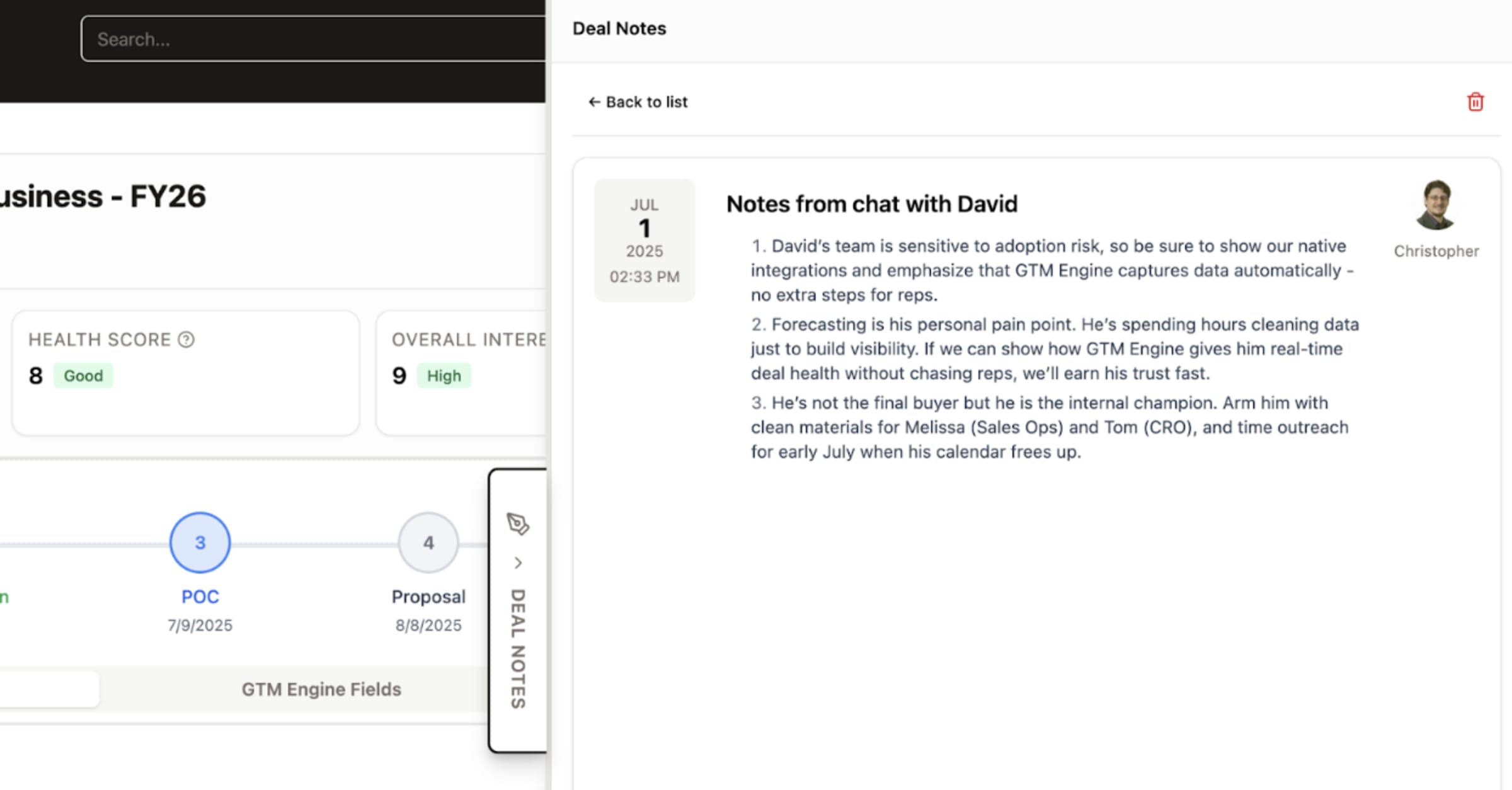
1. Deal Notes: Notes that work where you do; Full opportunity context, zero switching
TLDR: Your opportunity notes now live where they belong—directly in the opportunity view on the right side of your screen. Format, track history, and never lose work with auto-save. This eliminates the tab-switching tax and keeps critical context where decisions happen.
HOW IT WORKS:
- Access the new notes panel directly within any opportunity record• Format with markdown support using our intuitive toolbar
- View complete history to track how discussions evolved
- Continue where you left off with automatic draft saving
WHO BENEFITS: AEs can document customer conversations without leaving their workflow. Sales leaders gain visibility into deal progression without hunting for context. RevOps gets cleaner data with notes tied directly to opportunities.

2. Task-Opportunity Association: Context-aware follow-ups
TLDR: Tasks now connect directly to specific opportunities, ensuring follow-ups have proper context and nothing falls through the cracks. This bridges the execution gap between what you plan and what you track.
HOW IT WORKS: Simply select the relevant opportunity when creating tasks. View opportunity details within task views for seamless context switching.
WHO BENEFITS: AEs can manage follow-ups with full deal context. Sales managers can quickly assess if critical opportunities have appropriate activity plans. RevOps gains clearer visibility into activity-to-outcome relationships.
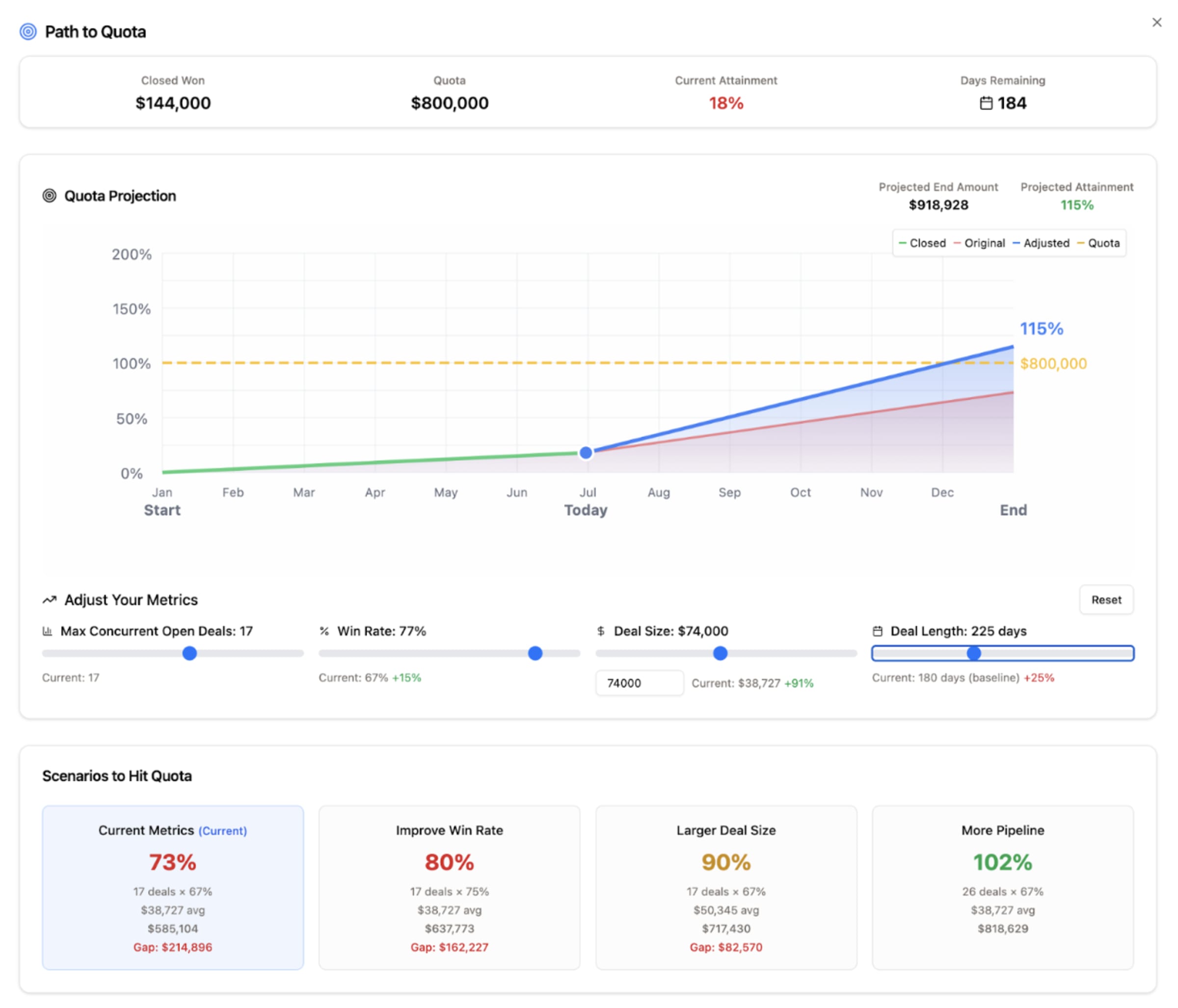
3. Path to Quota Calculator: Know exactly what moves the needle
TLDR: Stop guessing what activities will get you to quota. Our new calculator uses your actual performance metrics to project attainment and show precisely where to focus for maximum impact.
HOW IT WORKS: Access from your dashboard, adjust variables to see different scenarios, and identify the highest-leverage activities for your specific situation.
WHO BENEFITS: AEs can take control of their path to quota with data-backed strategies. Sales leaders can coach with precision based on individual performance patterns. RevOps can identify systemic bottlenecks across the team.
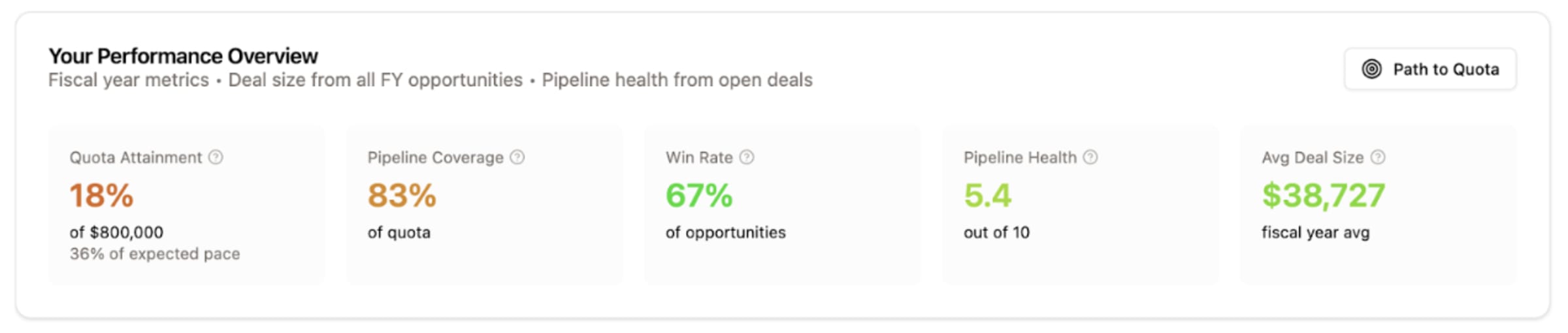
4. Rep Performance Metrics Dashboard: Self-service insights
TLDR: Take ownership of your performance data with our new self-service metrics dashboard. Quickly identify strengths and improvement areas without waiting for reports or meetings.
HOW IT WORKS: Access your personalized dashboard to view performance metrics with intuitive visualizations that highlight trends and opportunities.
WHO BENEFITS: AEs gain autonomy with on-demand performance insights. Sales managers spend less time generating reports and more time on meaningful coaching. RevOps can focus on strategic initiatives rather than fulfilling data requests.
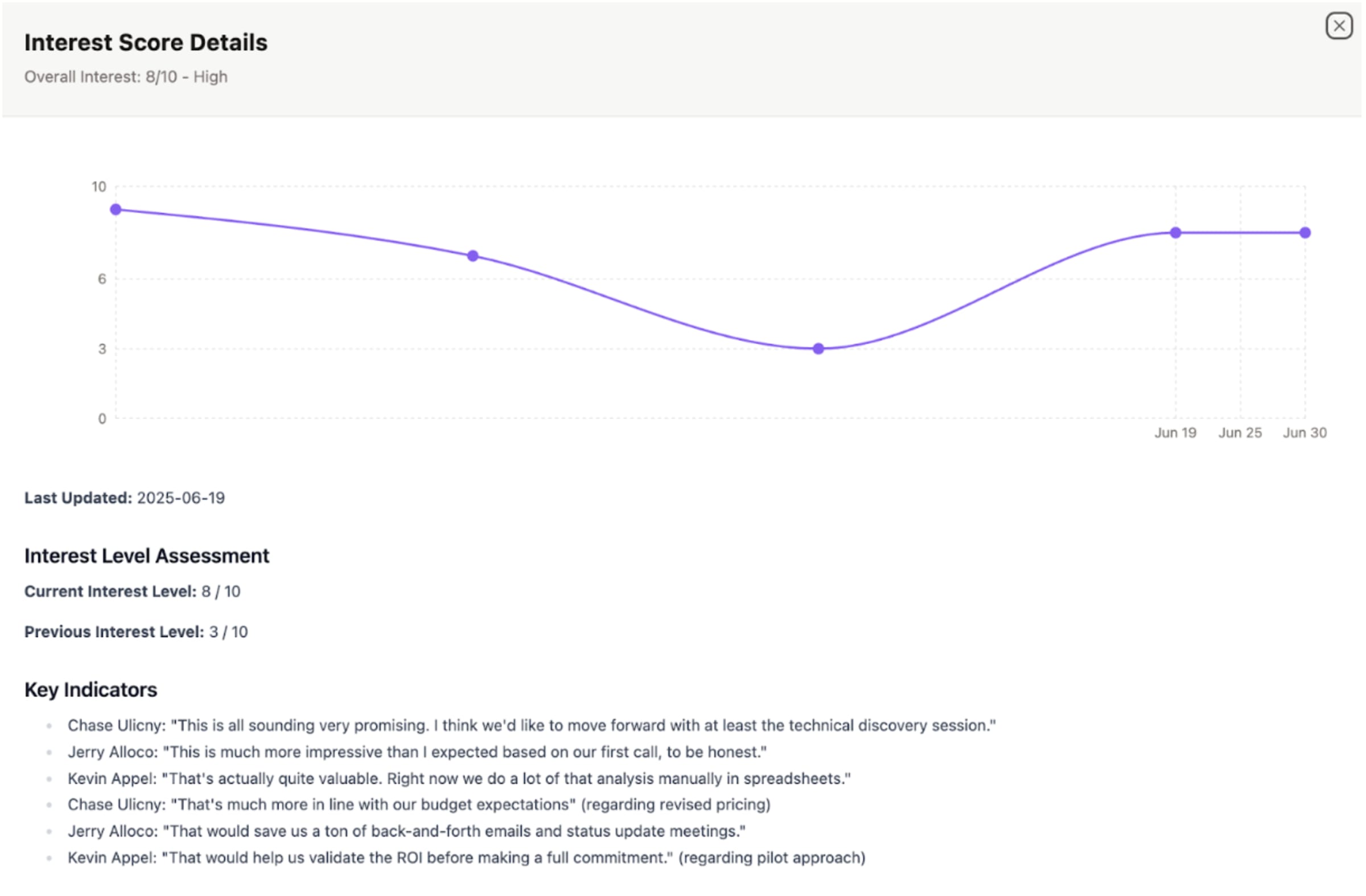
5. Historical Tracking Enhancements: The story behind the numbers
TLDR: Visualize how key opportunity metrics evolve over time with new charts for deal amount, health score, interest level, and close dates. Spot patterns and make better predictions based on historical trends.
HOW IT WORKS: Access the new visualization panel within opportunity records to see how critical metrics have changed throughout the sales cycle.
WHO BENEFITS: Sales leaders can identify pattern shifts that signal risk or opportunity. AEs gain perspective on deal evolution. RevOps can analyze trend data for process improvement.

6. Activity Timeline Enhancements: No more guesswork on engagement
TLDR: Quickly see recent activity, days since last interaction, and upcoming events with our enhanced timeline. The new “today” marker and stale opportunity indicators ensure nothing slips through the cracks.
HOW IT WORKS: View the enhanced timeline in opportunity records to track engagement history and upcoming activities with clear visual indicators.
WHO BENEFITS: AEs can prioritize follow-ups based on engagement patterns. Sales managers can easily identify at-risk opportunities during reviews. RevOps gains visibility into activity patterns across the pipeline.

7. Field Editability Controls: Data integrity without the friction
TLDR: Administrators can now designate which fields are editable across all interfaces, ensuring consistent behavior and maintaining data integrity without hampering workflow.
HOW IT WORKS: Use the new toggle in settings to control field editability across pipeline table, forecast view, and individual records.
WHO BENEFITS: RevOps gains control over critical data points. Sales leaders get more reliable reporting. AEs experience consistent interfaces with clear expectations about what they can modify.
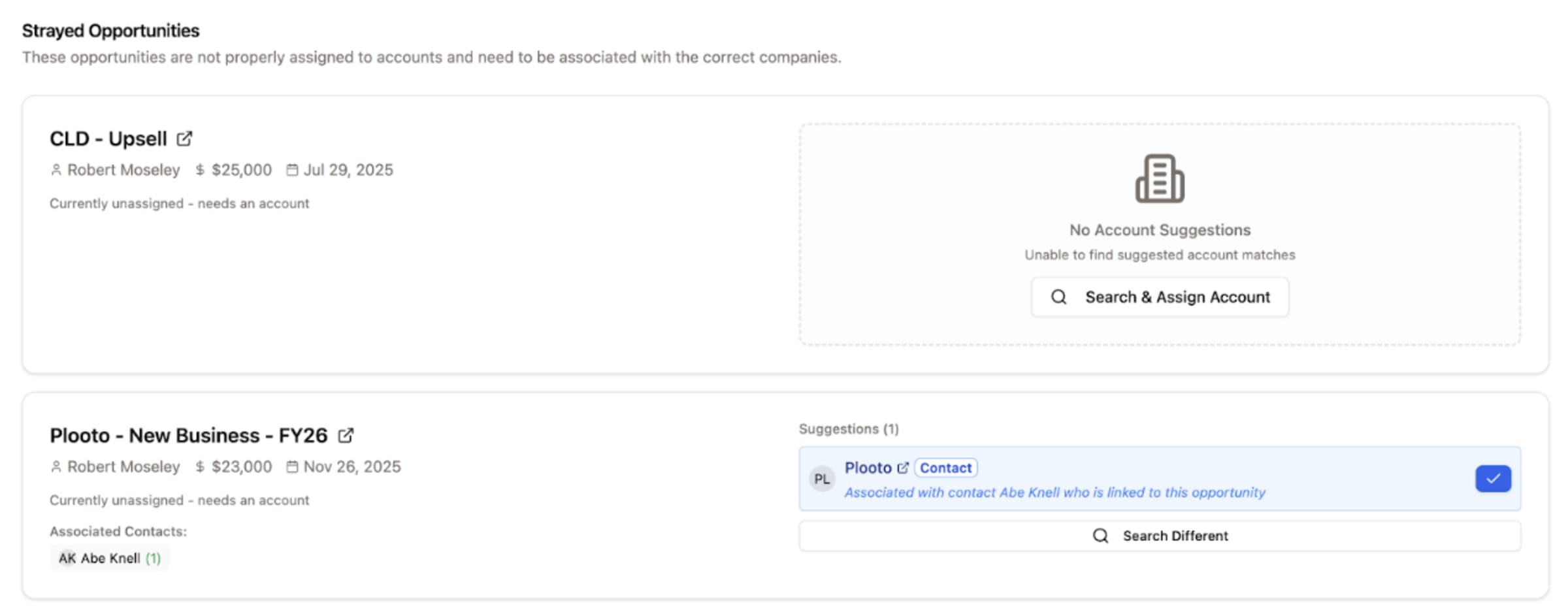
8. CRM Hygiene Improvements: Performance that respects your time
TLDR: Faster load times, smarter navigation, and more relevant recommendations make your daily workflow smoother and more efficient. Because your CRM should accelerate your work, not slow it down.
HOW IT WORKS:
- Experience faster performance with pagination (25 records per page)
- Open records in new tabs with direct links for efficient navigation
- Get more relevant recommendations with enhanced suggestion logic
- Access navigation more easily from the top-level sidebar
WHO BENEFITS: Everyone gets back precious minutes in their day with a more responsive, intuitive system that adapts to how you actually work.
Available in your GTM Engine account today. Have questions about these updates? Email us at support@gtmengine.ai for assistance.
Here's the full list of changes!
AI and Workflow Enhancements
- Added support for generateObject in the AI Prompt task with a selector for Text or Object output.
- Added a schema textarea for zod-based object generation.
- Implemented automatic zod validation with retry logic for structured outputs.
- Added a Copy button to the workflow output modal.
- Added a Copy All button to the workflow results modal.
- Added a Draft state for workflows using local storage to preserve unsaved changes.
- Added support in workflows for Claude 4 Sonnet and Opus.
- Fixed and improved prompt generation and execution for the research task.
- Added functionality in the UI for custom system workflows.
CRM Data Management and Record Handling
- Improved deduplication logic for accounts and contacts with links to existing records.
- Added handling for Closed-Lost opportunities with a dedicated message and ability to move stage.
- Enabled changing Opportunity Owner and Opportunity Name directly in the UI.
Opportunity and Pipeline Improvements
- Added Proto-Opp handling in both the pipeline view and opportunity view.
- Added a collapsed Proto stage column with actions for qualifying or disqualifying opportunities.
- Updated opportunity cards in pipeline view to show Health, Date Created, and Interest Level.
- Added ability to associate tasks with opportunities, including opportunity context in task detail views.
UI and UX Enhancements
- Added a customer feedback form in the app that sends directly to the customer-feedback channel.
- Slight design improvement on the AE dashboard.
- Added field editability controls in settings, allowing fields to be marked editable or read-only across the UI.
Integrations and System Features
- Added handling for global Gmail through Nango.
Subscribe below to stay in the loop for all future releases!


