1. Feature Overview
Agentic AI is GTM Engine's autonomous agent system that automatically handles CRM administrative tasks without human intervention. Unlike traditional "copilot" tools that merely suggest actions, Agentic AI agents actively perform multi-step workflows to maintain your CRM data, enrich contacts, flag risks, and update opportunities—all without requiring manual effort from your sales team.
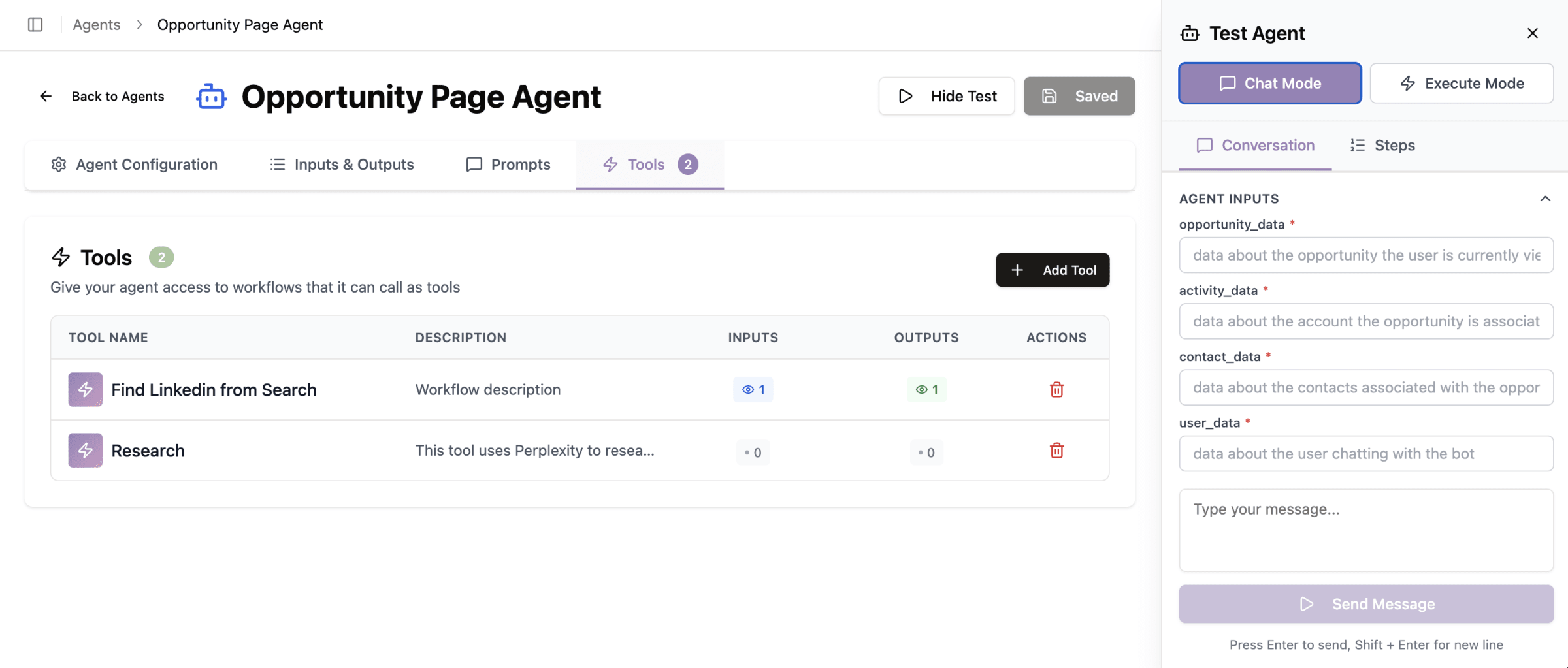
Located in the Automations section, this feature allows RevOps teams to build custom agents that execute specific tasks relevant to your business needs. Each agent can be equipped with custom workflows (tools) that enable it to complete complex sequences of actions autonomously.
2. Benefits to the User
- Time Savings: Reduces CRM administrative work by up to 62%, giving sales reps 30-40% more time to focus on actual selling
- Improved Data Quality: Automatically updates CRM records with accurate, timely information from calls, emails, and meetings
- Enhanced Pipeline Visibility: Creates trustworthy forecasts based on complete, up-to-date data
- Early Risk Detection: Identifies potential deal issues like disengaged stakeholders or missing champions before they derail opportunities
- Seamless Operations: Works in the background without interrupting your team's workflow
- Consistent Execution: Ensures critical CRM processes are completed consistently, not just when reps remember to do them
3. Accessing the Feature
- Log in to your GTM Engine account
- Navigate to the Automations section in the main navigation menu
- Select the Agents tab to view existing agents or create new ones
Note: You need RevOps administrator permissions to create and modify agents. Regular users can benefit from agent actions but cannot configure them. ❞
4. Step-by-Step Usage Guide
Creating a New Agent
- From the Agents tab, click the + New Agent button
- Provide a descriptive name for your agent
- Define the agent's purpose and scope of responsibilities
- Select or create the workflows (tools) the agent will use
- Configure any specific parameters or triggers for the agent
- Save and activate your agent
Building Custom Workflows
Workflows are the tools that agents use to accomplish tasks. To create a workflow:
- From the Agents tab, select Manage Workflows
- Click + New Workflow
- Name your workflow (e.g., "Find LinkedIn Profile," "Post to Slack," "Research Contact")
- Add specific actions to your workflow:
- Select from pre-built actions in the action library
- Arrange actions in the desired sequence
- Configure parameters for each action
- Test your workflow to ensure it functions as expected
- Save the workflow and assign it to relevant agents
Example Agent Configurations
Post-Call Processing Agent
- Purpose: Process conversation data after sales calls
- Workflows:
- Extract and log commitments as next steps
- Update opportunity status
- Enrich contact data
- Flag potential deal risks
Data Cleansing Agent
- Purpose: Maintain CRM data integrity
- Workflows:
- Fix orphaned records
- Create missing contacts
- Correct misaligned data
- Link related records
5. Tips and Best Practices
- Start Small: Begin with one or two agents focused on high-impact, repetitive tasks
- Be Specific: Define clear, focused purposes for each agent rather than creating "do everything" agents
- Monitor Performance: Regularly review agent activities to ensure they're performing as expected
- Refine Over Time: Adjust workflow steps and agent parameters based on results
- Communicate with Teams: Ensure sales teams understand what the agents are doing on their behalf
- Build Specialized Tools: Create purpose-specific workflows that agents can combine to solve complex problems
- Document Custom Workflows: Keep track of what each workflow does and when it should be used
Important: Agents operate autonomously, so thoroughly test workflows before deploying them to production. Consider running agents in a limited capacity before full deployment.
Common Use Cases
- Automatically extracting commitments from call transcripts and creating follow-up tasks
- Updating opportunity stages based on conversation content and engagement patterns
- Enriching contact records with information from external sources
- Identifying and flagging potential deal risks like disengaged stakeholders
- Creating missing contacts when new participants join conversations
- Posting key updates to team collaboration tools like Slack
With Agentic AI, your CRM transforms from a manual data entry burden into an autonomous system that maintains itself. Your sales team can focus on what they do best—building relationships and closing deals—while GTM Engine handles the administrative work in the background.
