
Sales Leaders Finally Have the Pipeline Memory They've Always Needed
TL;DR: Four major updates ship this month built specifically for how sales leaders actually run the number. Forecast History gives you an auditable record of every pipeline shift. The AI Report Builder turns any question into a chart in seconds. Comment Threads keep deal context attached to the deal. And a new onboarding experience means your team gets up and running without the friction that kills adoption.
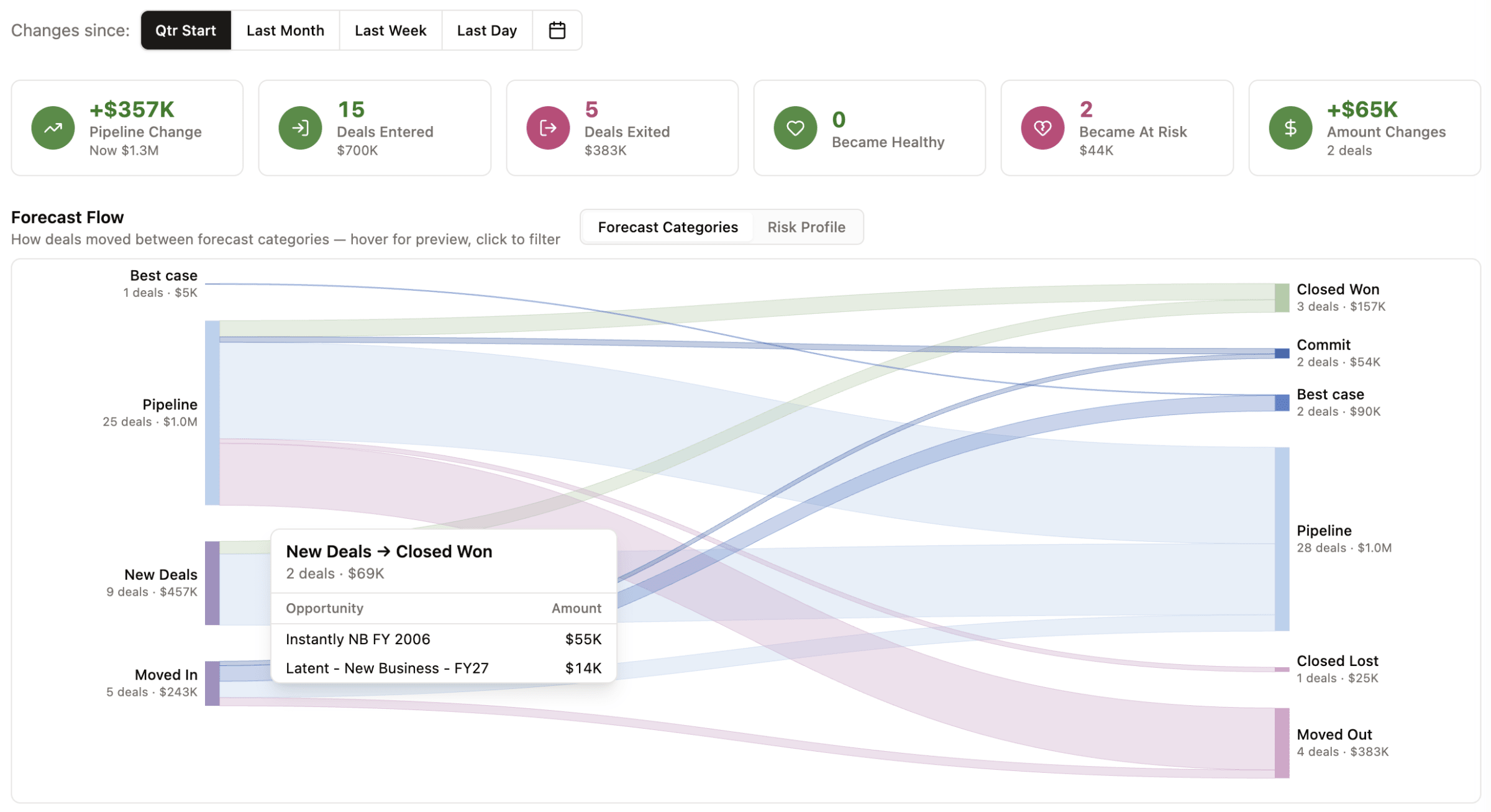
1. Forecast History: Your Pipeline Memory, Finally on Record
TL;DR: Stop reconstructing what happened from memory or spreadsheet screenshots. Forecast History gives you a precise visual record of exactly how your pipeline moved across any time window, so your forecast calls are anchored in data, not gut feel.
HOW IT WORKS:
- Open the Forecast History tab on your Forecast page
- Select a comparison date using a preset interval (start of month, last week) or a custom date
- View a Sankey flow chart mapping deal movement across Commit, Upside, Stretch, and Pipeline — click any node to drill into the deals behind the shift
- Toggle to risk view to see how your Safe vs. At Risk mix changed over the same period
- Review the pipeline delta panel for a snapshot of deals entered, exited, gained, lost, closed won, closed lost, and health score changes since your selected date
WHO BENEFITS:
- Sales leaders walk into every forecast call with an auditable record of what moved and why; no more "I think we had more commit last week"
- RevOps teams can identify where deals are slipping between categories before it becomes a miss
- Managers can coach reps on specific movement patterns instead of generic pipeline health conversations
Available to Sales Leader and RevOps roles. Live in your dashboard today.
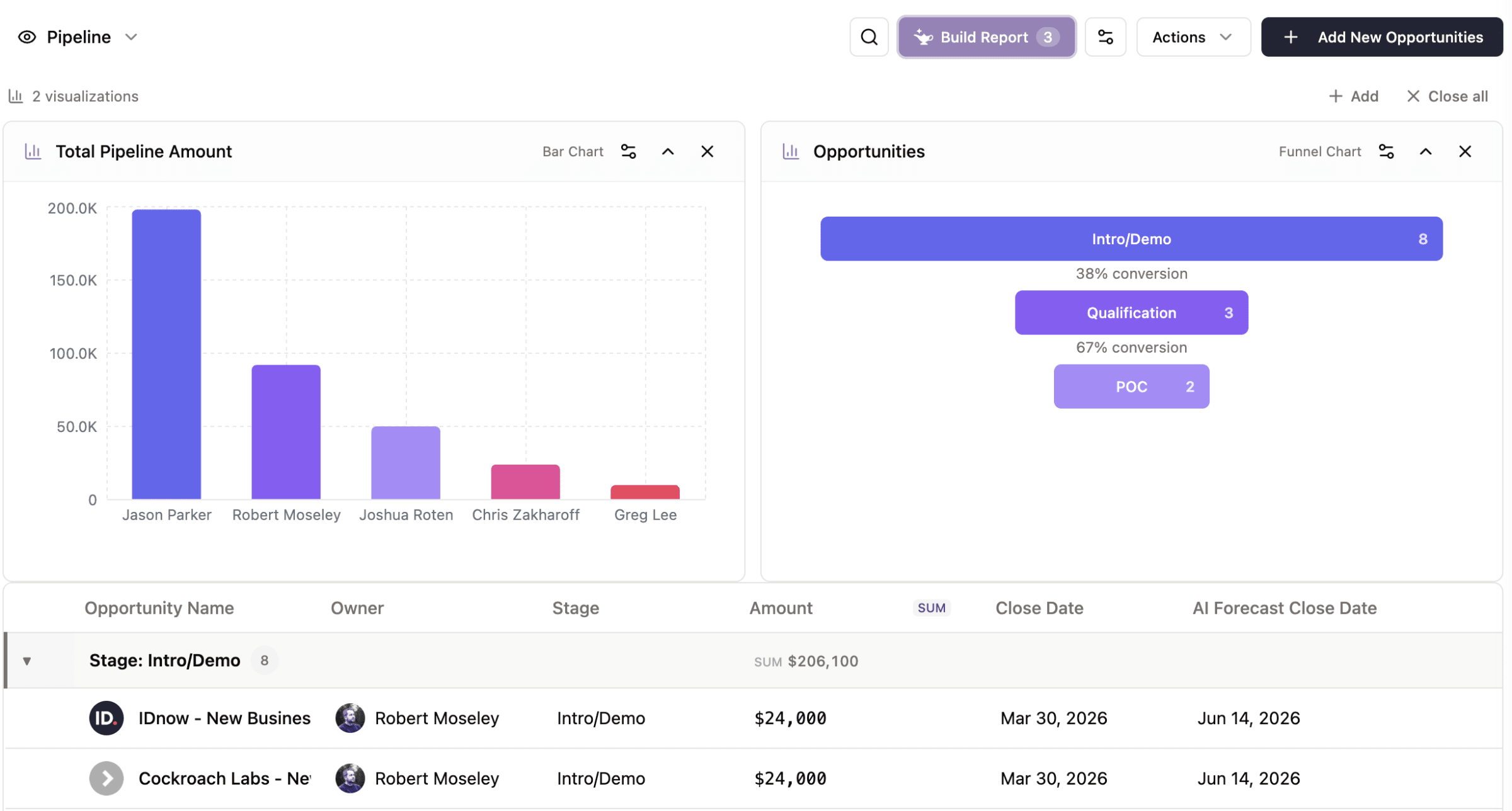
2. Revenue AI Report Builder: From Question to Chart in Seconds
TL;DR: Ask your pipeline question in plain English. Get a decision-ready chart back. Edit records inline without leaving the view. Your team goes from question to insight to action without touching your CRM.
HOW IT WORKS:
- Type any reporting question in plain English and GTM Engine selects the right chart type and renders it automatically
- Choose from 9 chart types: bar, line, funnel, pie, donut, gauge, scatter plot, area, and metric cards
- Slice data using group-by and aggregate controls across any field (sum, average, count, min, max) no formula required
- Run period comparisons side by side automatically: this month vs. last month, or any two windows you define
- Edit records inline from table views across Accounts, Contacts, Opportunities, and Activities without navigating away from your report
WHO BENEFITS:
- Sales leaders get answers to pipeline questions in seconds instead of waiting for RevOps to build a report
- Managers can run recurring pipeline reviews with consistent grouping and period comparisons natively
- The entire team can act on what they find without context-switching out of the view
Available now in the Revenue AI Report Builder. Try it before your next pipeline review.

3. Opportunity Comment Threads: Deal Context That Stays With the Deal
TL;DR: All the context about a deal, attached to the deal, not buried in Slack or lost in email. Threaded comments on every record mean your team stops asking "what happened on this account?" because the answer is right there.
HOW IT WORKS:
- Leave comments and notes directly on any Opportunity, Contact, Account, or Activity record
- @mention teammates to pull them into the conversation with instant notification
- Receive alerts in-app via the notification bell or via Slack DM with a direct link back to the thread
- Replies stay threaded so conversations remain readable and in context over time
- Annotate deals directly in Forecast View or Reports during pipeline reviews without breaking the workflow
WHO BENEFITS:
- Sales managers spend less time reconstructing deal history before pipeline calls and more time coaching
- Reps maintain deal context across the full lifecycle even when accounts go quiet and come back active
- Handoffs between reps, managers, and CS teams happen with full context attached
Available now on all Opportunity, Contact, Account, and Activity records.
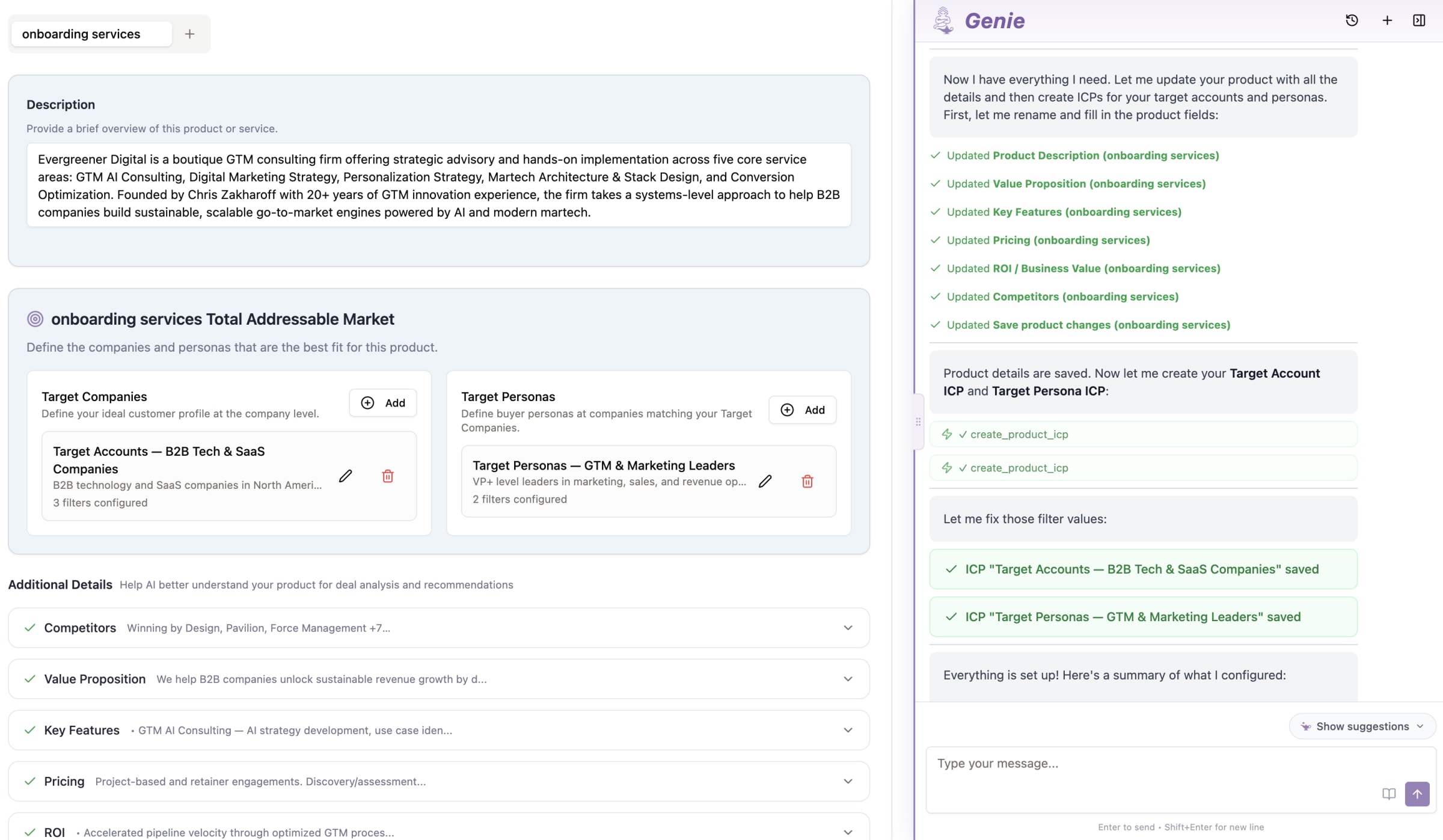
4. Genie Onboarding: Your Team Up and Running Without the Friction
TL;DR: The setup experience that made teams hesitate is gone. The new Genie onboarding is flexible, contextual, and designed around how sales teams actually adopt new tools, so you get adoption, not shelf-ware.
HOW IT WORKS:
- A persistent Setup Checklist lives inside the app; complete steps when they're relevant, not all at once before you've touched the product
- Contextual per-page banners surface the right guidance exactly where you need it
- Genie AI Agent is loaded with product help content and aware of which settings page you're on. Ask questions, configure your sales methodology, and get real-time guidance without leaving setup
WHO BENEFITS:
- Sales leaders rolling out GTM Engine to a new team get adoption that sticks instead of a tool that sits untouched after launch
- Admins and RevOps teams get a setup experience that creates momentum rather than friction
- New users can configure what matters today and come back to the rest when it's relevant
Live now. Available to all users on first login and accessible from your settings page at any time.
The Bottom Line: Forecast Calls Just Got a Lot Shorter
Sales leaders have always had to work around the gaps: reconstructing pipeline movement from memory, waiting on RevOps for reports, losing deal context across Slack threads, and watching new tools stall at onboarding. This release closes all four of those gaps in one shot. Your pipeline memory is on record. Your reporting answers itself. Your deal context stays with the deal. And your team gets up and running without the friction that kills adoption.
Every feature is live in your dashboard today.
- Forecast History: Open your Forecast page, select the History tab, and check it before your next pipeline call
- AI Report Builder: Type your first reporting question in plain English and see what comes back
- Comment Threads: Open any Opportunity record and leave a note for your team
- Genie Onboarding: Check your Setup Checklist or ask Genie a question directly from your settings page
Questions about any of these updates? Reach out to your Customer Success Manager or contact us. If you want a walkthrough, we're ready when you are.
The detail-oriented among you will want the full changelog; here's everything else that shipped this release:
GTM Engine Call Recorder (BETA)
- Native call recorder now joins scheduled meetings automatically and links recordings to the correct calendar event and activity
- Configure recording preferences per user: auto-record toggle and meeting type filter (all meetings, external only, or internal only)
- "Only record meetings I organize" toggle for users who want to restrict bot to their own hosted meetings
- Bot name and profile image fully customizable at the org level, including drag-and-drop image upload with validation
- Bot settings changes now immediately reconcile future scheduled meetings — toggling auto-record or changing meeting filters takes effect on already-scheduled bots instantly
- Internal calendar events now display in neutral gray across all calendar views for clear visual separation from external meetings
- Recall.ai bot camera output displays GTM Engine logo via webpage URL
Meeting Prep
- Meeting Prep modal completely redesigned: renders rich Markdown content instead of structured JSON tabs
- Compact header now shows date, time, join-meeting link, and account association links at a glance
- Enhanced contact sidebar with promoter score bars, contact role badges, and hover tooltips
- Collapsible "Your Team" panel shows internal attendees above external participants
- "Ask Genie" CTA embedded directly in the meeting prep modal
- Old-format meeting preps auto-regenerate into the new Markdown format on open
- Meeting prep now shown inline on the activity record page for upcoming meetings
- Meeting prep can now be scheduled up to 2 weeks in advance
Records and Views
- Cross-entity (join) filtering added to all Records pages: filter opportunities by related contacts, accounts, or activities; accounts by related opportunities or contacts; contacts by related accounts, opportunities, or activities
- Computed aggregate columns added to Records table column pickers: contact count, activity count, total pipeline, last activity date, and more — all sortable
- Comma-delimited OR matching for "contains" filters: entering "data,crm" matches records containing either term
- Filters and columns now persist locally so they survive navigation and page reloads
- "Last session" indicator in Views Selector when local customizations are active, with a "Start fresh" option to reset to defaults
- "Clear all filters" reset button added to all records page toolbars
- CSV export added to Contacts, Opportunities, and Activities record pages via a unified Actions dropdown
- Global search (CMD+K) now shows up to 10 results per entity type with a "Show more" expand button per group
- Activity hygiene page now shows up to 5 recommended opportunities and returns up to 10 results in opportunity search
AI Report Builder and Genie
- "Ask Genie" report builder now available across all Records pages (opportunities, accounts, contacts, activities) with context-aware placeholders, follow-up query support, and missing field recommendations
- Prominent purple "Build Report" button with Genie lamp icon and filter count badge added to records toolbar; opens chooser with "Ask Genie" and "Build manually" options
- Current user identity now available in AI query context so "my," "me," and "I" resolve to the logged-in user's data
- Role-aware missing field recommendations: admins and RevOps see a link to field settings; non-admins are prompted to contact their administrator
- Activity page now supports a URL parameter to auto-open the Genie chatbot on load
Workflows and Agents
- Workflow tagging system added: create, assign, and filter workflows by color-coded tags with autocomplete editor
- Enhanced workflow filters: filter by status (active/inactive), tags (multi-select), and creators (multi-select)
- Sortable column headers on workflows table: name, created by, version, updated, and status
- Workflow Outputs column added to Past Runs table showing mapped output values for workflows with defined outputs
- Workflow Outputs summary card added at the bottom of test run results for easier debugging
- Past Runs task detail modal upgraded with rich text rendering (markdown, research outputs, images) and copy-to-clipboard
- Claude Sonnet 4.6 and Opus 4.6 available in Workflows and Agents; all in-UI agents updated to Opus 4.6
- GPT-5.4 support added in Workflows and Agents
Platform and Performance
- Account, Contact, and Opportunity page load performance significantly improved through parallelized data fetching and elimination of duplicate queries
- Pipeline chart visualization added to Pipeline page
- Parent Account support added with UI


