

 ## TL;DR
When sales moves to Salesforce and marketing stays in HubSpot, the HubSpot Salesforce sync rarely breaks on deals. It breaks on contacts, companies, and activities at the handoff, and attribution breaks with them.
Here's what you'll learn in this article:
- Why lifecycle stage should change owners once, at a handoff point you define
- Why every person should be a Salesforce Contact with a status, not a Lead
- Why activity association needs one arbiter, not two systems with conflicting rules
- Why attribution survives only when HubSpot and Salesforce share one contact record
The Salesforce HubSpot Handoff Breaks on Contacts and Companies
Your reps will keep deals clean because deals are their KPIs. Nobody is measured on the contact record.
The Salesforce HubSpot handoff is the moment a contact HubSpot has been nurturing becomes a record a Salesforce rep owns. A HubSpot Salesforce sync is the connector that carries records and activities across at that moment, and it is where the split fails.
A Reddit thread on moving sales to Salesforce while keeping marketing in HubSpot shows the pattern. The original poster split the systems because "our 2 year renewal will cost us $140K." Deal hygiene was "a solid 8/10," but "the struggle now has been mostly with hygeine for contacts/companies." One commenter explained the gap: "Deal is directly related to their KPIs."
ASG, a GTM Engine customer, ran the split in reverse: it kept HubSpot for marketing and moved sales off Salesforce. The handoff problem was the same. A sales leader at ASG described the old process: once a prospect engaged and became an opportunity, "we just manually put them into, into Salesforce."
Trace One Qualified Lead From HubSpot Form Fill to Salesforce Opportunity
Field-ownership spreadsheets don't show you where a record breaks. Following one real lead does.
Tracing one qualified lead means following a single inbound person through five checkpoints and asking two questions at each: which system owns the record now, and what should cross the sync. The owning-system column shows one common setup, HubSpot through MQL and Salesforce after. Move the handoff row to wherever yours sits.
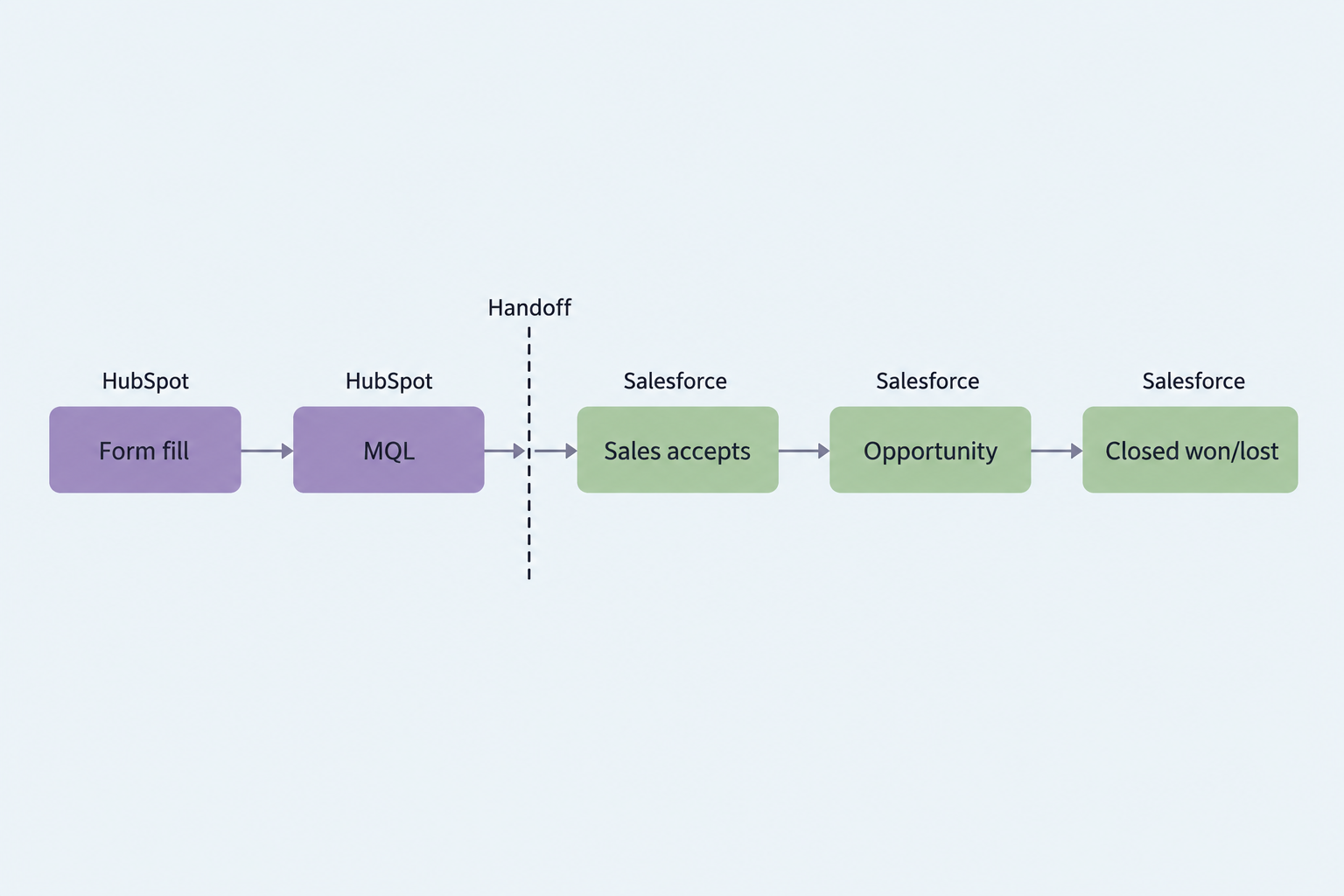 | Checkpoint | Owning system | What syncs | Failure mode | | --- | --- | --- | --- | | Form fill | HubSpot | Nothing yet, or an update to a matched existing contact | HubSpot auto-creates a Company that later duplicates a Salesforce Account | | MQL | HubSpot | The person syncs as a Salesforce Contact on the matching Account, status "lead" | Syncs as a Lead with no Account, or as a second record with the same email | | Sales accepts | Salesforce | Owner and status change in Salesforce; HubSpot receives them read-only | Both systems keep changing lifecycle stage | | Opportunity created | Salesforce | Opportunity on the Account, with prior marketing and discovery activity attached | Earlier activity and buying-committee contacts never reach the opportunity | | Closed won/lost | Salesforce | Outcome and amount write back to HubSpot | The HubSpot contact is a different record, so the touch gets no credit |
Every failure in that table takes one of two shapes: a second record appears, or an activity lands on the wrong record. Each section below prevents one or both.
Lifecycle Stage Should Change Owners Once, at a Point You Define
When both systems can move the stage, neither report is right.
Lifecycle stage ownership should change hands once, at a point you define, with one system in charge at any moment. Where that point sits depends on your motion. HubSpot through MQL and Salesforce after is a common pattern, not a rule.
Keep two terms apart. HubSpot lifecycle stage tracks where a person is in the buying journey. Salesforce Lead Status is an operational status a rep works. Treat them as one field and your reports drift.
After the handoff, the owning system writes its values to the other as read-only context. Budget real time for the mapping. "Trying to get stages and sources to align is a major pain," wrote Reddit commenter Asleep_Start_912.
- Name the single field value that marks the handoff.
- Block the non-owning system's workflows from changing lifecycle stage after that point.
- Write opportunity stage from Salesforce to HubSpot, never the reverse.
- Map stage and source values once, in one shared document.
Skip Salesforce Leads and Make Every Person a Contact With a Status
A Salesforce Lead has no account, no opportunity, and its own copy of every activity. Converting it later is where records split and history goes missing.
Don't use Salesforce Leads. A Salesforce Lead is a person record with no Account or Opportunity attached; a Contact is a person tied to an Account. Make every person a Contact on its Account, with a status field: lead, prospect, customer.
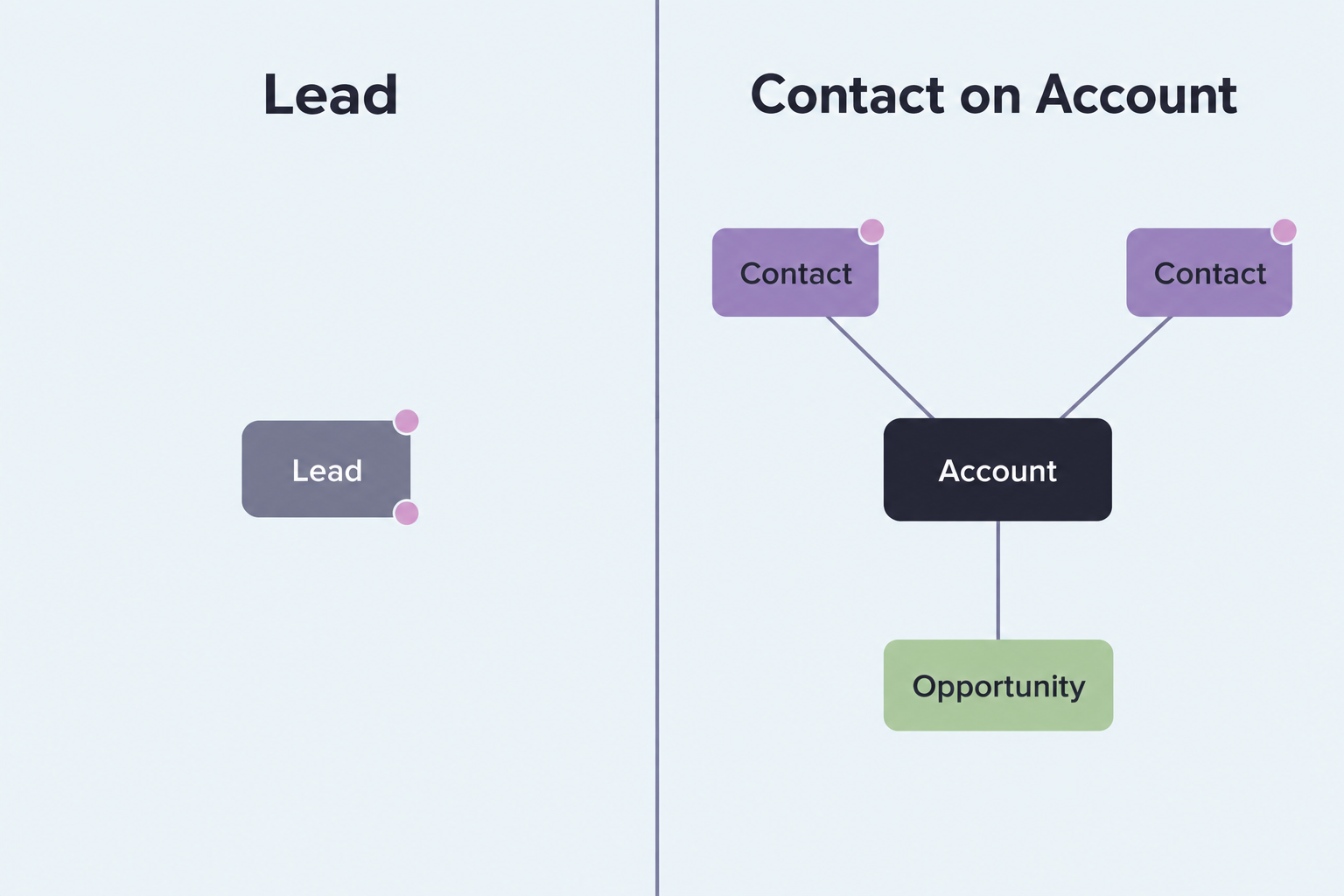 Going Contacts-only makes the HubSpot sync easier, since HubSpot represents people as Contacts. That's a side benefit. These reasons matter more:
- Relationships. A Contact sits on its Account from the first form fill, connected to the other contacts, opportunities, and history at that company.
- Duplicates. "SF can allow duplicate records with the same email whereas HS will not," Reddit commenter Prior_Ocelot8713 noted. A Lead and a Contact for the same person is exactly that problem, built into the data model.
- Activities. The form fill or meeting that would have created a Lead becomes an activity on one Contact.
One record carries the full history, so attribution works. Account roll-ups work too: when several contacts at one company engage, you can flag the account. And there's no Lead conversion step, where one record becomes an Account, a Contact, and an Opportunity and history gets left behind.
The counter-view deserves a fair hearing. Asleep_Start_912 runs HubSpot as lead capture only: marketing "can only add new leads to Salesforce, but once they go to a rep, HubSpot can't edit that record any further." That holds up when marketing hands over only net-new inbound. It stops working once you sell to buying committees at accounts you already know.
Match Before You Create: Existing Contacts and Duplicate Handling
The worst duplicate is the form fill from someone already on an open opportunity.
Matching rules decide whether the sync updates an existing record or creates a new one. Set them before anything syncs.
- Match people on email. HubSpot deduplicates contacts on email; Salesforce accepts a second record with the same email unless duplicate rules block it.
- Match accounts on email domain, and exclude free email domains so every Gmail address doesn't land on one account.
- Create accounts in Salesforce only and sync them back to HubSpot as companies. A Salesforce and HubSpot consultant in the Reddit thread (username svt1017) put it bluntly: "don't allow HubSpot to create Companies automatically & associate with contacts, turn that off immediately."
- When a form fill matches a contact on an open opportunity, update that contact, log the form fill as an activity, and notify the opportunity owner. Don't create a record or reset the status.
Pick One Arbiter for Activity Association
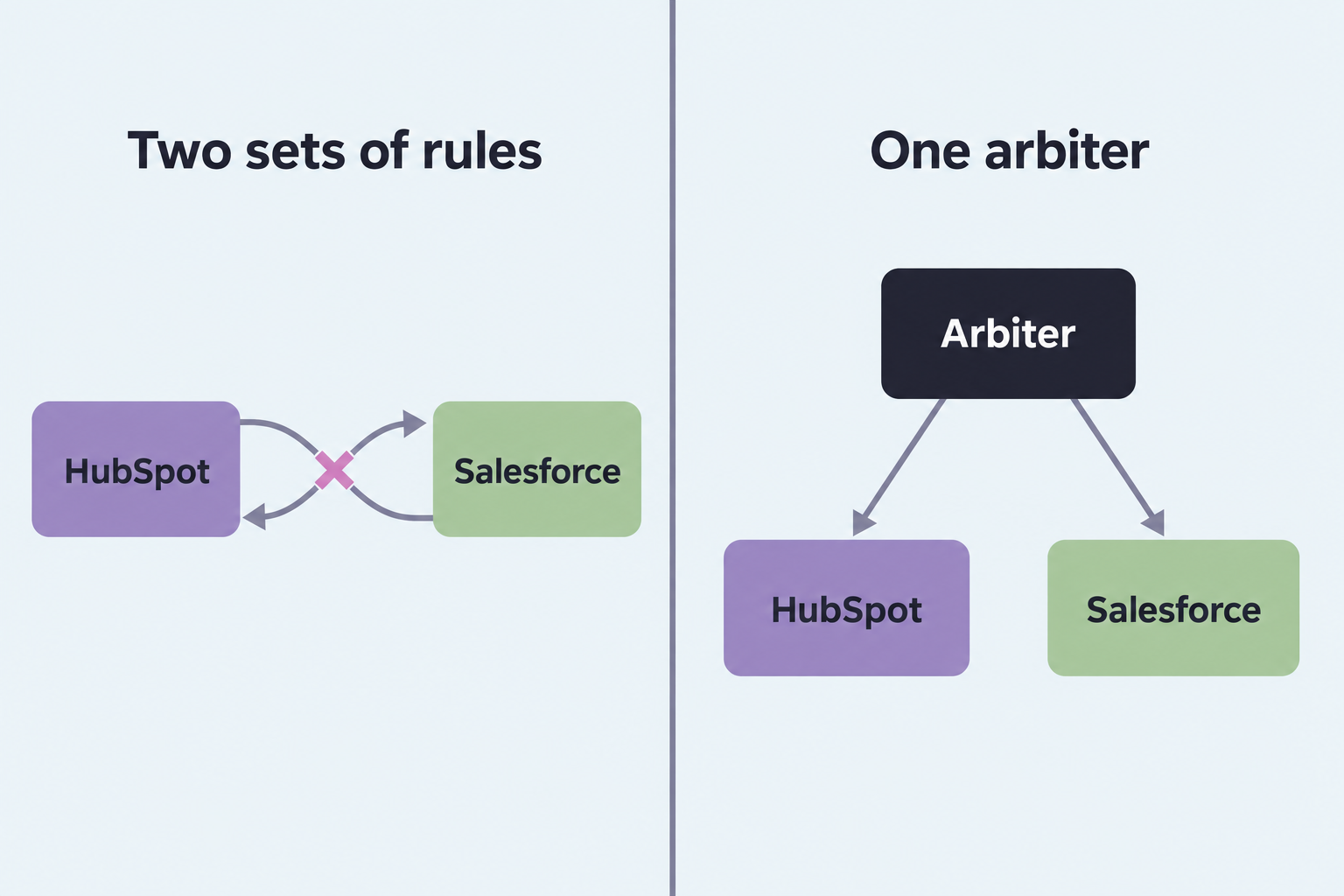
HubSpot and Salesforce each have their own rules for which record a call, email, or meeting belongs to. Sync both directions and you get two answers.
An activity association arbiter is the one system that decides which contact, account, and opportunity each activity belongs to. Without one, two-way activity sync between HubSpot and Salesforce is next to impossible, because each system applies its own association rules and those rules don't agree.
 The same consultant from the Reddit thread described the symptom: when tasks, calls, or meetings have multiple associations, "You'll get a cardinality mismatch error every time." His workaround has a HubSpot workflow write the account ID into the comments field, syncs it to Salesforce, and lets a Salesforce flow read it back to set the association. That's how far teams go to patch it.
Pick one system to own association and let the other receive the result. Or give the job to a third system. GTM Engine can be that arbiter, deciding which contact, account, and opportunity each activity belongs to. One activity can belong to more than one opportunity: a call where the customer discusses both the renewal and an upsell gets linked to both. In benchmarks we run continuously against HubSpot's native association, GTM Engine finds over 25% more correct associations and makes 80% fewer false ones (relative improvement, as of November 2026). We haven't run the same benchmark against Salesforce.
The tradeoff: GTM Engine links activities automatically rather than asking reps to approve each one. That's what keeps match rates high, but when it gets one wrong, the wrong link stands until someone overrides it.
The Contacts Nobody Creates During the Deal
The champion's boss joins call three. Nobody adds them to the account or the opportunity.
The contacts nobody creates are the ones who appear mid-deal: the champion's boss, the procurement lead, the technical evaluator. They show up on a calendar invite or an email thread and never get a record. No account relationship, no place on the opportunity, nobody for marketing to nurture later.
ASG's technical lead put it plainly: "adding contacts to a Salesforce record in the past hasn't been consistent." Telling reps to be more consistent won't fix it, because the contact record isn't what they're measured on.
GTM Engine creates those contacts from emails, meetings, and calls and adds them to the right accounts and opportunities automatically. Reps don't have to do anything to create the link, and they can override it when it's wrong.
Attribution Survives Only If the Record Does
If the HubSpot contact becomes a different Salesforce contact, the chain of custody from marketing touch to closed deal is gone.
Attribution chain of custody is one contact record carrying both the marketing activity and the sales activity. When one person exists as two records, HubSpot sees the webinar and the form fill, Salesforce sees the opportunity, and neither can connect them.
The no-Leads rule and the one-arbiter rule exist to protect that chain. One record with correctly associated activities is what makes attribution reportable.
GTM Engine can connect to HubSpot and Salesforce at once, merge duplicates into one record, and combine their relationships and activities in one data model. The tradeoff: it isn't plug and play. Connecting both systems takes manual setup by the GTM Engine team.
Run One Lead Through Before You Trust the HubSpot Salesforce Sync
The connector settings page will look fine. The test is whether one real lead arrives intact.
Before you trust the HubSpot Salesforce sync, submit a real form with a test email at a known account, then check five things:
- One contact exists, not two.
- It sits on the right account.
- Lifecycle stage and status changed once, in the owning system.
- The form fill and the first sales email are on the same record.
- When you close the test opportunity, the outcome shows up in HubSpot on that same contact.
Fix the rule behind any failed check before you migrate real records. As Reddit commenter Lazy-Negotiation-328 put it, "figuring out record ownership and which reports broke in the split was the real work."
Frequently Asked Questions
Should we use Salesforce Leads with HubSpot?
No. A Salesforce Lead is a person record with no Account or Opportunity attached; a Contact is a person tied to an Account. Use Contacts with a status field so relationships, duplicates, and attribution stay on one record.
Which system should own lifecycle stage?
One system at a time, with a single defined handoff point. HubSpot through MQL and Salesforce after is a common setup, but the right point depends on your motion.
How should activities sync between HubSpot and Salesforce?
In one direction, with one arbiter deciding which records each activity belongs to. That arbiter can be HubSpot, Salesforce, or a third system such as GTM Engine.
Can HubSpot attribution report on Salesforce opportunities?
Yes, with conditions. The connector can sync Salesforce opportunities to HubSpot deals, and HubSpot's attribution reporting credits a deal only when it is closed won, has an amount, create date, and close date, and has at least one associated contact. If the sync creates a second contact, the report can't credit the touch.
Is splitting cheaper than staying in HubSpot?
Sometimes, on license cost. Reddit commenter kevinbstout warned that "the migration costs (both in dollars and people time) are going to be way worse than the difference." Price the integration work, not just the seats.
Splitting HubSpot and Salesforce and want one clean record per person? Talk to our team and we'll walk through your handoff.