

TL;DR
Natural-language CRM queries only work when the question lands on connected records with typed fields. A folder full of call summaries can tell you what happened on one deal, but it can't hand you a list of every contact tied to a lost deal at a Salesforce shop. The plain-English box is the easy part. Whether the data under it is linked, typed and current decides if the answer is right.
Here's what you'll learn in this article:
- Why call summaries answer "what happened on this deal" and fail at "show me everyone who…"
- How one natural-language question splits into four filters across three linked objects, written out as a full worked example
- What missing, stale and ambiguous fields each do to the list you get back
- How to review a generated list and its supporting evidence before it goes into a campaign
Call summaries describe deals, and natural-language CRM queries need connected records
You have hundreds of recorded calls and a VP asking for a list by Thursday. The recordings won't build it.
Natural-language CRM queries are plain-English questions that get translated into filters on CRM objects (accounts, opportunities, contacts) and return a list or report you can count, sort and act on. A call summary is a paragraph of prose about one conversation. Both are useful. Only one of them can be filtered.
Try this question: "Show me contacts linked to closed-lost opportunities at accounts that use Salesforce, excluding anyone who has left the company." A summary tool can tell you that a buyer at one account mentioned Salesforce on a call in March. It can't tell you which of your several hundred opportunities are Closed Lost, which accounts run Salesforce today, and which contacts were attached to those deals. Those answers live in fields and in the links between records, or they don't live anywhere.
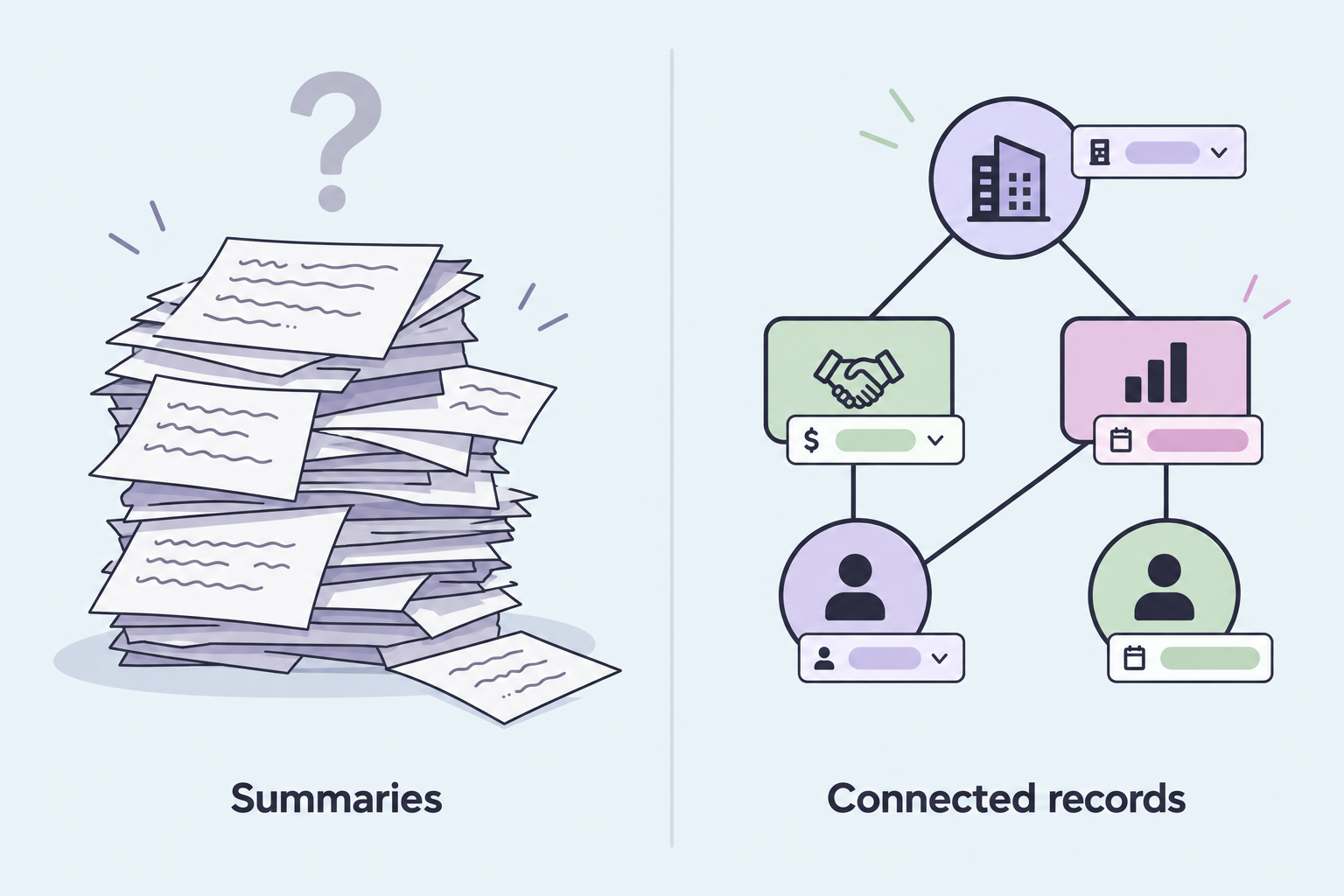
We hear the summary-only version of this problem on calls. A RevOps lead at a two-rep, AI-native law firm walked us through a setup of meeting transcripts, Google Drive and a ChatGPT-based process meant to fill roughly 25 opportunity attributes. The automation kept breaking, fields stayed blank, and reporting had no visibility (customer testimony, GTM Engine discovery call with the firm's RevOps lead, September 2026). He had plenty of text about his deals. He couldn't ask a single cross-deal question of it.
A summary answers "what happened on this deal." A query answers "show me every deal where this happened." The second one needs structure.
A natural-language CRM query is a stack of filters across linked objects
If you can't see the filters your question turned into, you can't tell whether the list is right.
A natural-language CRM query is a stack of filters, and each clause of your sentence becomes one of them. Our example question (illustrative, not a customer's real query) touches three objects and hides four separate filters:
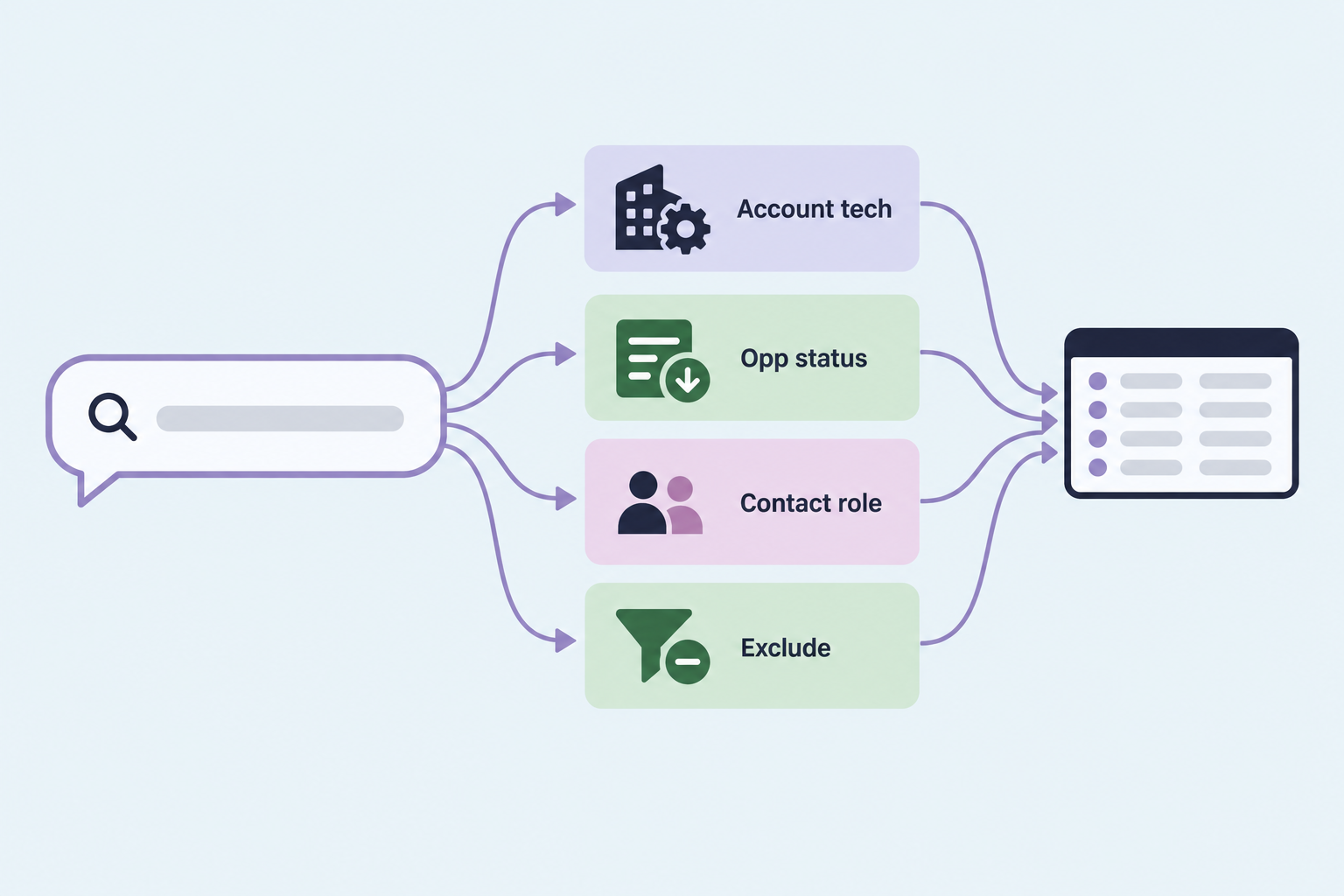
| Clause in the question | Object it hits | Field or link it needs | Where it quietly goes wrong |
|---|---|---|---|
| "at accounts that use Salesforce" | Account | A technology field with Salesforce as a value | Field is blank, years old, or lumps Salesforce CRM in with Slack and Tableau |
| "closed-lost opportunities" | Opportunity | Stage = Closed Lost, plus a close-date window | "Closed - No Decision" and "Disqualified" stages get skipped or swept in |
| "contacts linked to" | Contact via the opportunity | A contact role or association on the opportunity | Reps never attached contacts, so the link doesn't exist |
| "excluding anyone who left" | Contact | Employment status or a current-title check | Job changes never written back, so departed buyers stay on the list |
Account technology is a fact about the account, not a mention on a call
"Uses Salesforce" has to be a value on the account record, ideally a picklist or multi-select so every account says it the same way. If it only exists as a sentence in a call summary, the query has nothing to filter on. Decide what you mean before you ask: Salesforce as their CRM, or any Salesforce product.
Opportunity status depends on how your stages are defined
Closed Lost sounds unambiguous until you open the stage picklist. If yours also carries a "Closed - No Decision" or "Disqualified" stage, whether those count is a business decision, not a query setting. Add a date window too. A deal lost in 2021 and a deal lost last quarter are different conversations.
The contact relationship is the link reps forget to make
"Contacts linked to opportunities" means contacts attached to the deal (in Salesforce, through Opportunity Contact Roles), and that's a narrower set than everyone who works at the account. That link only exists if a rep or an automation creates it. A customer migrating off Salesforce told us on a sync call that "adding contacts to a Salesforce record in the past hasn't been consistent" (customer testimony, GTM Engine Salesforce migration tech sync, October 2026). If the link was never made, the contact never shows up, and nothing tells you it's missing.
Exclusions are where lists get dangerous
The exclusion clause protects you from emailing a former champion's old inbox or pitching an account that's already back in an open deal. Each exclusion needs its own field: employment status, open-opportunity flag, do-not-contact. Leave one out and the list still comes back. It just comes back wrong.
The worked example, written out as filters
Here is what the example question should look like once it's translated, using Salesforce object names. If the tool you're using can't show you something this explicit, you can't audit it.
Path:         Account > Opportunity > Opportunity Contact Role > Contact
Account:      Technology INCLUDES "Salesforce CRM"
              Technology IS NULL: excluded, reported as a separate count
              No open opportunity on the account
Opportunity:  Stage = "Closed Lost"
              Close Date within the last 24 months
Contact Role: at least one role on the lost opportunity
              (optional: Role IN "Economic Buyer", "Decision Maker", "Influencer")
Contact:      Employment Status != "Left Company" (NULL = unverified, flagged)
              Email Bounced = false, Do Not Contact = false
Dedupe:       one row per Contact ID, keeping the most recent lost deal
Output:       Contact, Title, Email, Account, Opportunity, Close Date,
              Loss Reason, Contact Role, Technology Last Updated
Three choices in there are business decisions. The 24-month window is a guess about how long a loss stays warm. Treating a blank technology value as "excluded but counted" keeps unknowns from passing as "no." The dedupe matters because a contact attached to three lost deals otherwise gets three emails.
Typed fields decide whether an answer can be counted
A notes field can hold the truth, but text search won't count it the same way twice. A typed field holds less and returns the same answer every run.
A typed field is a CRM field with a defined data type and allowed values (picklist, checkbox, date, number, lookup), so every record stores the same fact the same way. Typed fields are what let a natural-language CRM query turn "accounts that use Salesforce" into a filter instead of a guess. Free text can be searched, and semantic retrieval can surface notes that mention Salesforce. Neither gives you a stable count. Keyword search matches "Salesforce Tower" and misses "SFDC." Retrieval ranks by similarity and cuts off at a threshold, so borderline accounts drift in and out between runs. And once the query joins accounts to opportunities to contacts, a sentence in a note doesn't say which record it describes. A normalized field gives every record one value or an honest blank.
Conversation data earns its keep when it ends up in fields: competitor mentioned, technology in use, contact's role on the deal. GTM Engine does this extraction into reportable CRM fields and syncs them back to the system of record. Extraction has limits, though. A field filled from a call is only as good as what was said on the call, and we'd rather show you the source than ask you to trust the value.
Typed fields also make the query repeatable. In a customer walkthrough of the GENIE report builder in GTM Engine, our engineer Greg Lee described what happens when you type a question: "it's translating your natural language query into an actual query," which you can edit, for example changing the close date, and "it's deterministic. You can save it, it will update it, you know, as you get more data in" (GTM Engine employee commentary, recorded during a customer's Salesforce migration tech sync, October 2026). The sentence you type is the starting point. The saved filter is what you rerun next month.
Missing, stale and ambiguous data each break the list differently
A wrong list looks exactly like a right list. The query engine complains about syntax and permissions, never about stale values.
Some failures are loud. A query that references a field you don't have, hits a record you lack permission to see, or times out returns an error, and you fix it. Data-quality failures are quiet: the query validates, runs and returns a confident, well-formatted list with the wrong people on it. The three failure modes leave different fingerprints, and it helps to know which one you're looking at.
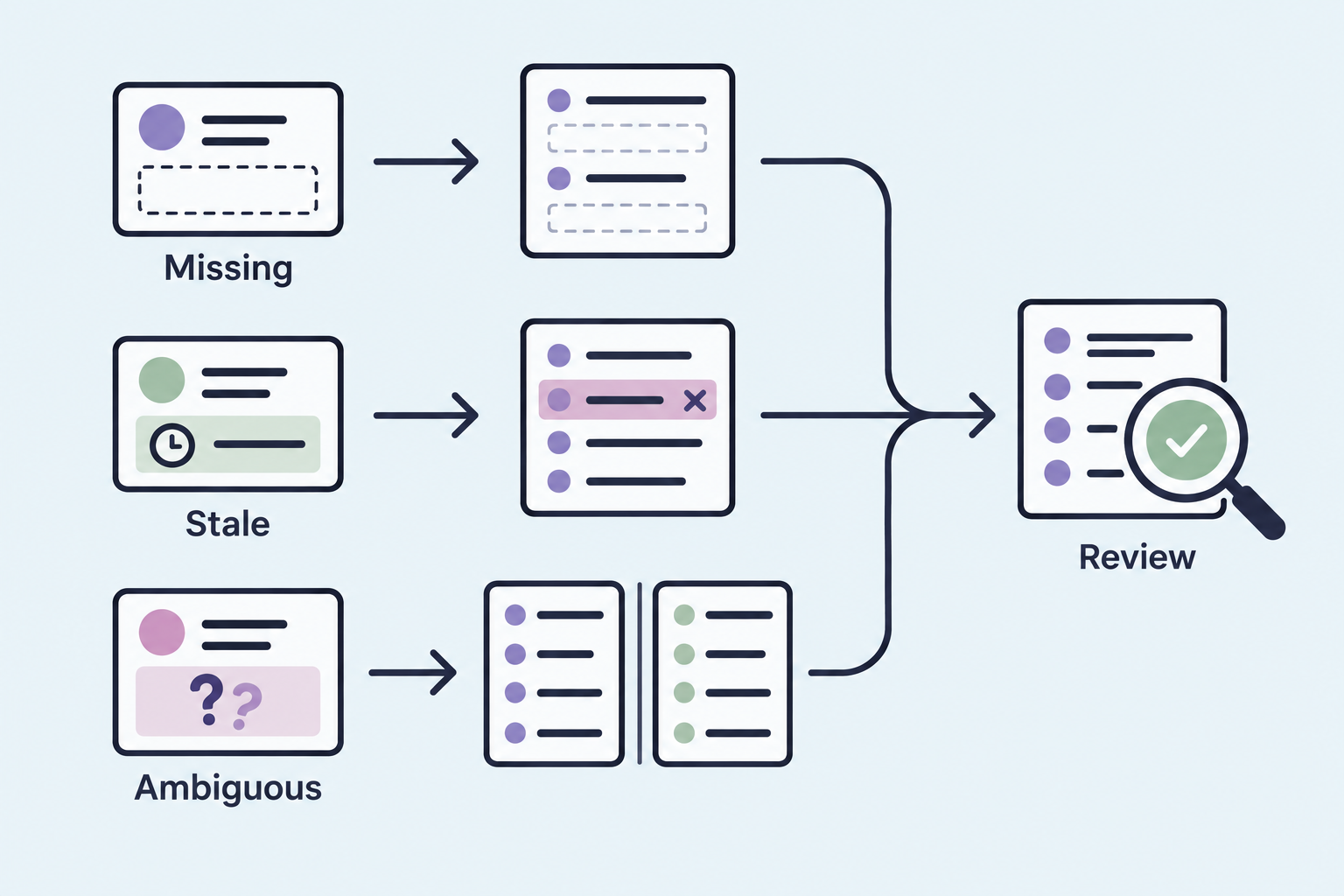
Missing data shrinks the list. If 40% of your accounts have no technology value (illustrative figure), the query can't tell "doesn't use Salesforce" apart from "we never checked." Those accounts drop out without a sound. Missing contact links do the same thing one level down, which is why a list of contacts on lost deals can come back suspiciously short.
Stale data puts the wrong rows on the list. A technology field populated during a 2023 enrichment run says Salesforce, but the account moved to HubSpot last year. A contact marked as the economic buyer left eight months ago. Every row looks valid. Some of them are just old.
Ambiguous data splits the answer. "Salesforce" might mean the CRM, Marketing Cloud, or any account where someone typed the word into a notes field. Ask the same question two ways and you can get two different lists, and both will look reasonable. Robert Moseley on our team flagged the related prompt-level risk while evaluating a third-party data API: "I'm not guaranteed to get the exact same results every time I prompt it," which is why he wanted the request translated into a saved filter (GTM Engine employee commentary, internal vendor evaluation call, September 2026). His fix applies here too. Once the question becomes explicit filters, the ambiguity is out in the open where you can see it.
Even a clean migration produces surprises. During that same customer migration, the team confirmed about 683 opportunities in GTM Engine, 137 of them from HubSpot, and the customer said: "I actually see things in GTM that I don't see in Salesforce" (customer testimony and record counts, same October 2026 migration tech sync). The extra records came from HubSpot and automated record creation. Neither system was wrong. They disagreed, and any query inherits that disagreement.
Review the filters and the evidence before the list goes anywhere
Shipping an unreviewed list to a sequence is how a "re-engagement campaign" emails the CFO who fired you.
Reviewing a natural-language query result means checking two things: the filters the question became, and the evidence behind the rows that matter. Skip either one and you're trusting a sentence instead of a query.
Start with the filters. Read them back as if someone else wrote them. Is the stage filter Closed Lost only, or Closed Lost plus No Decision? Is there a date window? Did the technology filter match the exact value or a fuzzy text search? That same customer's first pass at confirming closed deals came up empty because the view he was in had open stages selected and the forecast only looks forward. Switching to all stages in Pipeline fixed it. The data was fine. The filter was quietly answering a different question.
Next, measure what the filters can't see, before you look at a single row. Run three coverage counts against the population the query touches: accounts with a blank technology value, closed-lost opportunities in your date window with zero contact roles, and contacts with no employment-status value. Report each as a share, and note the oldest "last updated" date on the technology field. If 30% of your lost deals have no contact roles (illustrative figure), a perfect query still misses those deals entirely, and no spot check of returned rows will reveal it. Excluded records are invisible by definition, so you have to count them on purpose.
Then spot-check ten returned contacts. Is there evidence the account runs Salesforce today, such as a recent enrichment date or a call where it came up? Was this person on the deal, or just at the company? An internal GTM Engine product review in September 2026 found that explicit verification instructions improved email and LinkedIn URL accuracy in enrichment, while saving individual AI-generated insights back to records stayed clunky. Some of this is still manual.
Last, save the query instead of retyping it. A saved, editable filter is something you can audit, share with marketing and rerun after the next data refresh. A one-off answer in a chat window is something you can screenshot.
Champion lists are the harder version of the same question
"Who loved us at an account we lost?" is the list every sales leader asks for, and it needs more than a closed-lost filter.
A champion list is a set of contacts who actively pushed for your product inside a deal, filtered by what happened to that deal and where they are now. It reuses every layer of the worked example: opportunity outcome, the contact role join and the employment check. It adds one more. Somebody has to decide, from call and email evidence, that this person championed you rather than sat through two demos.
That judgment has to be a field before you can filter on it. Starting from the worked example, a champion query changes three lines:
Contact Role: Role = "Champion" (custom picklist value)
              Champion Evidence link IS NOT NULL (call or email that set it)
Contact:      drop the "Left Company" exclusion
              add Current Account, so a departed champion appears
              under their new employer
Dropping the exclusion is deliberate. Your best champion from 2024 who now works at a target account is the most valuable row on the list. Before trusting any of it, count how many closed-lost deals in the window have a champion flagged at all. If the answer is single digits across hundreds of deals, the field is your first project.
Fix the fields before you trust the question
The plain-English box tempts you to skip the data work. Do the data work anyway.
Natural-language CRM queries move the hard part. You no longer need to know which report type joins contacts to opportunity roles. You still need those joins to exist, the fields to be typed, and the values to be current. The question gets easier to ask, and the data has to be cleaner to answer it.
Your next step takes an afternoon. Write down the one cross-deal question your team asks most often and split it into clauses the way the table does. Write each clause as a filter line, like the worked example. For each line, record three numbers: records with a value, records blank, and the oldest last-updated date. The line with the worst numbers is your first data project, and it will tell you more about your CRM than any dashboard you own.
Frequently Asked Questions
Can't I just ask ChatGPT to read my call summaries and build the list?
You can ask it to read a handful. It can't reliably tell you which of several hundred opportunities are Closed Lost, which contacts were attached to them, and which accounts run Salesforce today, because those facts sit in CRM records and links rather than in transcripts. Use summaries for context on one deal and structured queries for lists.
Will a natural-language query return the same list every time?
It depends on whether the question becomes a saved filter. In GTM Engine's GENIE report builder, the question is translated into editable filters you can save and rerun, so the logic stays fixed while the data updates. Retyping the question each time invites drift.
Does this work if we're on HubSpot instead of Salesforce?
The logic is identical: account technology, opportunity outcome, contact association and exclusions. The object and field names differ. HubSpot uses deal-to-contact associations rather than Salesforce's Opportunity Contact Roles, so check how consistently your reps create those associations.
How do I know a contact on the list still works at the account?
Only through a field that tracks it, such as employment status, a recent title check or a bounced-email flag. If you don't have one, treat every contact older than about a year as unverified and spot-check before outreach.
If you want to run this exact question against your own Salesforce or HubSpot data and see the filters it turns into, book a working session with the GTM Engine team and bring the cross-deal question your team asks most often.
About the Author

Robert Moseley IV is the Founder and CEO of GTM Engine, a pipeline execution platform that’s changing the way modern revenue teams work. With a background in sales leadership, product strategy, and data architecture, he’s spent more than 10 years helping fast-growing companies move away from manual processes and adopt smarter, scalable systems. At GTM Engine, Robert is building what he calls the go-to-market nervous system. It tracks every interaction, uses AI to enrich CRM data, and gives teams the real-time visibility they need to stay on track. His true north is simple. To take the guesswork out of sales and help revenue teams make decisions based on facts, not gut feel.


