


TL;DR
Which CRM fields should sales reps actually fill in? Very few, and almost none of the ones that drive reports. Marketing, CS, and product all depend on opportunity data, and when every one of those fields lands on the rep, you get blanks, guesses, and "SFDC" in a field that should say Salesforce. Reportable fields should be typed and filled from activity data and enrichment, while reps write context in their own words.
Here's what you'll learn in this article:
- Why fields that power reports, dashboards, and automation should not depend on rep typing
- Which marketing, CS, and product fields to automate from sales and CS activity
- How a rep version and an activity version of stage, close date, amount, and next steps surface coaching moments
- Why contact and account records deserve activity-based fields, not just opportunities
 ## Sales reps should own context, not the fields that drive reports
If your dashboards depend on reps entering fields only because they are stage-gated, you're gonna have a bad time.
A sales rep's CRM job is to record the judgment and context only they have: what they think is happening in the deal and why. That belongs in open text fields. A reportable field is any field that feeds a dashboard, a forecast roll-up, a workflow trigger, or another team's report. Those fields need consistent typed values, and people under quota pressure are a poor source of consistent typed values.
The symptoms are familiar. One customer told us the CRM had to be their source of truth for compensation, and "the fields are half empty and sandbags." Another described the cost from the rep's side: it's the "non selling activity that kills morale and makes reps avoid the system." Those are two conversations, not a benchmark, but they describe the same loop. Each new required field adds friction, and friction produces worse data.
Marketing, CS, and product fields should be typed and automated
Every team downstream of the deal wants a field on the opportunity, and every one of them ends up on the rep's to-do list.
Opportunity data feeds far more than the sales forecast. Marketing wants use cases and competitors in the deal. CS wants primary contacts, required integrations, and the promises and expectations set during the sales cycle. Product wants feature requests, friction points, and integration gaps. Each request is reasonable. Stacked onto the rep, they produce a page layout nobody finishes.
These fields should be typed so you can report on them. An Integrations picklist with "Salesforce" as a value gets counted once, instead of split across SalesForce, SFDC, and salesforce.com. Competitors, use cases, and feature requests work the same way: a controlled list with written definitions.
The values should come from the conversations where they already appear. The buyer names a competitor on the discovery call, lists integrations in an email, and hears a promised onboarding date in the proposal meeting. Extracting those into typed fields from sales and CS activity, plus external research and enrichment for firmographic facts, gets every team its data without another click. In GTM Engine, each AI-filled value stays a typed value for reporting and carries a companion explanation with citations back to the source activity, so a CSM can check exactly where "promised SSO by March" came from.
Stage, close date, amount, and next steps need two versions
When the rep's close date and the buyer's stated timeline disagree, that gap is the most useful data in the deal.
A few fields are both judgment and fact: stage, close date, amount, and next steps. Keep two versions of each. The rep version records what the seller believes. The activity version records what the buyer's emails, calls, and meetings support.
Disagreements are where managers should spend their time. Picture a deal in Commit with a close date at month end, while the activity version shows no meeting with the economic buyer and a buyer who said "next quarter" on the last call. That is a coaching conversation waiting to happen. One prospect captured the rep side of this in a single forecast-call line: "The probability that this is going to close in this time frame is 85%." An evidence-backed second version gives the manager something to compare that number against.
Never let the activity version overwrite the rep version. A rep often knows something that never made it into a recorded conversation, such as a hallway chat with the CFO. Two versions exist to make the gap visible, and either one can be wrong.
Reps should not be responsible for creating records and relationships
A deal with one contact on it is often a deal where the rep only logged one contact.
Record creation and association are the least visible data-entry burden and the most damaging when skipped. A rep talks to five people on an account and associates one with the opportunity, and every single-threading report downstream is wrong. Contacts and accounts should be created from email, meeting, and call participants automatically, and activities should be linked to the right opportunity, with the rep confirming ambiguous matches. Reps can still create and edit records by hand. They just should not be the only path.
Contact and account records should carry activity-based fields too
Opportunity records get all the automation attention, while contact and account records stay frozen on the day they were created.
Contact and account fields rarely get filled from activity data, and that is where a lot of untapped value sits. A contact field that tracks who shows up to meetings, who advocates internally, and which outcomes they talk about helps you pick out your champions. An account field that records stated outcomes and sentiment across sales and CS conversations surfaces case study candidates before marketing has to go ask the CS team in Slack.
Every automated field needs a companion field that explains it
A picklist value with no explanation is a value nobody can check, so nobody trusts it.
Every automated field should be a pair. The first field holds the reportable value: a date, a number, a picklist choice, or a checkbox. Dashboards, forecast roll-ups, and workflow triggers read that field. The second field is the explanation: a short note on why the value is what it is, with citations linking to the calls, emails, and meetings it came from.
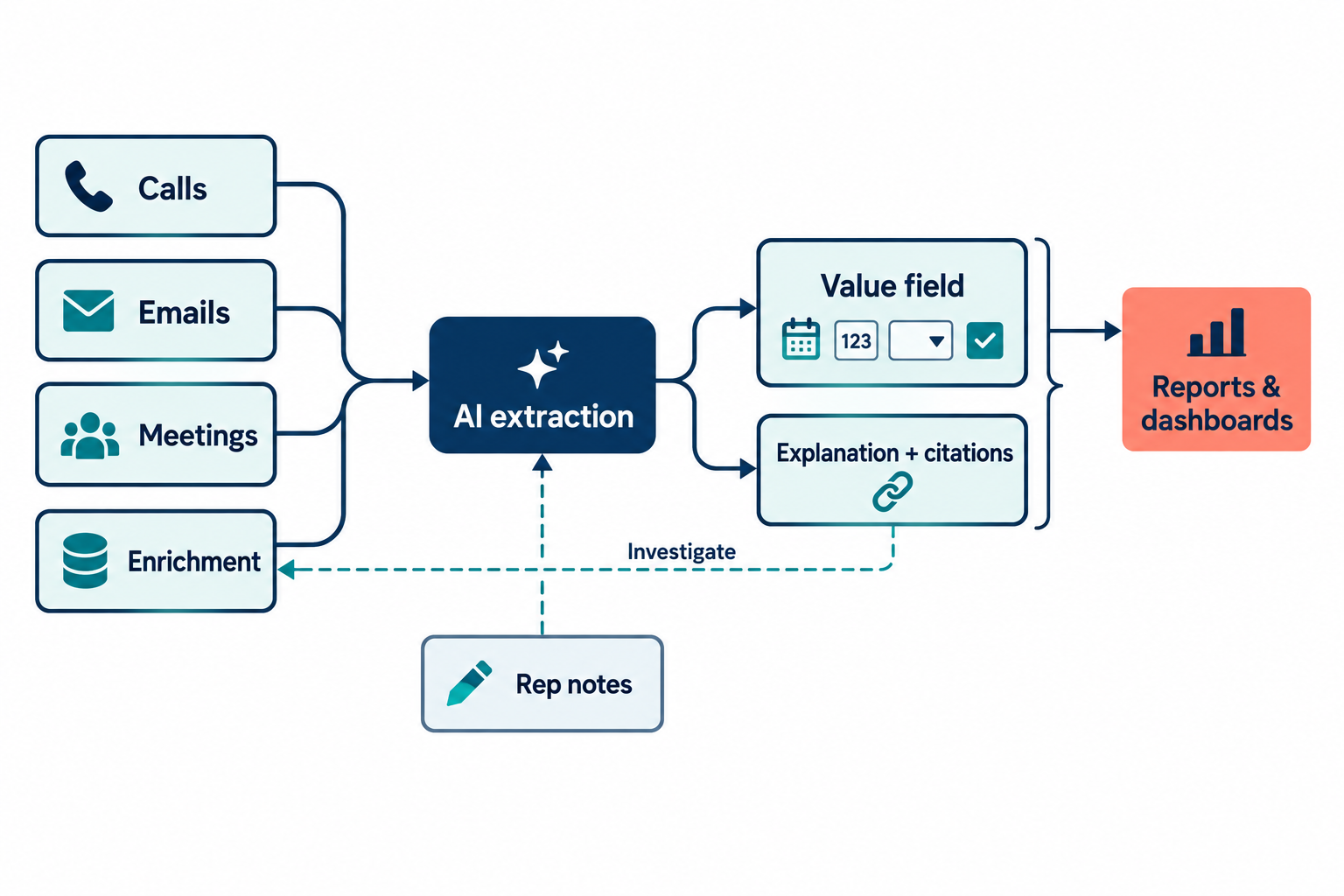 Take an automated close date of March 31. The value field holds the date, so it rolls into the forecast. The explanation field says the buyer's VP of Finance wants to be live before their fiscal year ends, and it links to the call where she said it. A manager who doubts the date clicks the citation and reads that moment, instead of asking the rep to reconstruct it from memory. An Integrations picklist reading "Salesforce, NetSuite" or a "Security review required" checkbox works the same way.
Extraction still gets things wrong. It can attribute a statement to the wrong contact or read a hypothetical as a commitment. The explanation field is how you catch those errors: when a value looks off, the citation shows exactly what was said and who said it, and anyone with edit rights can correct it.
Your next step: export your opportunity page layout and mark every field as rep context, automated, or dual. Give every automated field its companion explanation field before you turn the automation on.
Frequently asked questions
Which CRM fields should sales reps actually fill in? Open-ended context fields that capture their judgment, plus the rep version of stage, close date, amount, and next steps. Reportable picklists and cross-team fields should come from activity data and enrichment.
Should every CRM field be mandatory? No. Required fields the rep cannot reliably answer produce placeholder values that look like real data in reports.
How do you keep picklist values consistent? Use a controlled list with written definitions and fill it from activity data instead of manual entry, so "Salesforce" never becomes "SFDC."
What should happen when the rep's value and the automated value disagree? Keep both and review the gap. The disagreement is a coaching prompt, and either version can be wrong.
To see an AI-filled field with its source citation on one of your own deals, ask your GTM Engine contact for a walkthrough using a live opportunity.


