

TL;DR: Lightfield sells a CRM that fills itself in from your email, calendar, and meetings. The real comparison is how deep that goes: logging activity, structuring it into account, contact, and opportunity fields, and running analysis on top. That, plus whether you have to replace your current CRM and whether marketing and CS can use the same data, separates the alternatives below.
Here's what you'll learn in this article:
- The three layers of activity capture, and why most comparisons blur them
- What Lightfield includes, what it costs, and where its plans draw lines
- How Attio, Clarify, Day.ai, HubSpot, and Salesforce compare on capture, campaigns, and CS
- How GTM Engine works as a standalone AI CRM or as an overlay on Salesforce and HubSpot
Lightfield is an AI-native CRM built to replace your CRM, recorder, and sequencer
Lightfield's pitch is a CRM nobody has to update. To get it, you adopt its whole system.
Lightfield is an AI-native CRM that treats every email, meeting, and note as the source of truth, then derives accounts, pipeline, and tasks from that stream (Lightfield Knowledge Base). Its pricing page promises "one bill instead of six": CRM, call recorder, sequencer, enrichment, workflow builder, and agents. Sequences run across email and LinkedIn, and reports and forecasts can be built in plain language (Lightfield sequences).
As of November 2026, Starter is $89 per user per month, capped at three seats and 50,000 records. Pro is $999 per workspace per month (billed annually) with five capture seats, the seats whose email and meetings get synced and recorded, and it is where workflows and sequences start. Growth is $2,999 per month with ten capture seats, and extra capture seats are $200 a month. Bi-directional sync with an existing CRM is listed only on Enterprise (Lightfield pricing).
That design explains why teams look elsewhere. Keeping Salesforce or HubSpot as your system of record means buying the top tier. Lightfield's own help center pitches it to early-stage founders who find traditional CRMs heavyweight, and its solution pages center on sales execution and pipeline, with no dedicated marketing content or customer success module on the pricing page.
Activity capture happens in three layers: logging, structuring, and analysis
"Captures your activity" can mean an email sits on a timeline, or it can mean the opportunity's next step, champion, and risk are current. Ask which one you're buying.
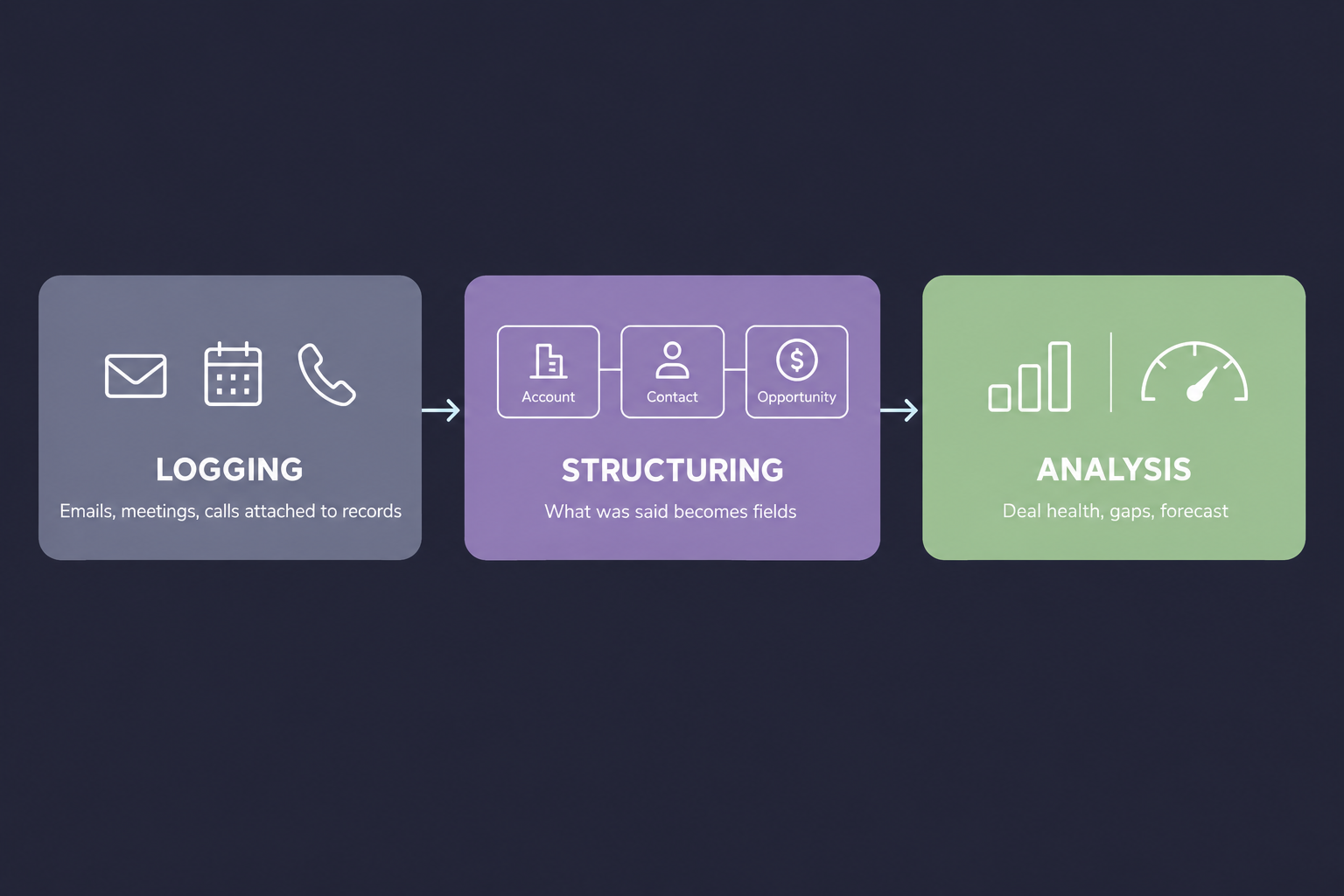 Logging is attaching emails, meetings, and calls to the right records. It answers "did we talk to them?" Every option on this page does some version of it.
Structuring is parsing what was said into fields across the related account, contacts, and opportunity. The budget mentioned on a call becomes the opportunity's budget field, a new attendee becomes a contact with a role on the deal, and a committed next step becomes a dated field. Tools differ most here. Reports and forecasts read fields, so a summary paragraph on the timeline doesn't move them.
Analysis is what runs on top of structured data: deal health, gaps against your sales methodology, forecast scenarios, renewal risk. It is only as good as the structuring underneath, or as one buyer put it to us, "bad data in bad output, bad outputs." In a trial, run one real call through each tool and check all three: which records it landed on, which fields changed, and whether the analysis cites those fields.
Lightfield alternatives fall into three groups: AI-native CRMs, traditional CRMs, and overlays
Every option below promises less manual entry. They differ on how deep the capture goes, and whether you have to move your data to get it.
The Lightfield alternatives worth evaluating split first on one question: do you replace your CRM, or keep it? An AI-native CRM is a new system of record that builds itself from your communications. A CRM overlay does the same capture and writes the results into the CRM you already run. Pricing comes from each vendor's site in November 2026.
| Tool | Type | Logging and structuring | Analysis | Call recorder | Campaigns and marketing | Customer success | Works alongside Salesforce or HubSpot | Pricing model |
|---|---|---|---|---|---|---|---|---|
| Lightfield | AI-native CRM | Derives accounts, deals, and tasks from email and meetings (capture seats) | Natural-language reports and forecasts | Built in | Email and LinkedIn sequences (Pro and up) | No dedicated module listed | Bi-directional sync on Enterprise only | $89/user/mo (Starter, max 3); $999/workspace/mo (Pro) |
| Attio | AI-native CRM | Self-builds records from email and calendar; AI attributes | Ask Attio; advanced reporting on Pro | Call intelligence on Pro and Ultra | Sequences for warm, lower-volume outreach | Via sequences and workflows | Built as a replacement | Free up to 3 users; Pro $100/workspace/mo plus $79 per added user |
| Clarify | AI-native CRM | Creates and updates contacts, companies, and deals | Deal and meeting intelligence, billed in credits | Built in, free on every plan | Multi-step email campaigns | No dedicated module | Built as a replacement | Unlimited seats; Starter $40/mo, Growth from $1,000/mo |
| Day.ai | AI-native CRM and agent platform | Self-updating record from email, calendar, and meetings | Pipeline analytics on higher agent tiers | Built in | Campaign management on higher agent tiers | No dedicated module | Can replace or run on top of either | Per agent, not per seat |
| HubSpot | Traditional CRM with AI | Logs email and calls; confirm which properties Breeze fills | Breeze Data Agent, reporting | Breeze Notetaker | Marketing Hub (separate hub) | Service Hub (separate hub) | Is the system of record | Sales seats $100/mo (Pro), $150/mo (Enterprise), plus credits |
| Salesforce | Traditional CRM with AI | Activity Capture logs to the timeline; Agentforce for Sales updates stage and next steps | Forecasting; Agentforce add-ons | Varies by edition and add-on | Marketing Cloud (separate product) | Service Cloud (separate product) | Is the system of record | $25 to $550/user/mo, plus AI add-ons |
| GTM Engine | AI CRM or CRM overlay | Writes to mapped account, contact, and opportunity fields | Deal health, deal gaps, forecast scenarios, natural-language reports | Included, or ingests 10+ recorders | Campaign Engine (email and LinkedIn sequences, broadcasts); Content Engine | Success Engine (customer health, renewal forecast, CS handoff) | Per-field bidirectional sync, included | Per seat by engine, plus usage for things like enrichment |
Attio, Clarify, and Day.ai are the closest AI-native alternatives to Lightfield
If you've already decided to switch CRMs, these three solve Lightfield's problem with different data models and pricing.
Attio
Attio is a schema-first CRM: you define custom objects and relationships to match how you actually sell. Even the Free plan "self-builds from email and calendar," and Ask Attio, enrichment, and agents come with every plan (Attio pricing).
Strong when your data model is unusual, such as partner, marketplace, or investor workflows, and you want to shape the objects yourself. Pro adds "data rules for reps and agents," the closest thing in this group to field-level write control. Sequences fit renewal notices and onboarding check-ins (Attio Sequences).
Breaks down when call recording matters on a budget, since call intelligence starts on Pro, or when marketing needs lifecycle campaigns at scale, which teams typically hand to a tool like Customer.io. Migrating from Salesforce or HubSpot is supported, but sequences and some activity history may need manual rebuilding (tl;dv Attio review).
Clarify
Clarify is an autonomous AI CRM that creates and updates contacts, companies, and deals from email and calendar, with an assistant called Rep for meeting prep and follow-ups (Clarify Help Center).
Strong when you want to add people without adding cost. Every plan has unlimited seats, the call recorder and background enrichment never use credits, and campaigns stop automatically on a reply or click (Clarify pricing).
Breaks down when AI usage is heavy or hard to predict. Structuring and analysis are billed in credits (a meeting summary costs 30), and workflow automation and CRM migration support start on Growth, at $1,000 a month and up.
Day.ai
Day.ai builds a self-updating customer record from email, calendar, and meetings, and positions itself as a GTM agent platform as much as a CRM (Day.ai).
Strong when you want agents handling follow-up, prospecting, and campaigns. Day.ai prices per agent instead of per seat, and says it can run in place of Salesforce or HubSpot or on top of them (Day.ai pricing guide).
Breaks down when finance budgets software by headcount, because per-agent pricing changes that conversation. If you run it on top of an existing CRM, test which fields it writes back and how it handles conflicts.
HubSpot and Salesforce now capture activity natively, at a price
If you already run one of them, check what you're paying for before you add anything.
HubSpot
HubSpot Sales Hub includes Breeze AI: a Notetaker that records, transcribes, and summarizes calls, a Data Agent that queries CRM and outside data, and a Prospecting Agent. Sales seats are $100 a month on Professional and $150 on Enterprise, and Breeze agents draw on HubSpot Credits (HubSpot Sales Hub).
Strong when marketing, sales, and service already live in HubSpot. Marketing Hub and Service Hub share the same records, so native capture means no second system and no sync to break.
Breaks down when you need structured deal properties, not just summaries. Logging is strong; structuring is the layer to test. Confirm which properties Breeze actually writes during your trial, and price each hub separately.
Salesforce
Salesforce Einstein Activity Capture syncs email and calendar events to the activity timeline of related leads, contacts, accounts, and opportunities (Salesforce Help). Agentforce for Sales uses conversation data to update fields such as stage and next steps. Editions range from Starter Suite at $25 per user per month to Max at $550, and Agentforce for Sales is a paid add-on for Core ($195) and Advanced ($395) (Salesforce pricing).
Strong when you need Salesforce's depth: CPQ, territory planning, complex permissions, and a deep bench of experienced Salesforce admins to hire from.
Breaks down when the AI you want sits two editions above the one you own. Activity Capture skips email attachments and ignores custom email fields by default (Salesforce Help), and Marketing Cloud and Service Cloud are separate purchases.
GTM Engine runs as an AI CRM on its own or as an overlay on Salesforce and HubSpot
You shouldn't have to choose between a CRM that fills itself and the CRM your company already depends on.
GTM Engine is a revenue platform that runs all three layers of activity capture, either as its own CRM or on top of Salesforce and HubSpot. It comes as four engines on one data set (Sales Engine, Campaign Engine, Content Engine, and Success Engine), so the same structured data serves sales, marketing, and CS.
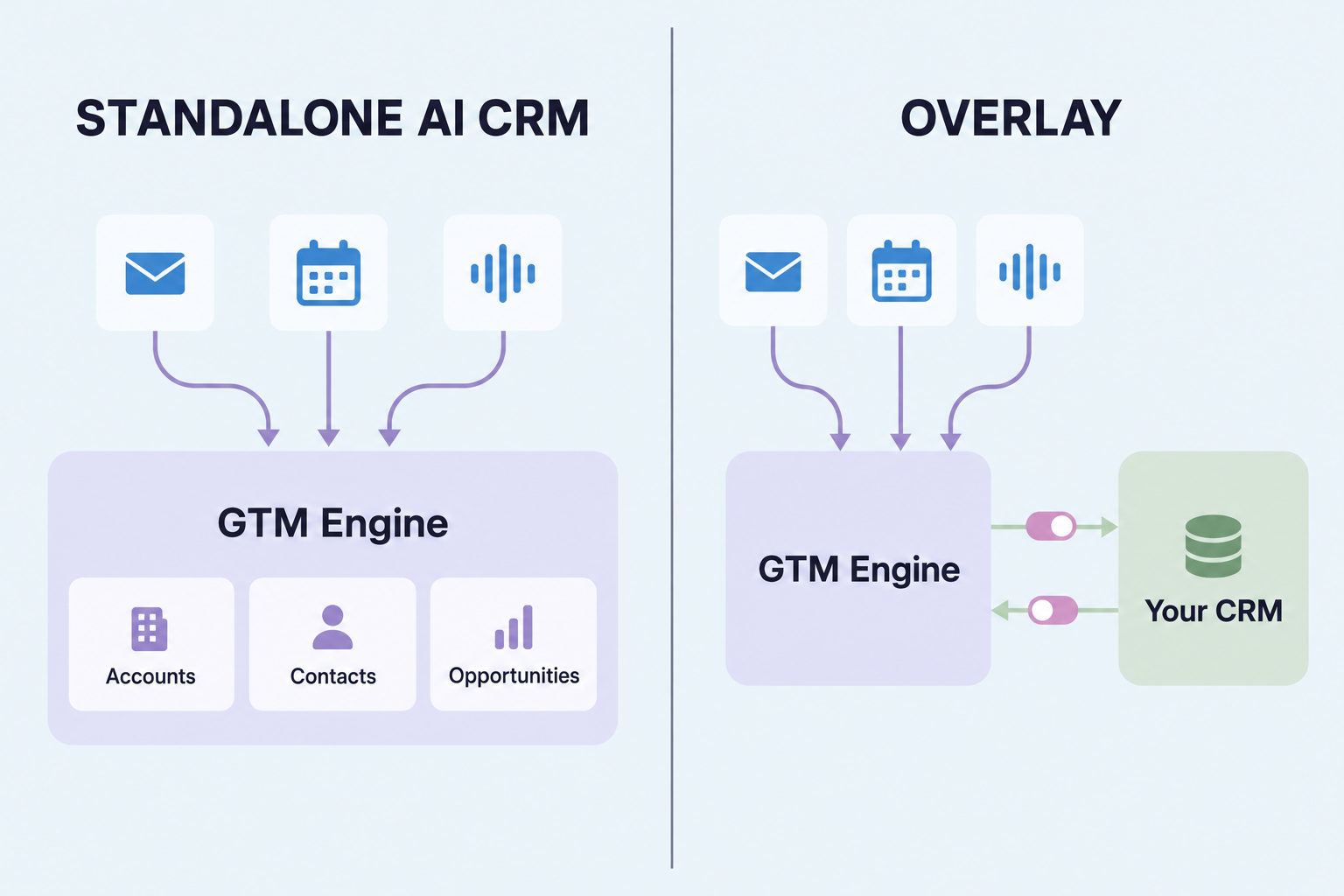 Logging and structuring. Email, calendar, and calls sync and match to existing accounts and contacts. AI workflows then write next steps, stakeholders, objections, budget, and timing to the account, contact, and opportunity fields you map. Our call recorder is included in the platform, or keep yours: transcripts come in from Gong, Chorus, Zoom, Fireflies, Fathom, Grain, Read, Sybill, Circleback, and Microsoft Teams.
Analysis. Each opportunity carries AI fields for health score, deal gaps, and a forecast close date, plus scoring against your sales methodology. Forecasts include history and scenarios, and you can ask questions of any record list in plain language.
As a standalone AI CRM, accounts and contacts are created automatically, with blocked-domain rules keeping personal and vendor contacts out, and pipelines, stages, and forecasts run on that data. Opportunities are the one exception: unlinked calls go to a hygiene queue where AI suggests the matching deal and a person confirms it. A human still decides what counts as pipeline.
As an overlay on Salesforce or HubSpot, your CRM stays the system of record. Each mapped field syncs to the CRM, from the CRM, both ways, or not at all, which answers the question one buyer asked us directly: "who wins? How is the conflict logged?" CRM sync is included, not reserved for a top tier.
"The rip and replace of these institutional systems right now just seems insurmountable. So I think the companion piece makes sense." That's how one buyer described their choice on an evaluation call, and it's why the overlay mode exists.
Beyond sales. Campaign Engine runs email and LinkedIn sequences and scheduled broadcasts from built-in sending domains, with one reply inbox. Content Engine turns call evidence into briefs, articles, case studies, and social posts, so marketing writes in the words buyers actually used. Success Engine tracks customer health, forecasts renewals, and builds the sales-to-CS handoff from the same deal history. Pricing is per seat for the engines you need, plus usage for things like enrichment, so a sales-only team doesn't pay for marketing or CS.
Here's where we'd point you elsewhere. If you need support ticketing, keep your help desk; GTM Engine doesn't run tickets. If you're three founders with no CRM yet, a free Attio or Clarify plan is a cheaper start than paid GTM Engine seats. If you need to merge thousands of historical duplicates, a dedicated tool such as DemandTools or Insycle does that job.
Pick a Lightfield alternative by where your customer data lives today
Feature lists converge. Your current system, your team's size, and how many teams need the data decide most of this.
- No CRM yet, small team: start on Attio's or Clarify's free plan, or Lightfield Starter if you want the all-in-one bundle.
- Unusual data model: Attio, for its custom objects and relationships.
- Agents doing outbound work, priced per agent: Day.ai.
- Marketing, sales, and service already in HubSpot: price out Breeze across your hubs before adding a vendor.
- On HubSpot or Salesforce and the fields are still empty: GTM Engine as an overlay, with per-field sync rules set before anything writes.
- Sales, campaigns, content, and CS on one structured data set: GTM Engine, standalone or as an overlay.
Frequently Asked Questions
What does activity capture mean in an AI CRM?
Activity capture is three jobs: logging emails, meetings, and calls to the right records; structuring what was said into account, contact, and opportunity fields; and running analysis such as deal health and forecasting on those fields. Most tools log well. Test structuring and analysis with a real call before you buy.
How much does Lightfield cost?
Lightfield Starter is $89 per user per month for up to three seats. Pro is $999 per workspace per month billed annually with five capture seats, Growth is $2,999 per month with ten, and extra capture seats are $200 a month each.
Can Lightfield work with Salesforce or HubSpot?
Lightfield lists bi-directional CRM sync on its Enterprise plan only. On other plans you migrate in, importing a CSV export from HubSpot, Salesforce, or Attio while its AI maps your fields (Lightfield migration).
Does Lightfield support marketing and customer success teams?
Lightfield includes email and LinkedIn sequences and a workflow builder from Pro up. Its pricing page doesn't list a marketing content or customer success module, so teams that need those typically pair it with other tools or choose a platform that covers them, such as HubSpot's hubs or GTM Engine.
Is Attio cheaper than Lightfield?
For a five-person team on annual billing, Attio Pro costs $416 a month ($100 for the workspace plus four added users at $79), and Lightfield Pro costs $999 a month with five capture seats. Lightfield's bundle includes a sequencer and recorder for every capture seat, so compare what you'd otherwise buy separately.
See how GTM Engine structures your calls and email into Salesforce or HubSpot fields, or runs as your CRM, at gtmengine.ai.
Tags:
RevTechAbout the Author

Robert Moseley IV is the Founder and CEO of GTM Engine, a pipeline execution platform that’s changing the way modern revenue teams work. With a background in sales leadership, product strategy, and data architecture, he’s spent more than 10 years helping fast-growing companies move away from manual processes and adopt smarter, scalable systems. At GTM Engine, Robert is building what he calls the go-to-market nervous system. It tracks every interaction, uses AI to enrich CRM data, and gives teams the real-time visibility they need to stay on track. His true north is simple. To take the guesswork out of sales and help revenue teams make decisions based on facts, not gut feel.


