

TL;DR
Your pipeline total on Friday says almost nothing about what happened to it since Monday. A flat number can hide a lost deal, two pushed close dates, a new opportunity, and a sync job that overwrote a rep's update, and a forecast call that only looks at the total will argue about the wrong thing.
Here's what you'll learn in this article:
- Why pipeline movement is a set of record-level changes, and why the net difference between two totals is the least useful number in the review.
- How to sort every change into business movement, sync delay, or manual edit before anyone defends a forecast.
- The six facts a change history has to show for a pipeline change to count as explained.
- Where a movement review stops being useful, and what it cannot tell you about whether a deal will close.
Pipeline movement is the set of record-level changes between two snapshots
You open the Thursday forecast call, the number is roughly where it was on Monday, and someone says "pipeline looks stable." Nobody in the room can say which deals got there.
Pipeline movement is the set of changes to opportunity records between two fixed points in time: which deals were created, advanced, regressed, won, lost, removed, or edited in a way that changes the forecast. It is a list of records with before and after values. A delta between two dashboard totals is a summary of that list, and summaries are where offsetting changes go to hide.
Start by pinning down the comparison. Pick a starting snapshot (Monday at 8 a.m. works, as long as it is the same Monday at 8 a.m. every week), pick the current snapshot, and write down the scope: which pipelines, which segments, which close-date range. If the scope drifts between snapshots, part of your "movement" is a filter change, and you will spend twenty minutes discovering that the hard way.
Then split the records into buckets before you look at any total. New, advanced, regressed, closed won, closed lost, removed, and changed-but-same-stage. Each bucket answers a different question, and each one deserves its own line in the review.
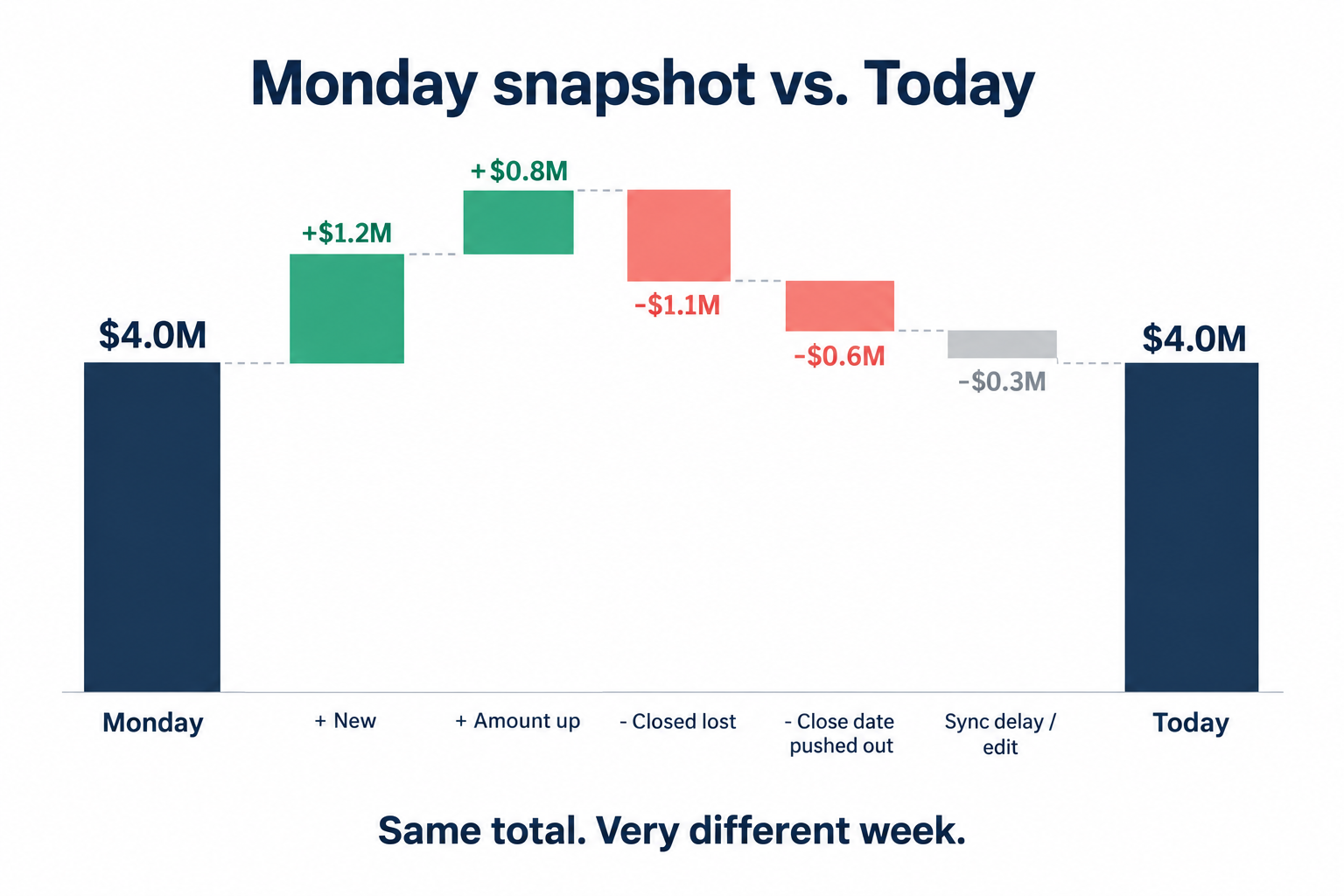 Here is an illustrative example (hypothetical numbers, not customer data). Monday's in-quarter pipeline is $4.0M. Friday's is $4.0M. Underneath: a $300K deal closed lost, a $250K deal pushed its close date into next quarter, a rep added a $350K opportunity, two amounts went up by a combined $150K, and a $50K swing came from a field that a sync rewrote on Wednesday. Net change: zero. Actual week: eventful. The method in this article is practical guidance from how we think about pipeline reviews, not a benchmark validated across customers.
Every pipeline change is business movement, a sync delay, or an edit
If you cannot tell whether a close date moved because the buyer said so or because an integration ran late, you are forecasting the plumbing.
Business movement is a change that reflects something that happened with the customer: a stage advanced after a mutual action plan was signed, an amount dropped because procurement cut seats, a close date moved because legal review slipped. Business movement is the only bucket that should change your forecast conviction.
A sync delay is a change that reflects when a system wrote the data, not when the customer situation changed. A field update made in one tool on Tuesday lands in the CRM on Thursday. A migration backfill rewrites a batch of timestamps. A one-way integration that is supposed to flow in a single direction pushes a record back the other way. In one recent implementation we supported, the team agreed on a one-way flow from HubSpot into GTM Engine and explicitly planned to monitor for records that were inadvertently written back, because that configuration had seen limited testing. That is the correct posture: assume sync is a writer in your change history and check its work.
An edit is a person correcting or cleaning a record: fixing a typo in the amount, replacing a placeholder value, reassigning ownership after a territory change. Edits are legitimate. They are also the easiest bucket to mistake for movement. One prospect we spoke with listed placeholder pipeline values as an open setup risk, and placeholders are exactly the kind of number that "moves" the first time someone fills in the real figure.
| Bucket | What changed | Signal in the record | What the reviewer does |
|---|---|---|---|
| Business movement | The customer situation | A dated customer interaction or documented reason precedes the field change | Validate against exit criteria and adjust conviction |
| Sync delay | When a system wrote the value | Editor is an integration user; timestamp clusters with other system writes; value matches an earlier change elsewhere | Confirm the original change date and source, then classify the underlying change |
| Edit or correction | The accuracy of the record | Editor is a rep, manager, or admin; no customer event nearby; replaces a default or placeholder | Confirm intent, note the correction, exclude from movement totals |
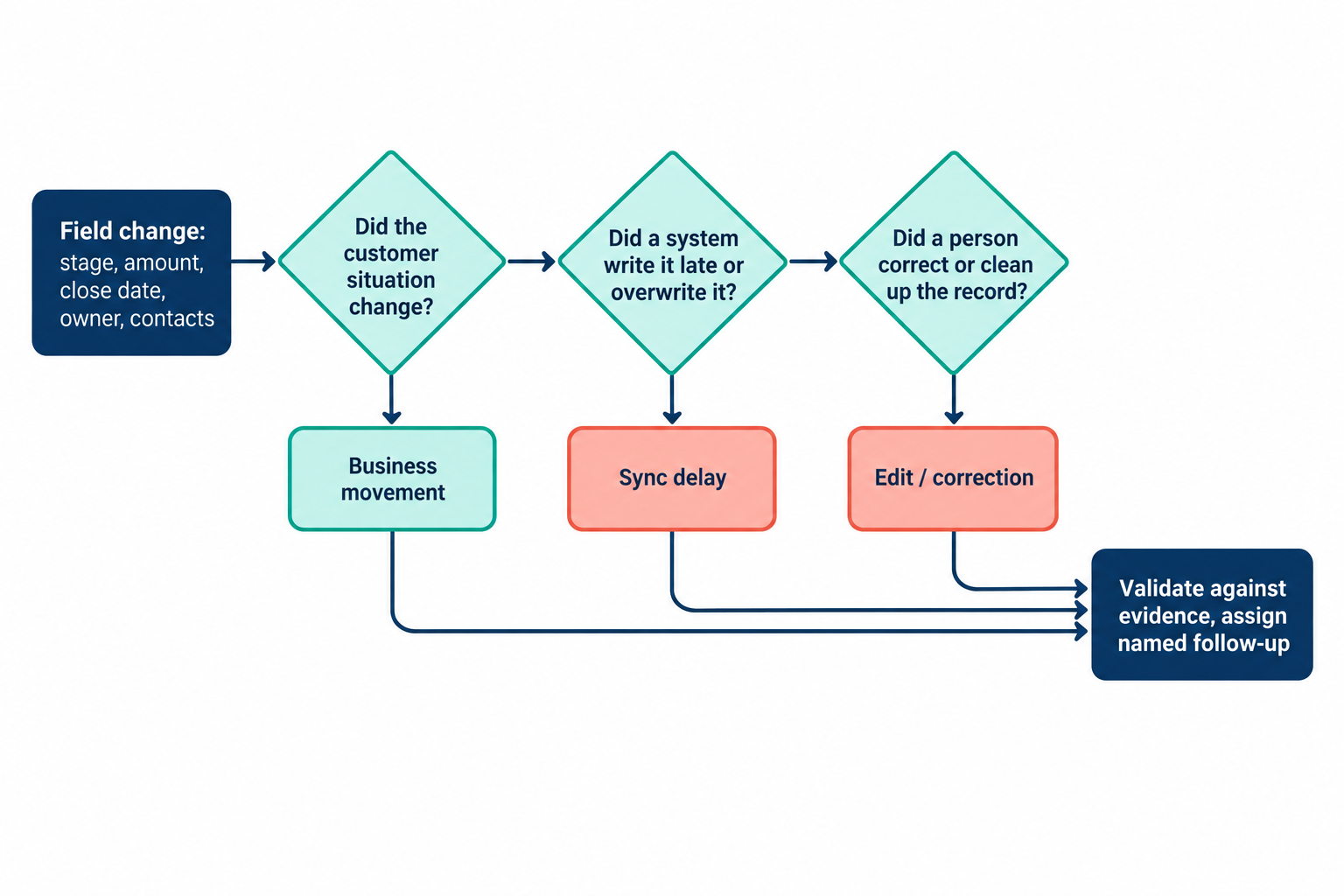 Classify first, debate second. A forecast call that skips the classification step ends up litigating sync jobs as if they were buyer behavior.
A defensible pipeline review starts with the change history
When a VP asks "who moved this to Commit and why," the answer cannot be "I think it was Tuesday."
A change history is the field-level record of what changed on an opportunity. For each material change it should show six things: the field, the prior value, the new value, who or what made the change, when it was made, and the recorded reason. Salesforce exposes this through opportunity field history and HubSpot through property history; the field names differ, but the six facts are the same.
Review the fields that move the forecast: stage, amount, close date, owner, status, and forecast category, plus contact roles if your team uses them to track stakeholders. Everything else is context. If you track forty fields in the review, you will explain forty kinds of noise and miss the one close-date push that mattered.
Keep two histories separate in your head. Field history records edits to the opportunity. Activity history is the chronology of customer interactions: calls, emails, meetings. You need both, and you need to connect them, because a stage change with no customer activity anywhere near it is a question, and a stage change two hours after a call where the buyer confirmed budget is an answer.
If your CRM does not retain reliable history for a field, say so on the review slide. Do not reconstruct who changed what from memory.
That limitation is common enough that it belongs in your review template as a standing line item. In Salesforce, field history tracks only the fields an admin has selected, and retention windows vary by CRM and plan. Label the gap. A labeled gap is honest; an inferred history is fiction with a timestamp.
Validate stage, amount, close date, ownership, and stakeholder shifts against evidence
A field edit proves that someone typed something. It does not prove the deal changed.
Validation is the step where a reviewer checks whether the evidence on the record supports the new value. Every field has its own test, and the test is the same whether the change came from a rep, a manager, or an integration.
Stage changes need documented exit criteria
Check the stage change against your team's documented exit criteria for the prior stage. If moving to Proposal requires a confirmed economic buyer and a scoped use case, look for both in the record and the activity history. A regression deserves the same scrutiny as an advance; deals that slide backward quietly are how a quarter surprises you in week ten.
Amount and close date changes need a reason the buyer would recognize
Amount and close date are the two fields that most directly change the number. One prospect described the goal of post-meeting documentation in plain terms: "realistic forecasting, realistic time to close." That is the bar. For each change, find the customer event that justifies it. A close date that moves out by exactly one month, three weeks in a row, with no customer interaction attached, is a calendar reminder wearing a forecast's clothes.
Ownership, forecast category, and stakeholder changes need intent
Ownership changes should match a known event: territory realignment, a rep departure, a handoff to an account team. Forecast category changes should match your team's definitions, which means someone has written those definitions down. Stakeholder changes matter more than they get credit for. A new contact role added as economic buyer is positive movement only if there is a recorded interaction with that person; a champion who disappears from the contact roles deserves a direct question to the rep.
When a change does not pass its test, do not silently revert it and do not silently accept it. Write it down as an open question, which is the subject of the next section but one.
Pipeline movement and pipeline quality are separate questions
A pipeline can move a lot and still be built on stale records, and it can sit perfectly still while every deal in it quietly ages out.
Pipeline movement answers "what changed since Monday." Pipeline quality answers "how much of what is here is supported by evidence." A good weekly review shows both: the opening and current views, the record-level changes that explain the difference, and a separate list of records that did not change but should have.
That last list is where stale deals live. Flag opportunities with no customer activity in a defined window, close dates already in the past, or stages that have not moved past their typical duration. A flag is a reason to inspect. Some deals are legitimately quiet, and a reviewer who treats every flag as risk teaches reps to generate activity for the sake of the report.
Stage conversion and rep-level analysis belong here too, with conditions. One prospect asked about seeing "pipeline stages, conversion rates" alongside deal-to-deal and rep productivity views. Those are reasonable questions, and they are only as good as the underlying stage definitions, the reporting period, and the data quality. If stage definitions changed in the last quarter, conversion rates across that boundary compare two different processes.
A useful pipeline audit ends with named follow-ups
If the review ends with a cleaner dashboard and no owners, you will have the same conversation next Monday.
A follow-up is a specific question about a specific record, assigned to a specific person, with a date for the answer. "Acme close date moved from March 28 to April 30 with no customer activity since March 3; Jordan to confirm with the buyer by Wednesday" is a follow-up (illustrative example). "Clean up close dates" is a wish.
Capture four things for each unsupported or unclear change: the record, the question, the owner, and the next review point. Keep the list short by keeping the review focused on changes that affect the forecast or a decision. Adding fields, reports, or tools without a clear operational purpose makes the review longer and the CRM heavier, and it widens the gap between what reps record and what leaders read.
That gap is the real cost. One prospect put it well: "CRM should be something that helps you close deals as a sales professional, not just busy work, not just a task." A movement review that generates busy work for reps will produce exactly the shallow, last-minute updates it was designed to catch.
A movement review cannot tell you whether a deal will close
Change history tells you what happened to the record. It does not tell you what the buyer intends to do.
A complete, well-classified change history is still a history of field edits. It cannot establish a deal's likelihood to close, and it cannot explain buyer intent on its own. A deal can pass every validation check and still lose to a budget freeze nobody on your side heard about. Manager judgment and direct customer evidence stay in the loop.
The review also has prerequisites. If your team lacks consistent field definitions, retained change history on the fields that matter, or any habit of recording why a value changed, fix those foundations first. Running an "audit" without them produces confident answers to unanswerable questions.
Where GTM Engine fits: it updates CRM records from customer activity on calls, email, and calendars, and it syncs with systems such as Salesforce and HubSpot. That narrows the distance between a customer interaction and the field change it justifies. It also adds a system writer to your change history, which is one more reason to classify changes before you interpret them. It does not capture every interaction; offline conversations still need manual notes, and a prospect we spoke with raised that gap directly.
The forecast call gets shorter when the records come first
The leader who asks for the records behind the movement is asking a cheaper question than the one who asks reps to defend a number.
Defending a total invites storytelling. Asking for the six facts behind each material change invites evidence, and evidence is faster to review than narrative. Once changes are classified, the sync noise and corrections drop out of the conversation, and the remaining business movement is small enough to discuss deal by deal.
Your next step: before next Monday's review, export the field history for stage, amount, close date, owner, and forecast category for the prior seven days. Tag each change as business movement, sync delay, or edit. Count how many you cannot classify. That number is the honest measure of how explainable your pipeline is today, and it tells you whether to work on the review or on the data underneath it.
Frequently Asked Questions
What is the best way to track a sales pipeline?
Compare consistent snapshots taken at the same time each week with the same scope, then inspect the opportunity history behind each material change. Look at prior and new values, who or what made the change, when, and the recorded reason. Totals summarize movement; records explain it.
What are the stages of a sales pipeline?
Pipeline stages are the steps your team uses to describe opportunity progress, defined by documented exit criteria. There is no universal stage model. Salesforce, HubSpot, and Microsoft Dynamics all ship default stages, and teams adjust them; what matters for movement reviews is that the definitions are written down and stable across the reporting period.
How do you conduct a pipeline audit step by step?
Set the review window and scope, compare the two snapshots, list the changed opportunities, and classify each change as business movement, sync delay, or edit. Validate business movement against exit criteria and customer activity, then assign follow-ups with owners and dates for anything unsupported.
What should an audit trail show for a pipeline change?
The field, the prior value, the new value, who or what made the change, the timestamp, and the recorded reason. If your CRM does not retain one of those for a given field, note the gap in the review instead of inferring it.
How do I tell a sync delay from a real close-date change?
Check the editor and the timestamp. Integration users, clusters of changes written at the same minute, and values that match a change made earlier in another system point to sync. Then trace the original change to its source and classify that.
If you want to see how your own last seven days of pipeline changes break down by business movement, sync delay, and edit, ask the GTM Engine team for a pipeline movement walkthrough using your CRM's field history.
About the Author

Robert Moseley IV is the Founder and CEO of GTM Engine, a pipeline execution platform that’s changing the way modern revenue teams work. With a background in sales leadership, product strategy, and data architecture, he’s spent more than 10 years helping fast-growing companies move away from manual processes and adopt smarter, scalable systems. At GTM Engine, Robert is building what he calls the go-to-market nervous system. It tracks every interaction, uses AI to enrich CRM data, and gives teams the real-time visibility they need to stay on track. His true north is simple. To take the guesswork out of sales and help revenue teams make decisions based on facts, not gut feel.


