
Campaign Engine is a unified campaign workflow, built directly on GTM Engine, that turns CRM activity, contact data, account signals, scoring, message generation, and deliverability controls into one operating motion.
Runs outbound, inbound follow-up, consideration, win-back, closed-lost, and lifecycle campaigns from the same engine, instead of a different tool per motion.
Writes each recipient's message from that account's actual CRM activity, deal stage, and even what a contact said on a call, not a name-and-company merge tag.
Governs deliverability (warmup, authentication, inbox rotation, suppression) as a constraint on every send, not a setup checkbox.
Syncs enrollment, replies, and outcomes back to HubSpot, Salesforce, or the built-in CRM automatically.
Lets one campaign trigger enrollment in the next one, so a reply like "follow up with me next quarter" starts a sequence on its own, with no task to remember.
Campaign Engine is available now in early access.
What Campaign Engine is
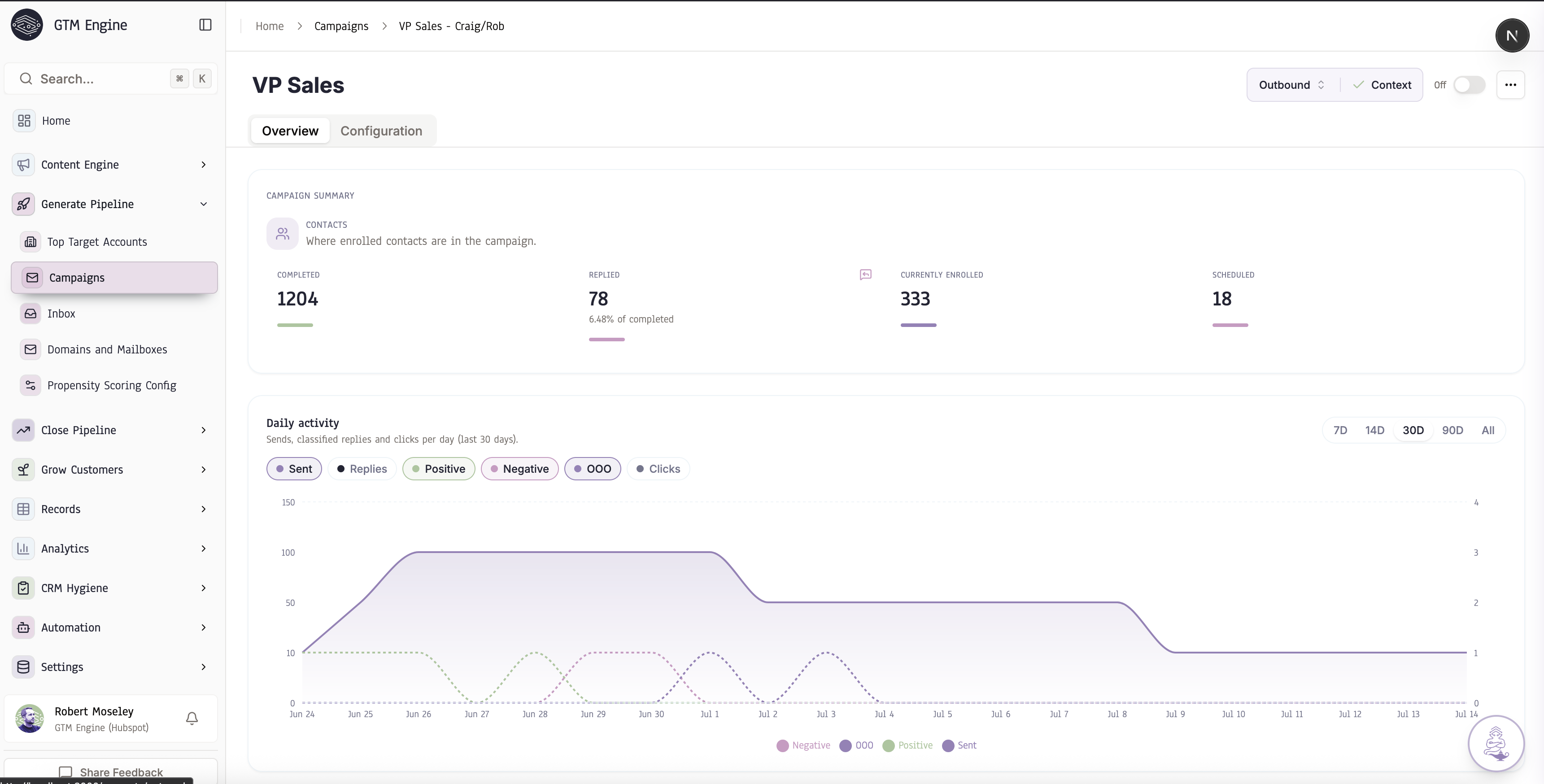
A Campaign Engine unifies the data you already own with automated workflows that research accounts, enrich contacts, write outreach, and send it, then track every reply back as an activity tied to the actual Contact and Account in your CRM. Campaign Engine is GTM Engine's version of that system, running on the same account and contact data GTM Engine already keeps current.
That matters because most teams already have the raw material for this in HubSpot or Salesforce. What they don't have is a way to turn CRM records into a live campaign without exporting a list, rebuilding context in a separate tool, and losing the thread the moment the campaign starts.
One RevOps buyer we talked to described the scale of that gap in plain terms: their team had 38,000 company records, full of duplicates, ghosts, shell companies, holding companies, and acquisitions. That is not a data-hygiene footnote. It is the reason reps stop trusting the list, marketing stops trusting the reporting, and outbound starts from a spreadsheet instead of from the CRM.
Campaign Engine's answer is to skip the export. You describe who you want to reach and what you want to say, and it reaches into the data you already own, scores it, finds and enriches the right people, writes the outreach, sends it, and syncs the outcome back to the CRM. The next two sections cover why that has to work this way, and how the pieces fit together.
The four-tool outbound stack is why your CRM data never becomes a campaign
Outbound today runs on four disconnected tools, and every handoff between them leaks data, context, and time. In the small set of RevOps buyer conversations behind this launch (three accounts), that stack looked the same account to account: a prospecting database, an AI email writer, a sequencer, and a pile of RevOps glue to keep the CRM in sync. That is a pattern across a handful of conversations, not a market-wide study, and we are naming it as such rather than dressing it up as broader research.
Each handoff is a place data gets stale. The prospecting database does not know what happened on last week's call. The AI writer does not know the deal stage. The sequencer does not know the contact left the company. The CRM finds out about all of it days later, if it finds out at all. By the time a rep works the list, half of what made it worth working has already changed.
That fragmentation is also why static CRM records stop being useful, why scores lose confidence when a channel is not connected, why enrichment decays, and why deliverability gets treated as a one-time setup step instead of an ongoing constraint. Each of those is its own failure mode. Together, they are the reason a CRM full of data still produces campaigns that miss.
Idle CRM contacts need signals, not another static list
A record with no recent signal is a name, not a lead. CRM records existing is not the same as CRM records being useful. A contact can sit in HubSpot or Salesforce for a year with no note about why they matter today.
One buyer described this directly: their CRM was "idle," and "there isn't enough right signals" to know who to work next or when. Another used the phrase "timing matters." The same account that looks cold in January can be worth a call in March, and nothing in a static export tells a rep that changed.
Campaign Engine treats meetings, emails, calls, page visits, and record updates as raw material. Consolidated, that activity becomes structured account and contact context: not a bigger list, a ranked one, with the reasoning attached to each account instead of a number with no explanation.
Propensity scoring is only as good as the signals it can see
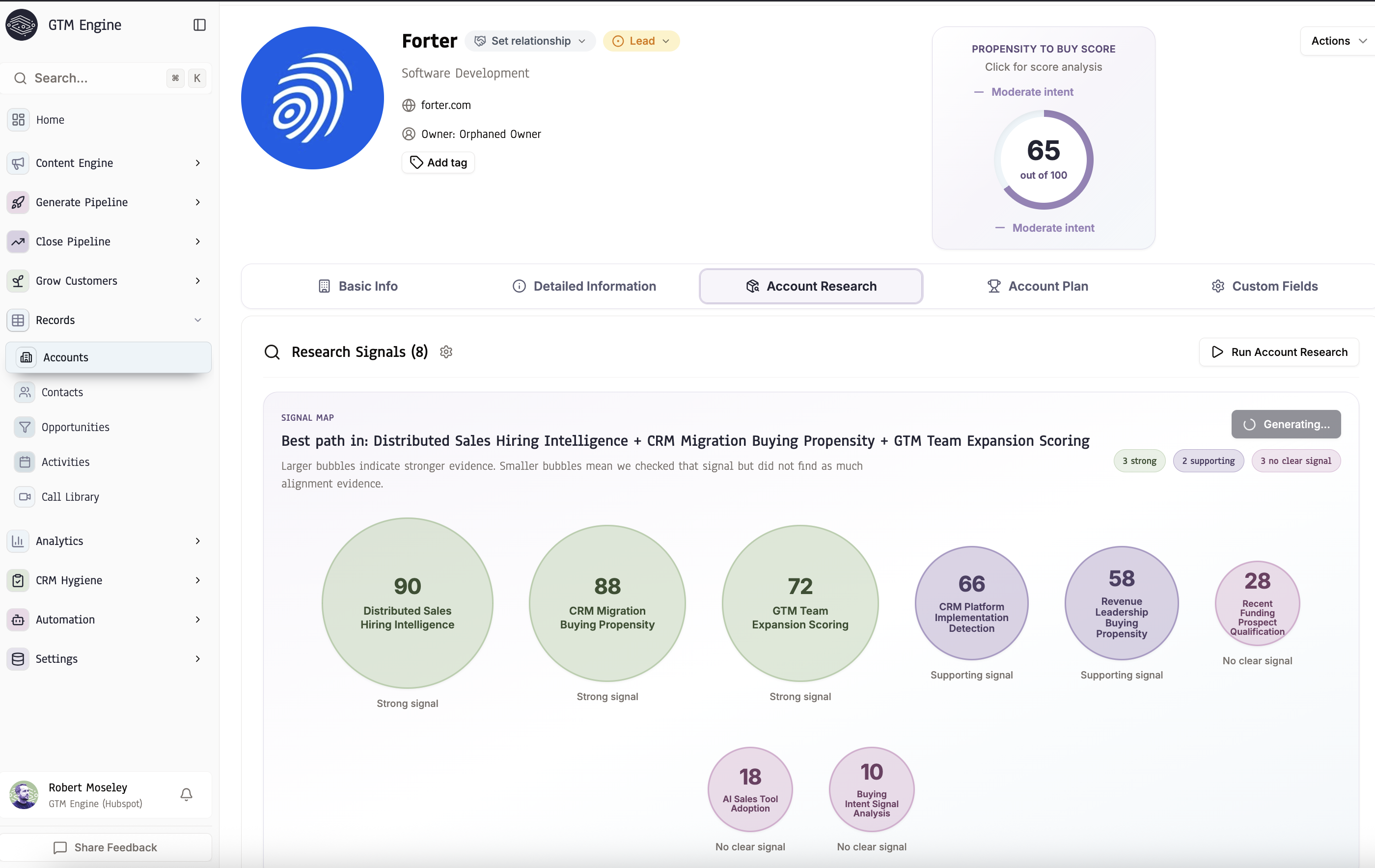
A score with no explanation is just a number reps learn to ignore. Every account in Campaign Engine gets a score built from the signals connected to it: ICP fit, funding, tech adoption, hiring trends, and churn or upsell indicators, plus any custom research prompt you define.
The point of the score is to find custom signals that suggest an account is actually in-market for what you sell, not to produce a number for its own sake. Once Campaign Engine surfaces those signals, they become part of the account plan and shape the message itself, so outreach reflects why an account looks like a fit right now instead of running the same script against every contact.
That score can only reflect the channels feeding it, and Campaign Engine shows which signals fed a given score rather than presenting a number with no explanation. One sales enablement buyer raised exactly this concern during evaluation: with calls, email, and CRM connected but other touchpoints (personal cell calls, texts, in-person meetings) going uncaptured, she asked how those gaps would get filled before she could trust the score for prioritization. That is not a flaw unique to Campaign Engine. It is true of any scoring system built on activity data. The practical takeaway for RevOps: audit which engagement channels are actually connected before you route campaigns off a score.
Enrichment has to fix decay, not just add fields once
Enrichment gets sold as a one-time purchase: pay for a list, get fresh fields, done. In practice, the fields go stale the moment they are appended, because people change jobs, titles change, and companies get acquired.
A buyer told us their team met with 500 people last year and still could not analyze that audience cleanly, because the contact records had blank job titles. That is not a minor gap. Without a title, there is no way to tell which roles converted faster or which titles to prioritize next quarter. Another buyer connected the same decay problem directly to deliverability: reps kept emailing contacts who looked like a fit on paper but had already left the company, and the emails bounced.
That lines up with published research on data decay, though the published estimates vary by what is being measured. Contact-level decay (people changing jobs or titles) is commonly cited around 22.5% to 30% per year, while email-specific decay is often cited higher and faster, since a bounced address fails immediately rather than degrading gradually (Cleanlist, 2026). Different studies use different definitions of decay and different underlying databases, so treat the exact percentage as directional. The operating point holds regardless of which figure you use: a list that looked clean in January is meaningfully out of date by the time a campaign ships in Q3.
Campaign Engine's enrichment runs per campaign, not per one-time purchase: find missing email, validate existing email, or re-enrich stale data, all configurable before a send. Contacts with no reachable email are skipped automatically rather than enrolled and sent anyway.
AI copy only works when it starts from account truth
The usual "personalization at scale" output is generic copy with a few details pasted into the wrong places: a first name, company name, or job title wrapped around an argument that could have been sent to anyone. It reads like lazily prompted AI, not an email built from the account's actual situation. Adding more fields does not make the message relevant when the underlying insight is missing.
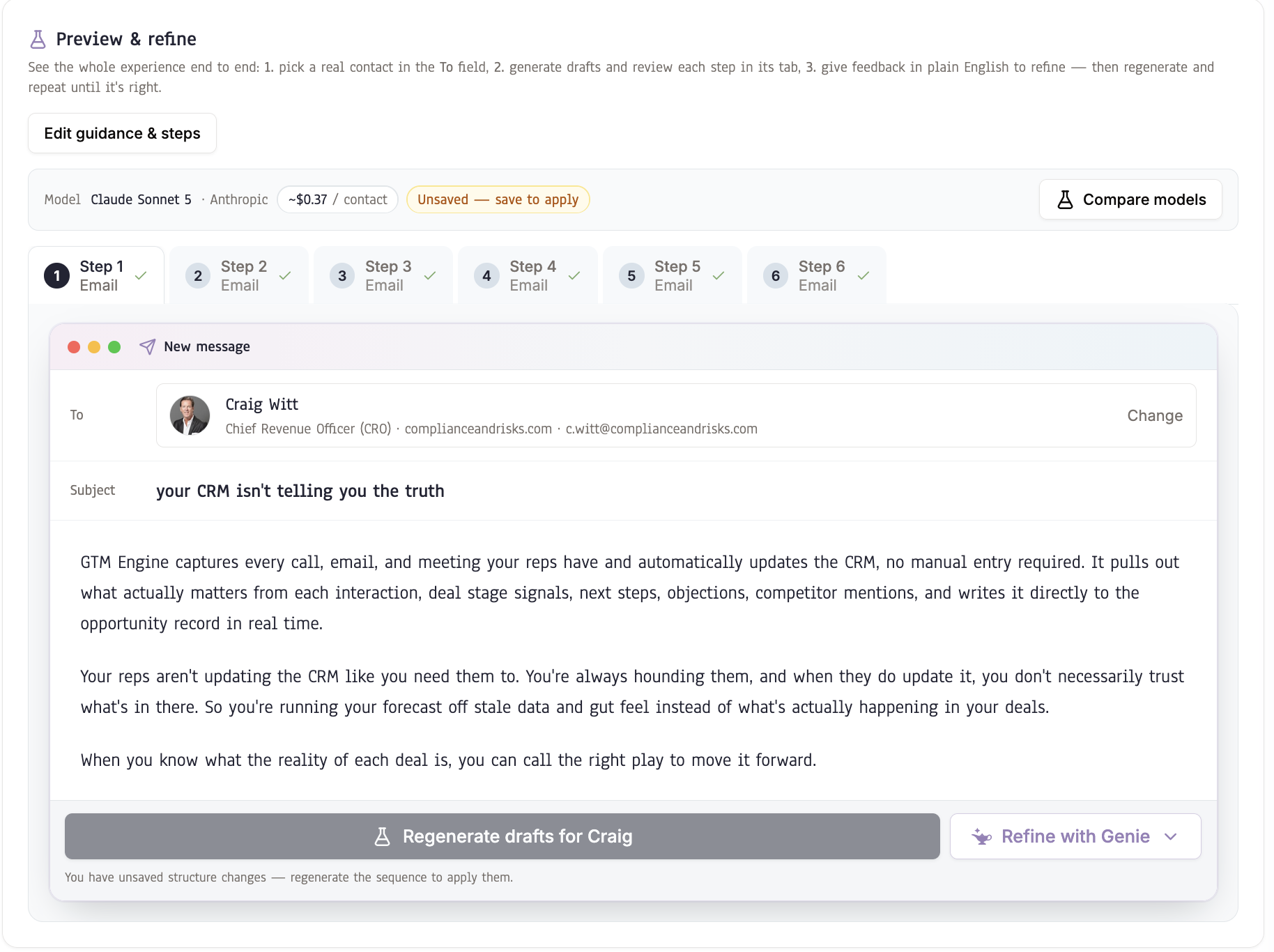
A buyer's question pointed at the real bar: could the system pull from CRM activity to find the actual insight, not just the contact's name and company? For relights, upsells, and warm outbound, Campaign Engine can use cross-contact account activity, role changes, pain points, competitor mentions, product usage, and deal-stage signals to shape each recipient's message. Cold outbound has no deal context to draw on, so the message relies on current research, including web data, social activity, account news, and other relevant account insights, rather than pretending a shared CRM history exists. A preview-and-refine loop lets you test the copy against a real contact, refine it in plain English, and compare models cheapest-first before you commit to a send.
Cold outbound copy in Campaign Engine is also kept plain and text-like on purpose, with no images and no heavy HTML, because that is what tends to land in the inbox rather than the spam folder. More on why that matters in the next section.
Deliverability is an operating constraint, not a box to check at the end
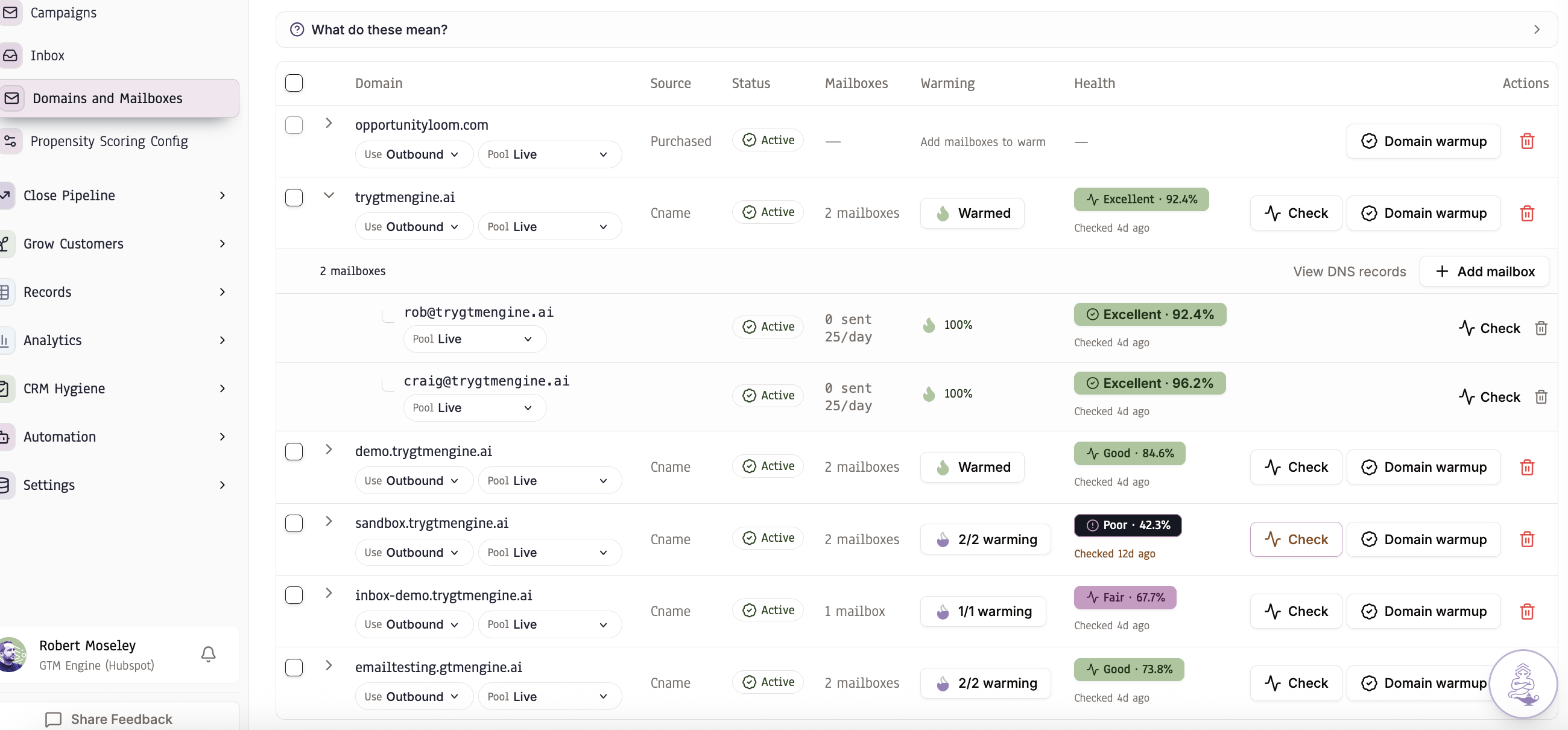
The best copy sent to the best account is worthless if it lands in spam. When deliverability is handled only during setup, stale contacts and volume changes can damage sender reputation before anyone notices. Campaign Engine treats it as a constraint that governs every send.
The buyer who raised the bounce problem above tied it to a second concern: reps sending to stale contacts risked "tanking our deliverability score," not just wasting one send. That connection is the reason deliverability cannot be separated from data quality: stale data causes bounces, bounces damage sender reputation, and damaged reputation hurts every subsequent campaign.
Campaign Engine's sending infrastructure includes:
Dedicated sending domains, either AI-suggested brandable domains you buy or your own domain connected via DNS.
Automated warmup that ramps a new mailbox's volume gradually rather than sending at full volume on day one.
Inbox-placement health checks (spam-versus-inbox scoring graded Excellent to Poor).
Inbox rotation that distributes sends across mailboxes by available daily capacity, so no single mailbox absorbs the full volume.
Suppression and automatic removal on replies, bounces, and unsubscribes.
All five of these are live today, not on a roadmap.
Setting up sending infrastructure correctly is its own discipline. For the full technical rundown on domains, warmup, authentication, and inbox placement, see our deliverability guide.
Campaign Engine overlays your CRM. It does not replace it.
The most common fear in this category is rip-and-replace: another tool that asks reps to abandon the CRM and learn a new system.
One buyer said it plainly: Campaign Engine is "not a rip and replace of HubSpot… an overlay." That is the intended relationship. Enrollment, generated content, replies, and outcomes flow back to HubSpot or Salesforce (or the built-in CRM). Enrollment status is surfaced directly on contacts, accounts, and reports, and a unified inbox handles replies so nothing lives only inside Campaign Engine.
This closes the loop: CRM data feeds the campaign, the campaign produces results, the results sync back to the CRM, and the next campaign starts from better data than the last one. That loop is also why Campaign Engine does not stay confined to outbound. The next section covers what changes when the same engine runs every motion off one shared data model instead of running outbound in a silo.
One shared data model runs every campaign motion, not just outbound
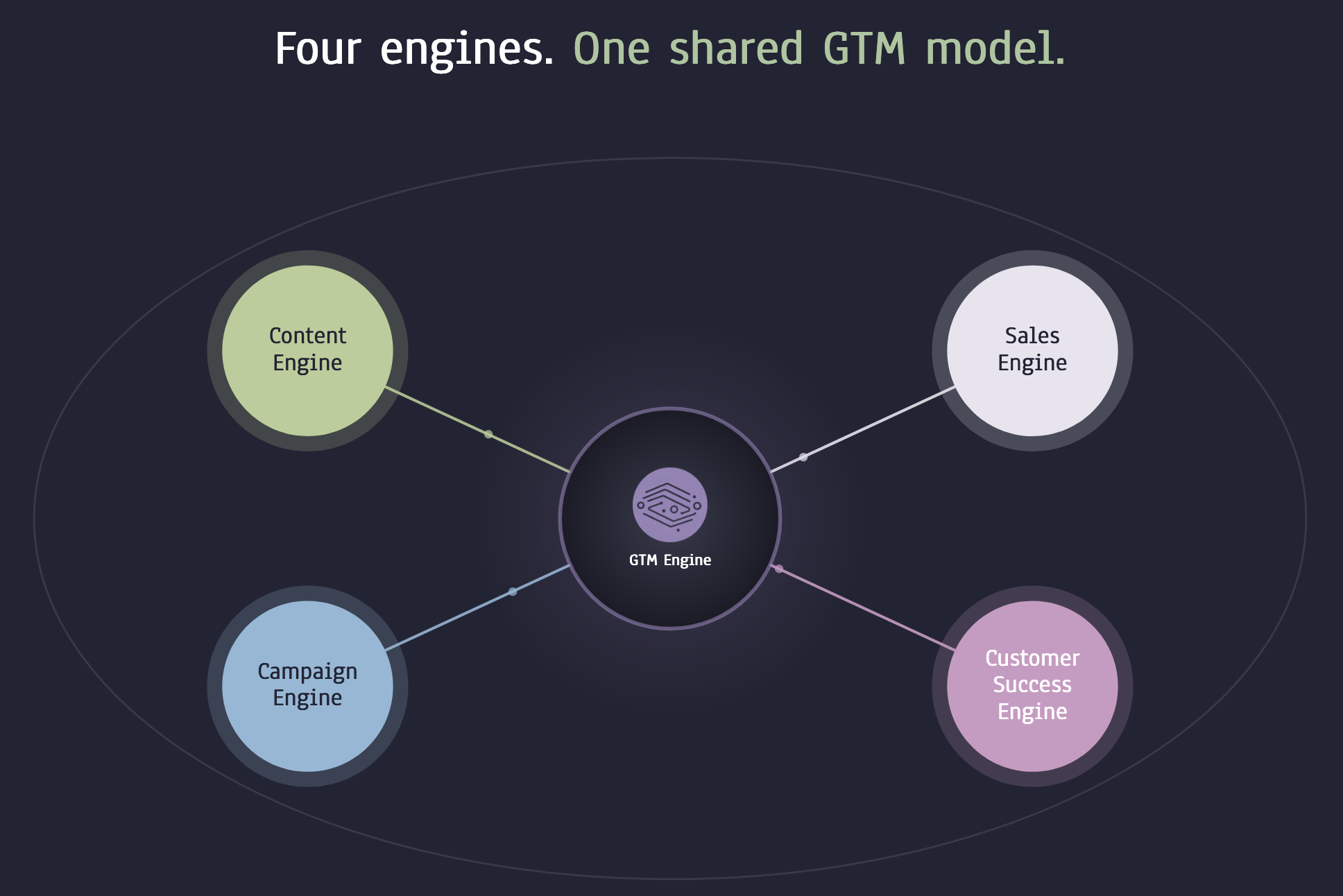
Scoring and enrichment are not the point. A scheduled call, a saved account, or a re-engaged customer is the point. Treating outbound as its own silo, walled off from the CRM data everyone else in the GTM org is also working from, is exactly the fragmentation this launch is built to remove.
One buyer's stated goal was for AI agents to identify opportunities, take action, and get a call on the calendar automatically. Campaign Engine is built around that outcome: define your ICP, your scoring rules, your enrichment checks, your copy guardrails, your CRM sync, and your routing rules once, and the system executes against them continuously rather than requiring a rep to manually rebuild the campaign each time.
Because every motion draws on the same underlying account and contact data, the engine turns CRM signals into messages across outbound, inbound follow-up, consideration, win-back, closed-lost nurture, and customer lifecycle campaigns:
Outbound. Score net-new accounts, surface the top tier, find and enrich contacts matching your buyer personas, generate a plain-text personalized sequence, send from warmed inboxes, and let replies land in the unified inbox and sync to the CRM.
Inbound follow-up. Enroll qualified inbound leads in a multi-step sequence built to book the meeting, instead of a single auto-reply and a rep who gets to it when they get to it.
Consideration. Enroll contacts tied to an open opportunity in a sequence that personalizes off the deal itself, including what that contact said on a call about their pain and interest, not just their name and title.
Win-back. Enroll churned accounts in a sequence built around why they left and what has changed since.
Closed-lost nurture. Start a sequence automatically a set number of months after an opportunity moves to closed-lost, timed to when the buyer might revisit the decision instead of firing off immediately.
Customer lifecycle. Enroll at-risk or expansion-ready accounts based on churn and upsell propensity signals, personalized not just on who the contact is but on how their team is actually using the product.
The shared data model is what makes each of those specific instead of generic. A consideration campaign personalizes off the deal itself, including what that contact actually said on a call about their pain and interest, not a name-and-title merge field. A lifecycle campaign personalizes off product usage and engagement signals, not just who the contact is on paper. An outbound campaign personalizes off account and contact enrichment. Different motion, same underlying account truth, same engine.
Campaigns can also enroll contacts into other campaigns, so one sequence's outcome becomes the next one's trigger. A reply like "follow up with me next quarter" enrolls that contact in a sequence timed to do exactly that, automatically, with no task created and nothing for a rep to remember. Chained this way, campaigns run as an always-on loop instead of a collection of one-time sends: outbound can feed consideration, consideration can feed win-back, win-back can feed lifecycle, all from the same account record.
Campaign Engine runs campaigns from CRM signals
Campaign Engine scores your CRM accounts, finds and enriches the right contacts, writes each message from that account's current activity, sends from warmed and authenticated inboxes, and syncs replies and outcomes back to the CRM, all in one sequence instead of four disconnected tools.
A prospecting database, an AI writer, a sequencer, and CRM glue: that is what outbound looks like today, and it is why campaigns lose data at every handoff.
Campaign Engine replaces that handoff chain with a single sequence, running on one shared data model: prioritize accounts by score, find and enrich the right contacts, write copy from current account activity, send from warmed and authenticated inboxes, track replies and bounces, and sync every outcome back to HubSpot, Salesforce, or the built-in CRM.
The next campaign starts smarter than the last one, because the data it draws from actually updates, and because a reply in one campaign can trigger enrollment in the next.
Campaign Engine is available now in early access on HubSpot, Salesforce, and GTM Engine's built-in CRM. Early access currently requires connecting your CRM plus at least one email inbox; LinkedIn and SMS sending are configured separately. [VERIFY: exact setup time, enrollment volume limits, and daily send caps for early access before publishing.]
Get in touch to see it running against your own CRM data.
FAQ
What is Campaign Engine?
Campaign Engine is GTM Engine's unified campaign workflow. It combines CRM data, current account signals, enrichment, propensity scoring, AI-generated messaging, multi-channel sequencing, and deliverability controls into one motion, and it runs across outbound, inbound follow-up, consideration, win-back, closed-lost, and customer lifecycle campaigns.
Does Campaign Engine replace HubSpot or Salesforce?
No. Campaign Engine is built as an overlay that enriches and updates your existing CRM (HubSpot, Salesforce, or GTM Engine's built-in CRM) rather than replacing it.
What campaign motions does Campaign Engine support?
Campaign Engine supports any campaign motion you can define and configure from your CRM data, signals, scoring rules, enrichment requirements, messaging, and routing logic. Outbound, inbound follow-up, consideration, win-back, closed-lost nurture, and customer lifecycle campaigns are examples, not a fixed list. You can build campaigns for the workflow your team needs, then run them on the same underlying account and contact data.
How does propensity scoring work?
Every account gets a score from 1–100, in bands from Very Low to Very High, based on signals you define: ICP fit, funding, tech adoption, hiring trends, and churn or upsell indicators, plus any custom research prompt. New accounts are scored automatically as they sync.
Can I trust a score if not every touchpoint is captured?
Treat it as bounded by the signals connected. Campaign Engine shows which signals fed a score so you can see where confidence is high and where a channel gap means the score should carry less weight.
Why does enrichment quality affect deliverability?
Stale contact data, meaning people who changed jobs or left a company, leads to emails sent to addresses that bounce. Bounces damage sender reputation, which affects inbox placement for every subsequent campaign, not just the one that caused the bounce.
How does Campaign Engine protect deliverability?
Dedicated sending domains, automated warmup, inbox-placement health checks (spam-vs-inbox scoring plus auto setup of SPF/DKIM/DMARC), inbox rotation by capacity, and automatic suppression on bounces and unsubscribes. See the full deliverability guide for the technical detail.
How does a consideration or lifecycle campaign personalize beyond name and title?
Consideration campaigns personalize off the open deal itself, including what the contact said on calls and emails about their pain and interest. Lifecycle campaigns personalize off product usage and engagement signals, not just who the contact is on paper. Both draw on the same CRM-connected account data outbound campaigns use for enrichment.
Can one campaign trigger another?
Yes. Campaigns can enroll contacts into other campaigns based on how they reply. A reply like "follow up with me next quarter" enrolls that contact in a sequence timed to do exactly that, automatically, with no task created and nothing for a rep to remember.
What channels does Campaign Engine support?
Email, LinkedIn (DM and InMail reminders), calls, and SMS, as either live per-contact sequences or scheduled one-time broadcasts, plus action steps like enrolling a contact in another campaign.
About the Author

Robert Moseley IV is the Founder and CEO of GTM Engine, a pipeline execution platform that’s changing the way modern revenue teams work. With a background in sales leadership, product strategy, and data architecture, he’s spent more than 10 years helping fast-growing companies move away from manual processes and adopt smarter, scalable systems. At GTM Engine, Robert is building what he calls the go-to-market nervous system. It tracks every interaction, uses AI to enrich CRM data, and gives teams the real-time visibility they need to stay on track. His true north is simple. To take the guesswork out of sales and help revenue teams make decisions based on facts, not gut feel.


