

TL;DR: A priority account list tells you where to sell. It doesn't tell you who you know there. Single-threaded accounts, where your whole relationship runs through one person, look fine in a pipeline review right up until that person goes quiet, changes jobs, or turns out not to own the budget.
Here's what you'll learn in this article:
- How to spot single-threaded accounts by counting buying roles instead of contacts
- Why some coverage gaps are people your team already met but never logged
- How to find the problem owner who sits several layers below your executive contact
- How to turn each gap into owned work without flooding the CRM with unreviewed contacts
1. Find single-threaded accounts by counting roles, not contacts
Your top 50 accounts got agreed in a planning meeting. Ask who you know in finance at account 12 and the room goes quiet.
A single-threaded account is a priority account where every real relationship runs through one person. Contact counts hide it. An account with seven names in the CRM can still have exactly one person who answers your emails.
One revenue leader asked the question on a call with us: "how many are we single threaded with? How many are. Do we have multi with? Do we even know who the CFO is? Even though CIO may be our, our key contact." That is one conversation, not a benchmark. It is still the right question to ask of every account on the list.
Start with ten priority accounts. List the buying roles for each priority account: economic buyer, business owner, champion, technical evaluator, procurement, and end users. Mark each role verified, guessed, or unknown. Verified means someone on your team has talked to that person or a current source confirms the title. Guessed means a rep thinks so. Unknown means nobody has a name.
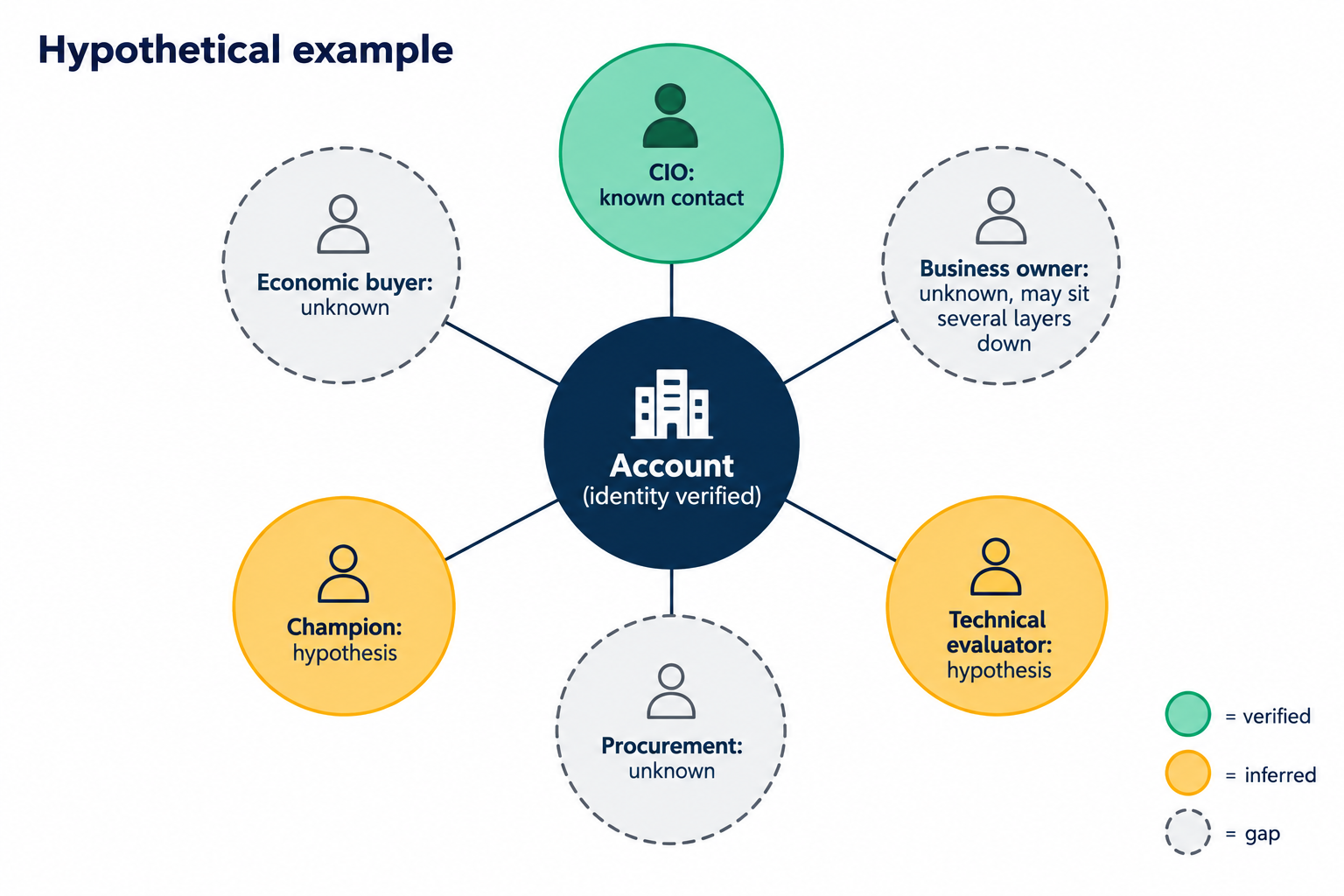 Here is a hypothetical account, built only to show the structure. The team has a strong CIO relationship. A likely champion and technical evaluator exist on paper, but nothing confirms either role. Economic buyer, business owner, and procurement are blank. Seven names, one verified relationship, five open questions.
2. Log the people your team has already met
Some of your coverage gaps aren't gaps at all. Your reps met those people on a call last month and never created the contact.
Contact creation is the step reps skip. A rep runs a demo with five people from the account, updates the opportunity, and creates one contact: the person who booked the meeting. The other four live in a calendar invite and an email thread, and nowhere on the account. Your coverage check then reports a single thread that is really five.
Before you assign anyone to research an account, pull everyone who has already shown up in meetings, emails, and calls. That is the cheapest coverage you will ever get, because the relationship already exists.
GTM Engine automates this step. Once an admin turns it on, it creates contacts and accounts from the emails, meetings, and calls your team already has, so the people a rep talked to land on the account without anyone typing them in. Linking those activities to the right opportunity is recommended by the system and confirmed by a user, not fully automatic. It has limits worth stating: it can't find people nobody has talked to yet, and it won't tell you which person is the economic buyer. Those gaps still need strategies 3 and 4.
3. Look for the problem owner below the executive contact
The executive you know is easy to find. The person who owns the problem day to day is several layers down and invisible from the outside.
The business owner is the person who lives with the problem your product solves and feels it when it breaks. A prospect described why that person is hard to reach: "they don't know the person who owns our problem actually even exists in their org. And, and they might be four layers below them." Executives show up on leadership pages. Operational owners rarely do.
The fastest path to that person runs through the relationship you already have. Ask your CIO contact who runs the process day to day, who would notice first if it failed, and who signs off on spend. A referral from a known contact also verifies the role, which a title search alone can't do.
4. Give every gap one owner and a due date
"Research the account" is a task nobody finishes, because nobody can tell when it's done.
A research assignment is one gap on one account, turned into a question with an owner and an end date. "Identify who approves spend for this initiative at account 12" can be finished. "Build out account 12" can't.
| Field | Hypothetical example |
|---|---|
| Gap | Economic buyer unknown |
| Question | Who approves spend for this initiative? |
| Owner | The SDR assigned to the account |
| Counts as an answer | A direct conversation, a referral from a known contact, or a current public source |
| Due and review | Ten business days, checked at the next account review |
Every assignment ends in one of three states: a sourced answer, a documented "still unknown" with what was tried, or a recommendation to the account owner. "Still unknown" is a valid result, and it beats an assignment that sits open for six weeks.
Intent data belongs here as a sorting tool. One prospect told us "I've got all this data for buyer intent" and "I'm not sure what to do with" it. Use a spike to move an account's assignments up the queue. A spike doesn't tell you who is researching or whether a purchase exists, so keep it out of the role fields.
5. Filter new contacts before they reach the CRM
Loading every name you find doesn't fix coverage. It moves the work to whoever cleans the CRM next quarter.
Bulk-loading contacts is the tempting shortcut once the gaps are visible. A prospect described how that went: "when we loaded up like 400 contacts and then you've got to go review them and check them and stuff. It's probably not the best approach ... you kind of want to filter it before you load them." Four hundred unreviewed contacts make an account look covered when it isn't.
Keep the filter short. Confirm the contact belongs to the right account record. Another prospect raised the risk directly, asking "if it was a duplicate account, would it try and, you know, create the contact and then it would end up on the duplicate account." Confirm the person maps to a role on your list, and record where the information came from and when it was checked. Anything uncertain goes to one named reviewer. Everything else loads.
The goal, in one prospect's words, is "trust in CRM data," with "the right companies to look at and not just noise."
A coverage check only works if you run it again
Single-threaded accounts don't announce themselves. They show up later as a deal that stalls when the one champion leaves, or a renewal where nobody knew the CFO had changed. A check run once in a planning meeting goes stale as people change jobs and new names appear on calls.
At every account review, ask whether anything moved from unknown to verified, and whether any finding changed the account plan. If findings never change a plan, the research is decoration. If you can't name the decision the check is supposed to inform, settle that first.
Frequently Asked Questions
What is a single-threaded account? A single-threaded account is one where your relationship runs through one person. If that person leaves, goes quiet, or lacks budget authority, the deal has no other path forward.
How do you multi-thread a priority account? Start by logging the people your team has already met in meetings, emails, and calls. Then ask your known contact for referrals to the business owner and the economic buyer, and assign every remaining gap to one owner with a due date.
Which roles should you map at a priority account? Start with the economic buyer, business owner, champion, technical evaluator, procurement, and end users. Then confirm which of those roles actually matter at that account rather than filling every box by guesswork.
Should you bulk-import contacts to close coverage gaps? Only after filtering. Confirm the account match, check for duplicates, and confirm each contact maps to a real role. Unfiltered imports make accounts look covered and create cleanup work.
What should you do with intent data on a priority account? Use it to decide which account's gaps get researched first. Record it as context, not as evidence of who the buyer is or that a purchase is underway.
Next step: Run the ten-account check against your CRM this week. To see how many of your "single-threaded" accounts are really people your team already met, book a GTM Engine walkthrough and bring one account you think is well covered.
About the Author

Craig Witt is a seasoned revenue executive and GTM advisor with more than three decades of experience building, scaling, and leading enterprise software sales organizations. He has held senior revenue leadership roles across companies including Compliance & Risks, MotionPoint, Ventiv Technology, VersionOne, TIBCO, Software AG, Business Objects, Quest Software, and OpenText. Throughout his career, Craig has led global sales teams, owned full revenue P&Ls, and helped organizations strengthen go-to-market strategy, sales execution, forecasting, and operational discipline.
As a consultant to GTM Engine, Craig brings a CRO’s perspective to helping revenue teams turn data, process, and customer intelligence into better outcomes. He is especially focused on practical ways to improve pipeline quality, seller productivity, account prioritization, and forecast confidence without adding unnecessary complexity for reps or RevOps teams. Craig is known for his direct, execution-oriented approach and his belief that strong culture, clear strategy, and consistent accountability create elite results.


