

TL;DR
AI meeting notes made it easy to put words into the CRM. They did nothing to make it easier to get answers out, because you can read a paragraph, but you can't filter it, count it, trend it, alert on it, or use it to trigger a workflow.
Here's what you'll learn in this article:
- Why an AI meeting note is a document and a CRM field is a data point, and why that difference decides whether a report can exist at all
- The four properties that make CRM data reportable: types, standard values, history, and relationships
- A field-mapping example showing which meeting insights belong in notes and which belong in governed fields
- How AI extraction fails, and the validation controls that catch it before it reaches a dashboard
AI meeting notes are documents, and CRM fields are data
Your CRM holds more words than it ever has, and your VP of Sales still can't get a straight answer about the pipeline.
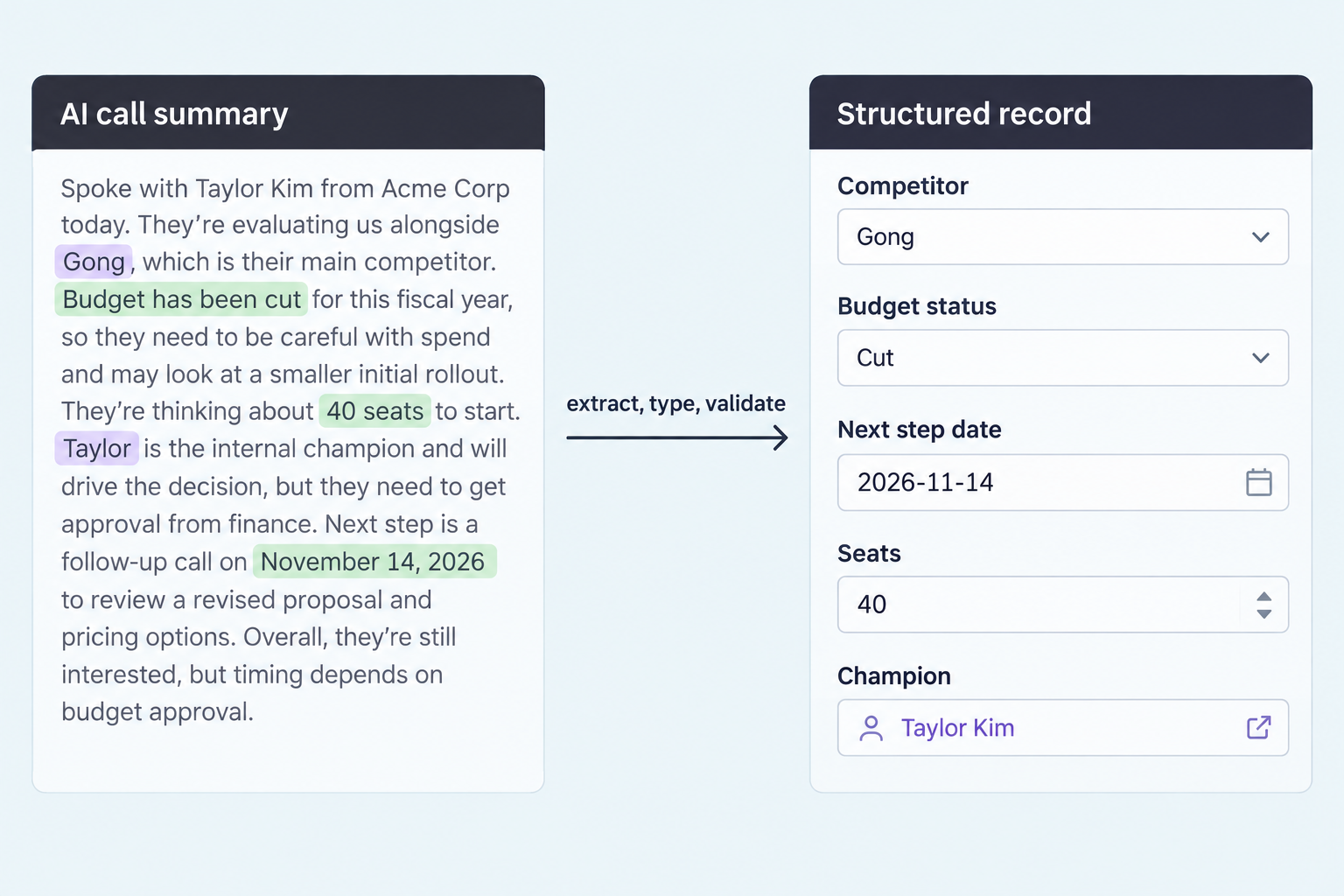
An AI meeting note is a document. It's written for a person to read, one record at a time, and it's good at that job. A CRM field is a single typed value attached to a specific record and stored so the system can compare it with every other record. Those are two different storage models, and only the second one can answer a question about more than one deal.
Here's how it plays out. In September your note taker starts dropping a clean summary onto every opportunity. In October the CRO asks how many open deals over $50K mention a budget freeze and have a close date this quarter. The answer is probably sitting in those summaries. None of them can return it. Somebody opens 200 records and starts reading, and that somebody is usually RevOps.
A paragraph tells you what happened on one call. A field tells you how many deals, which ones, and since when.
The ask from leadership doesn't change. A RevOps manager at an education company running HubSpot told us, "Reporting is one of my big things," and described what her executives wanted: "They just want to ask the question." Prose can't meet that request, however well the AI writes it. A question that spans 300 deals needs 300 comparable values.
A paragraph fails five jobs your CRM depends on
If a report, dashboard, or workflow touches a piece of information, that information has to live in a field.
A paragraph fails the moment you treat it as data, and it fails in five specific ways. Each one maps to something RevOps gets asked to build every quarter.
- Filtering. "Competitor = Gong" is a filter. "They mentioned looking at a couple of other tools, one of which records calls" is homework.
- Aggregation. A CRM can sum a seat count of 40. It can't sum "about forty seats, maybe more after the pilot."
- Trending. A trend needs the same attribute measured the same way over time. AI summaries are rewritten from scratch after every call, so there's no consistent attribute to line up.
- Alerting. An alert fires when a value changes. When a paragraph goes from "budget approved" to "budget under review," that's a new paragraph, and no system registers it as an event.
- Automation. Workflows branch on values. You can't route a deal to deal desk because a sentence somewhere hints at procurement.
Keyword search is the usual workaround, and it breaks fast. Search "budget" and you get "budget approved," "no budget concerns," and "they just had their budget cut" in one result set. Search can't handle negation, synonyms, or which deal a sentence refers to.
Pointing a chatbot at your notes has the opposite problem. It sounds confident, it gives a slightly different answer each time you ask, and you can't pin the result to a dashboard and defend it in a forecast call. That's fine for exploring. It doesn't work as a system of record. Search and AI extraction can both do these five jobs, but only after they write their output into a typed field with allowed values, a source link, and review rules. Without those controls, the report is a guess.
Reportable data needs types, standard values, history, and relationships
A field can look fine on a record and still break the report you actually need, depending on which of these four properties it's missing.
Reportable data is data with four properties: types, standard values, history, and relationships. Each one supports a different job. A current-state pipeline view needs types, standard values, and correct relationships. A trend report ("how often did budget status flip in the 30 days before a slip?") also needs history. Find out what your report needs before you trust the field behind it.
Types
A typed field holds one kind of value. A date field holds a date, a number field holds a number, and a boolean is true or false. Types are what let you sort close dates, sum amounts, and build a "next meeting in the next 7 days" view. "Sometime after their board meeting" isn't a date.
Standard values
Standard values mean every record uses the same label for the same thing. If one rep's notes say "Gong," another's say "gong.io," and a third says "Gong (I think)," your competitive report shows three competitors and a rounding error. A picklist with a controlled set of values fixes this, and so does an explicit "Unknown" option so a blank and a "no" don't look the same.
History
History is the record of when a value changed and what it changed from. Salesforce field history tracking and HubSpot property history exist for this reason. History is how you see that a deal's close date moved three times or that budget status flipped two weeks before the deal slipped. When summaries get rewritten, that history is gone.
Relationships
A value only matters if it's attached to the right deal, account, and contact. This is where things get ugly in real CRMs. The same RevOps manager told us, "I couldn't tell you how many companies we have because of the duplication issue," and added, "We have a lot of districts in schools with the same names but different states." A VP of IT on another call asked the question every buyer eventually asks: "how do you match data? Like, because the customer names can be different." A perfect field on the wrong duplicate record is still wrong.
Meeting insights split into narrative context and governed fields
You decide where an insight goes by asking whether anyone will query it more than once.
The rule is short. If you'll filter, count, trend, alert, or automate on an insight, it gets a governed field. If it only helps someone understand one specific deal, it stays in the note. Most calls produce both, and the note is where the evidence for the field lives.
| Meeting insight | Where it belongs | Field type | Validation rule |
|---|---|---|---|
| Competitor being evaluated | Opportunity field | Multi-select picklist | Must match the competitor list; new names go to review |
| Budget status | Opportunity field | Picklist: Approved, Pending, Cut, Unknown | Unknown only when the field is empty; never overwrite a known value because a call didn't mention it |
| Next meeting date | Opportunity field | Date | Must be later than the date of the call it came from; vague dates go to review |
| Seat count discussed | Two opportunity fields: min and max | Number | Integers only; "40 to 60" stores 40 and 60, a single number fills both |
| Economic buyer named | Contact role on the opportunity | Relationship | Matches an existing, deduplicated contact, or goes to review to create one |
| Objection raised | Topic field plus note | Picklist plus text | Topic comes from a controlled list; exact wording stays in the note |
| Why the champion is nervous about procurement | Note | Text | None; this is human context |
That last row matters. Some of the most useful things said on a call shouldn't be in a field, and shoving them into a 255-character text box labeled "Champion Concerns" just builds a smaller paragraph nobody reports on. Keep the narrative. Just stop expecting it to work like data.
AI extraction breaks in predictable ways, and validation catches them
If you point a model at transcripts and write straight to the CRM, you swap rep data-entry problems for machine data-entry problems.
AI extraction is the step that turns conversation into typed values, and it fails in ways you can predict. The first is invented values. Ask a model to fill a budget picklist and it'll pick something even if budget never came up, unless "Unknown" is a valid answer and the default. The second is label drift, where the model makes up a slightly different value every time and your picklist ends up with 60 options.
The third is association: the call gets matched to the wrong duplicate account and updates the wrong deal. The fourth is overwrites, where an AI value replaces something a rep or manager set on purpose, like stage or forecast category. The fifth is coverage. If reps call prospects from their personal cell phones, those calls never reach the extraction step. That RevOps manager pointed out that her remote sales team "can use any phone they want," and our founder's honest answer on that call was, "That part's legitimately hard."
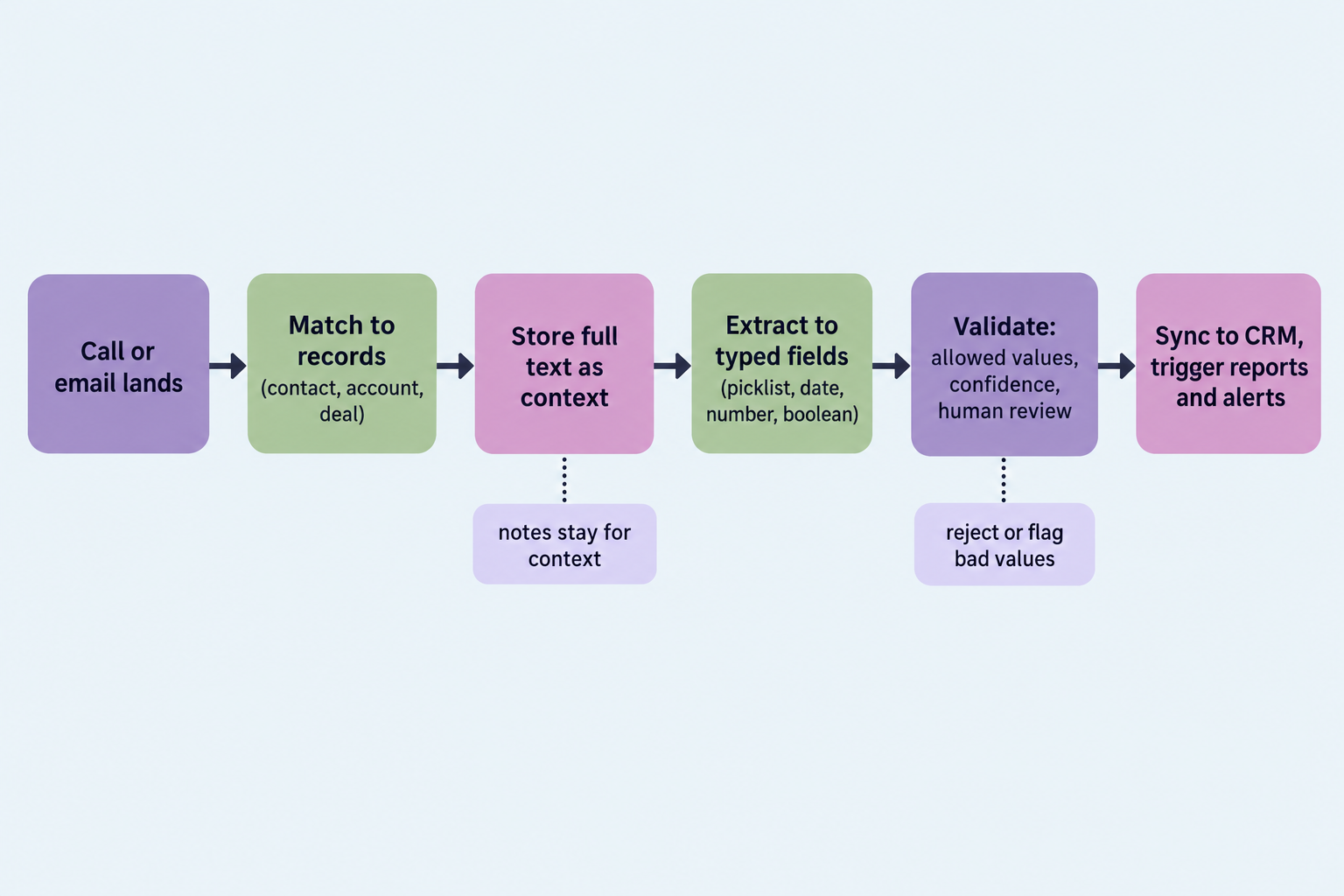
The controls follow from the failures. Enforce the field type so a date field only ever receives a date. Restrict picklists to allowed values, and send new values to a review queue instead of auto-creating them. Make "Unknown" the default for empty fields only. A call that doesn't mention budget is not evidence that budget is unknown, so a known value stays until a newer source contradicts it. Attach a source to every value so anyone can click through to the sentence that produced it. Lock fields that people own, and set sync direction per field so a system ID or a manager-set forecast category never gets overwritten.
Human review belongs where the stakes and the uncertainty are both high. A rep doesn't need to approve "next meeting date." RevOps should see a new competitor name before it shows up in the board deck. The same goes for a vague date like "after their board meeting," two calls that disagree, and any change to amount, close date, or stage.
How GTM Engine writes meeting data into CRM fields
This is where the product fits into the argument, including what it doesn't do.
We built GTM Engine around the idea that notes and fields are different jobs. Calls, emails, and meetings get matched to the right contacts, account, and opportunity first, and the full text is kept as context. From there, AI autofill fills the specific CRM fields you choose. You describe what belongs in a field, test it on a real record, and correct the output until it's right. Autofill respects data types, so a HubSpot or Salesforce picklist only gets one of its existing values, a number field gets a number, and a date field gets a date.
Every value is sourced to the activity it came from. Updates made in GTM Engine push to the CRM, and changes made in the CRM sync back to GTM Engine, so the reports you already have in HubSpot or Salesforce run on data no rep had to type. Because the full text stays available, you can add a field later, like the prospect's current tech stack, and backfill it from past calls and emails instead of asking reps to go back through 200 deals. When an email says the budget got cut, the opportunity gets flagged and an alert can go to Slack or Teams.
There are tradeoffs. We don't capture every interaction, and calls made on personal cell phones are still a gap that manual notes have to cover. Duplicate matching uses a tiered set of signals (domain, email, LinkedIn URL, then name and company), and in our own words it's "not absolutely perfect," so you still review merges. One more: our topic field is a dynamic picklist that adds new values as new subjects come up. That goes against the review-queue rule above, and we did it on purpose. Topics are for exploring what buyers bring up, so new values are allowed there. Competitor, budget status, and anything else on a board slide stay on locked lists. Give the topic list to one RevOps owner, have them merge near-duplicates every quarter, and report on topics in quarterly buckets instead of comparing week to week. And no tool fixes a bad schema. If you can't say what a field means, AI will fill it with confident nonsense faster than any rep ever did.
The note is the evidence, and the field is the claim
Once you treat summaries as evidence instead of data, the way you plan CRM work changes.
AI note takers made writing cheap and left querying where it was. The teams that get value out of call data treat the transcript and summary as the evidence file and the field as the claim that evidence supports. Reports, alerts, and workflows run on the claim. People check the evidence when a claim looks off.
Here's your next step. Write down five questions leadership asked in the last two quarters that you couldn't answer from the CRM. For each one, define the field, its type, its allowed values, its Unknown default, and who owns it. Then backfill those fields from the notes you already have and see how many come back as Unknown. That number tells you how much of your "data" was ever data.
Frequently Asked Questions
Does AI work better with structured data?
Yes, for any task that compares records. A model can summarize one call well from raw text. Counting, ranking, and trending across hundreds of deals needs typed, standardized values, and AI is most useful when it's producing those values from unstructured activity.
Will AI replace the CRM?
Not as the system of record. Something still has to hold canonical records, relationships, permissions, and history, and other systems like CPQ and finance reporting depend on it. What AI replaces is the manual data entry that kept the CRM empty.
Should AI meeting notes write directly to the CRM?
Notes can be logged as activities without much risk. Field updates should go through type checks, allowed values, an Unknown default, source citations, and field locks. Send low-confidence or brand-new values to review before they land in reports.
Can ChatGPT or a free AI note taker fill CRM fields?
They can write a good summary, and some can push that summary into a CRM note. Filling governed fields also takes record matching, deduplication, type enforcement, and sync rules. Without those, you get faster paragraphs, not reportable data.
Do we still need meeting notes if fields are filled automatically?
Yes. Notes hold the context a field can't, like why a champion is worried, and they're the evidence anyone can check when a field value looks wrong. Keep both, and don't expect either one to do the other's job.
If you want to know which of your CRM fields are empty, which are duplicated, and which questions your call and email data could already answer, book a CRM data assessment with the GTM Engine team.
About the Author

Robert Moseley IV is the Founder and CEO of GTM Engine, a pipeline execution platform that’s changing the way modern revenue teams work. With a background in sales leadership, product strategy, and data architecture, he’s spent more than 10 years helping fast-growing companies move away from manual processes and adopt smarter, scalable systems. At GTM Engine, Robert is building what he calls the go-to-market nervous system. It tracks every interaction, uses AI to enrich CRM data, and gives teams the real-time visibility they need to stay on track. His true north is simple. To take the guesswork out of sales and help revenue teams make decisions based on facts, not gut feel.


