

TL;DR
CRM records from sales calls go wrong when the system treats every new email address as a new person and every meeting as a new deal. A good sales conversation creates exactly one new thing, the activity, and then matches, associates, and updates the records that already exist.
Here's what you'll learn in this article:
- Why a call should create one activity and match everything else, and when creating a record is actually correct
- How a match-before-create waterfall (domain, email, LinkedIn URL, then name plus company) prevents duplicates
- Why opportunities and their participants are a human decision, and how prior activity gets attached without polluting the deal
- How typed, source-cited field updates keep reports intact, and a checklist for auditing your own CRM
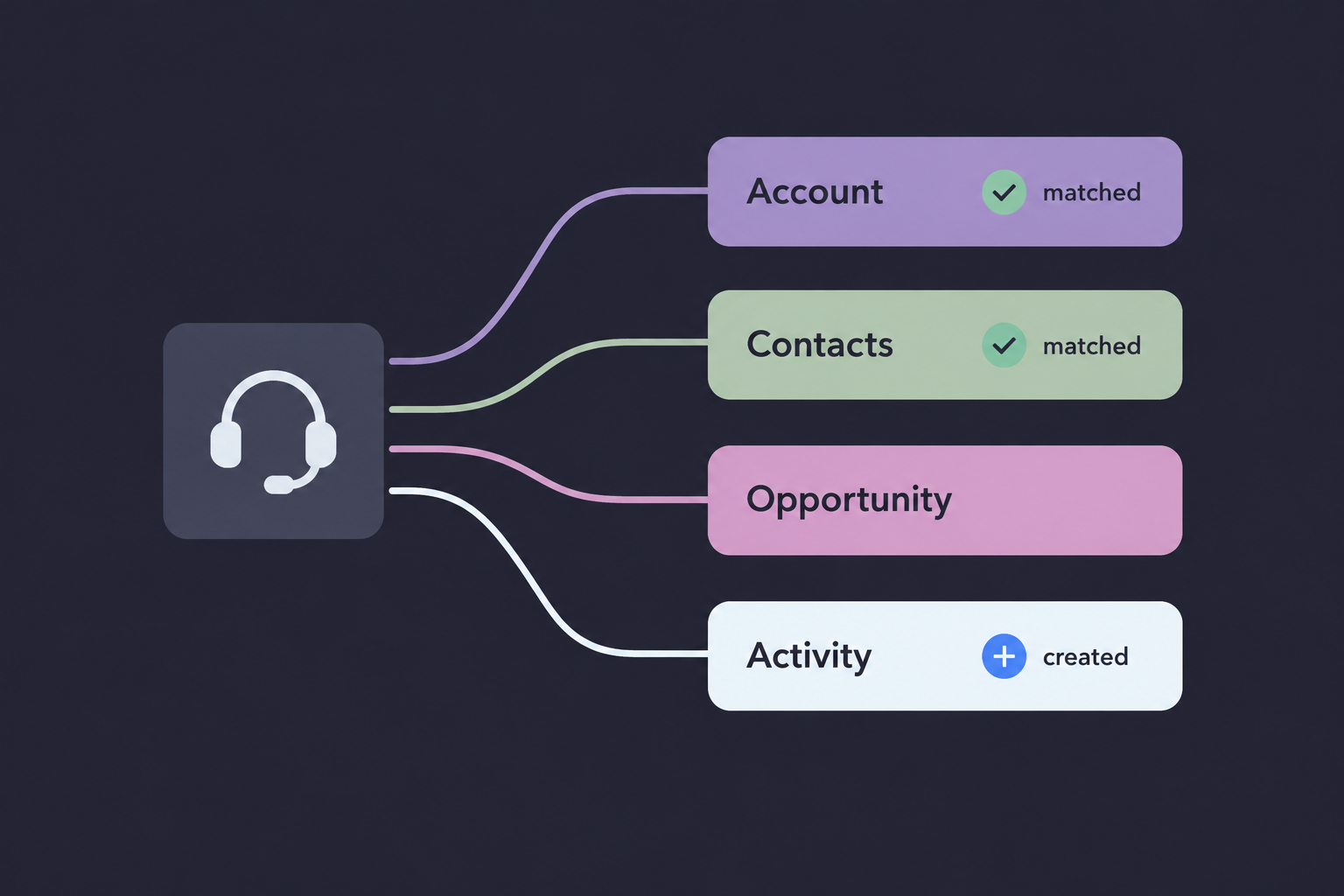
A sales conversation should create one activity and update everything else
If your CRM grows a new contact every time someone changes jobs, and nobody can say how many real accounts you have, the problem started at the moment a call got logged.
CRM records from sales calls fall into two groups: the activity, which is new every time, and everything else, which almost always exists already. An activity is the record of the conversation itself: who attended, when it happened, the transcript, and what was said. Record matching is the step that decides which existing account, contacts, and opportunity that activity belongs to before anything new gets created.
Get the order wrong and you get a CRM that looks busy and answers nothing. A RevOps manager at an education company put it plainly on a call with us: "I couldn't tell you how many companies we have because of the duplication issue." That team was not short on records. It had too many of them, and each copy split the history that should have lived in one place.
The default for every record except the activity is "match," and "create" is the exception you have to earn.
Duplicates also break everything downstream. If there are five copies of the same buyer, the system processing the call has no reliable way to know which one to update, so the update lands on one copy and the other four go stale. Deduplication is a precondition for association. It belongs before the call is processed, as the first step.
One illustrative discovery call touches four record types
You can't audit what your calls create until you've traced a single one end to end.
Here is an illustrative scenario. The company and people are fictional, but the record problems are the ones we see in real CRMs. Priya, an AE, runs a 45-minute discovery call with Northwind Logistics. Three people join from the buyer side.
Maria Chen, VP of Operations, is a familiar face. She was the champion on a closed-won deal at her previous employer, Contoso, and now she's at Northwind with a new email address. Sam Okafor, Northwind's IT director, was added to the invite by Maria and has never appeared in the CRM. Jordan Reyes, an outside consultant Northwind hired to run the evaluation, joined from a forwarded invite using his own firm's domain.
Before the call, the CRM already holds two company records for Northwind. One came from a webinar form fill ("Northwind"), the other from a list import ("Northwind Logistics Inc"). Both share the domain northwindlogistics.com. No opportunity exists yet, because this is the first real conversation.
A naive call-logging setup sees four email addresses, two of them unknown, and does the obvious thing: creates two contacts, picks one of the Northwind records at random, and maybe opens a deal because a meeting happened. Every one of those choices is wrong.
The annotated record map shows what the call should create, match, or leave alone
Most CRM cleanup projects fail because nobody wrote down the intended outcome for each record type.
Here is what the Northwind call should produce. Read the "Action" column first: one record is created outright, one is created after matching fails, and the rest are matches, associations, or deliberate non-actions.
| Record | What the call contains | Action | Why |
|---|---|---|---|
| Account: Northwind Logistics | Two existing records sharing northwindlogistics.com | Match by domain, flag the pair for merge, attach to the surviving record | Domain is the strongest account identifier. Two records means split history. |
| Contact: Maria Chen | New email, same LinkedIn URL as the ex-Contoso champion | Match the existing contact, add Northwind as her primary account | She's the same person. Her Contoso history is context Priya needs. |
| Contact: Sam Okafor | New email at a matched domain, no record anywhere | Create, enrich (title, LinkedIn URL), associate to Northwind | Creation is correct here: nothing matched at any step. |
| Contact: Jordan Reyes | Consultant on an outside domain | Log as a call participant, leave off the Northwind account, review | He influences the deal but doesn't work for the buyer. |
| Opportunity | None exists, first discovery call | Create nothing | A meeting is not a qualified deal. Priya decides that. |
| Activity: discovery call | Transcript, attendees, timestamps | Create one, associate to the account and all three contacts | This is the one record every conversation should create. |
| Fields: current CRM, team size, evaluation deadline | Stated by Maria during the call | Write as picklist, number, and date with a citation to the transcript | Typed values keep reports working, and the citation shows where each value came from. |
Two outcomes in that table surprise people. The call creates no opportunity, and the consultant does not become a Northwind contact. Both are deliberate. A system that "fills the CRM" by inventing deals and misfiling partners is producing future cleanup work for RevOps.
Matching beats creating because duplicates break every association that follows
Your dedupe rules decide whether a call updates the right record or spawns a fifth copy of the wrong one.
Duplicate prevention is a waterfall of identifiers ordered by confidence. For accounts, the company domain is the primary key. For contacts, email is strong, and the LinkedIn URL is often stronger, because people change email addresses when they change jobs while their LinkedIn URL stays the same. Below those sit weaker signals like name plus company name, which should lower confidence and route to review, not trigger an automatic merge.
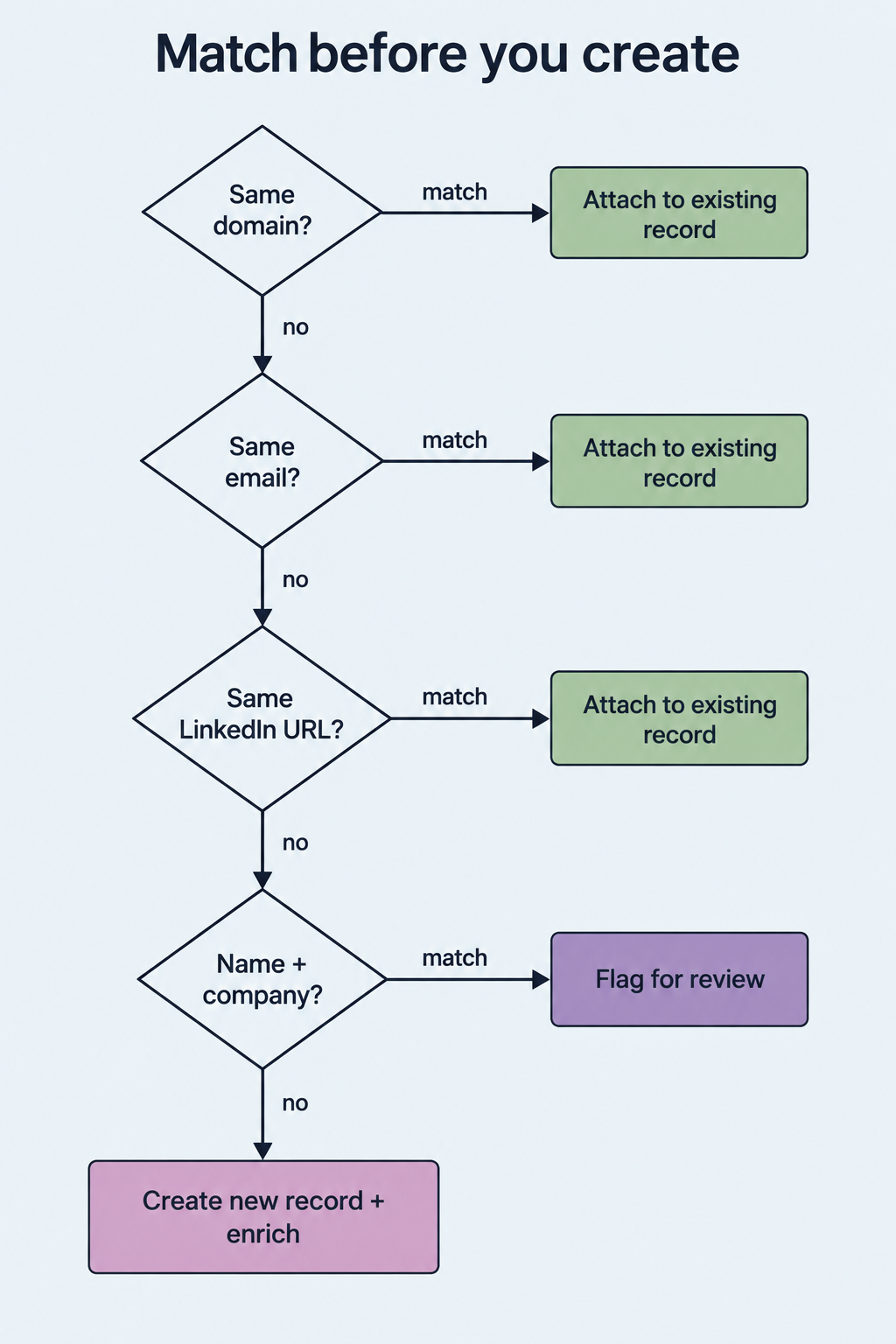
Domain applies to accounts; email and LinkedIn URL apply to contacts. Weak matches go to a human.
This is how GTM Engine handles it: a tiered waterfall that scores confidence in each potential duplicate, flags what it finds, and shows a merge preview with associations and field sources before anything combines. Our own team has said on customer calls that the logic is "not absolutely perfect," and that's accurate. Weak matches will misfire in both directions, which is exactly why they go to review.
The same RevOps manager named the hard case: "We have a lot of districts in schools with the same names but different states." Name matching alone will merge two different school districts, and domain matching alone fails when one organization runs several domains. Your rules need geography or another tiebreaker for those segments, and a person approving the merge.
Contacts follow people, while account associations follow jobs
When a champion changes companies, you either keep two years of relationship history or start from zero with a duplicate.
A contact record belongs to a person, and an account association describes where that person works now. When Maria moves from Contoso to Northwind, the right move is to keep her single contact record, add the new email, and add Northwind as her primary account. Creating a second Maria throws away the context that makes her valuable in the first place.
The activities need different treatment. Her past calls and emails stay associated with the Contoso account and the old opportunity. New activities attach to Northwind going forward. When a sales leader at one of our customers walked through this exact scenario with a contact who had changed jobs, his summary was: "Okay, so it's all additive. It doesn't change things."
Additive is the standard to hold your system to. Nothing about a job change should rewrite history. Whoever inherits the Northwind account later should be able to open Maria's record and see every prior interaction, clearly labeled by company.
An opportunity is a decision, so a call should never create one on its own
Auto-created deals inflate pipeline, and empty deals with no history make reps stop trusting the record.
An opportunity is a seller's judgment that a qualified buying process exists. One meeting doesn't establish that, so the Northwind discovery call stays on the account and contacts. Pre-opportunity activity is real work, and an account-based model keeps it visible at the account level until Priya decides there's a deal.
The friction shows up when the deal does get created. A seller on a customer team described it after creating an opportunity manually: "I had two discoveries with him and two emails. All of that should have taken place over the last 10 days and like pulled in." Her expectation is reasonable. Her rep's view of the deal was empty even though the history existed on the contact.
The tradeoff is real in both directions. If the system pulls every prior activity onto a new opportunity, a returning contact like Maria drags her Contoso calls into the Northwind deal. In GTM Engine today, activities logged after the opportunity exists associate automatically, and earlier ones are attached from the activity's related-records panel. That's a deliberate choice to avoid polluting deals, and it means someone has to make the selection. Opportunity participants follow the same logic. Maria and Sam belong on the deal. Jordan belongs on it as an outside influencer, not as a Northwind employee.
Typed enrichment and source evidence make call data reportable
A field filled with a paragraph of AI prose breaks the dashboard it was supposed to feed.
Typed enrichment means every value written from a call matches the field's data type in the CRM. If "current CRM" is a picklist, the value must be one of the picklist options. Team size goes in as a number, and the evaluation deadline goes in as a date. GTM Engine's AI autofill is built this way, so reports built on those fields keep working after the system starts filling them.
Source evidence is the other half. Every field value should point back to the transcript moment or email that produced it. When the deadline changes, you can see which email changed it and why. A sales leader at one of our customers told us why that matters: "I can't trust this right now because it doesn't have all the information, so I don't trust it." Without trust, reps go back to keeping notes in a spreadsheet.
That same customer hit the ugliest failure mode in this whole topic. Their HubSpot contact properties (first name, last name, title) were set to read-only. GTM Engine created and enriched a contact from a calendar invite, tried to sync it, got rejected, and the next sync down overwrote the enriched record with HubSpot's empty one. The result was a nameless partial contact, and every call and email that should have associated with it had nowhere to go. The fix was making those contact properties writable, a setting the customer's own HubSpot admin controls. Before you blame the tool that fills your CRM, check what your CRM allows it to write.
A checklist for auditing what your sales calls actually create
Run this against your last 20 discovery calls before you buy anything or change any rules.
- One activity per conversation. Check for duplicate activities from multiple recorders on the same meeting.
- Account matched by domain. Count how many calls attached to a record that has a duplicate sibling.
- Contacts matched before creation. Search new contacts from the last 30 days for existing LinkedIn URLs.
- Job changes are additive. Confirm movers kept one contact record with history labeled by company.
- Outside participants stay outside. Consultants, partners, and vendors should not land on the buyer's account.
- No opportunities from meetings alone. Every new opportunity should trace to a seller's decision.
- Prior activity attached on purpose. New opportunities should show the qualifying conversations and exclude unrelated ones.
- Fields are typed and cited. Spot-check five auto-filled values for correct data type and a source link.
- Sync permissions match intent. Confirm the fields you want written are writable in the CRM, and the locked ones are locked on purpose.
- Stray and orphaned records are tracked. Count contacts with no account association and records owned by deactivated users.
Matching discipline is what makes the CRM worth filling automatically
Automated capture without matching rules gets you a messy CRM faster.
Taking reps out of data entry only pays off if the system writing the data is more careful than the reps were. That means creating one activity, matching everything it can, creating only when the waterfall comes up empty, and leaving opportunity decisions to sellers. Every field it writes has to be typed and traceable.
There are honest limits here. Calls on personal cell phones are hard to capture, and offline conversations still need manual notes. Same-name organizations need human review. Locked CRM fields will quietly break sync until someone fixes the permissions. None of those are reasons to keep reps on data entry. They are the edge cases your rules and your review queue need to cover.
The next step is concrete. Pull the Northwind-style trace for one real call from last week: list every record it touched and mark each one as created, matched, or associated. Then decide whether each action was right. Most of your cleanup roadmap will come out of that one exercise.
Frequently Asked Questions
Should every sales call create a new contact?
No. A call should create a contact only when the attendee fails every matching step (email, LinkedIn URL, and name plus company). Known people get matched, and people who changed jobs get a new account association on their existing record.
How do you match sales call notes to the right CRM records?
Use attendee email addresses and the meeting's domain to match contacts and the account first, then associate the activity with any open opportunity those contacts are participants on. If no opportunity exists, keep the activity on the account and contacts until a seller creates one.
Why not automatically attach all prior activity to a new opportunity?
Because contacts carry history from other deals and other employers. Attaching everything mixes unrelated conversations into the new deal's record, which skews deal health and forecasting. Attach the qualifying conversations deliberately.
How do you keep CRM records accurate when AI fills fields from calls?
Require that every auto-filled value matches the field's data type and links to the transcript or email it came from. Then audit a sample weekly, and confirm the CRM actually permits the fields you expect to be written.
Does GTM Engine replace HubSpot or Salesforce?
No. GTM Engine works alongside the CRM with field mapping and configurable sync direction per field, so reports built in HubSpot or Salesforce keep running on data that reps no longer type in by hand.
If your audit turns up duplicate accounts, nameless contacts, or deals with no history, book a CRM data assessment with the GTM Engine team. We'll trace your own calls into your own records and show you which matching rules to fix first.
About the Author

Robert Moseley IV is the Founder and CEO of GTM Engine, a pipeline execution platform that’s changing the way modern revenue teams work. With a background in sales leadership, product strategy, and data architecture, he’s spent more than 10 years helping fast-growing companies move away from manual processes and adopt smarter, scalable systems. At GTM Engine, Robert is building what he calls the go-to-market nervous system. It tracks every interaction, uses AI to enrich CRM data, and gives teams the real-time visibility they need to stay on track. His true north is simple. To take the guesswork out of sales and help revenue teams make decisions based on facts, not gut feel.


