

The Dashboard Your CFO Actually Trusts
TL;DR: Revenue teams have the same data problem websites had before tracking pixels existed: activity happens, nothing gets captured, and every downstream decision is built on gaps. GTM Engine is the instrumentation layer that fixes it, automatically turning calls, emails, and calendar events into structured CRM fields. Here is what this article covers:
• Why CRM forecast data is structurally unreliable and what causes it
• Which specific revenue events go unlogged and why reps do not fix the problem
• How GTM Engine captures, structures, and writes activity data into your CRM schema automatically
• Why retaining raw activity data lets you backfill new CRM fields from historical conversations
• What changes operationally for RevOps, sales leaders, and finance when the data captures itself
• Which specific revenue events go unlogged and why reps do not fix the problem
• How GTM Engine captures, structures, and writes activity data into your CRM schema automatically
• Why retaining raw activity data lets you backfill new CRM fields from historical conversations
• What changes operationally for RevOps, sales leaders, and finance when the data captures itself
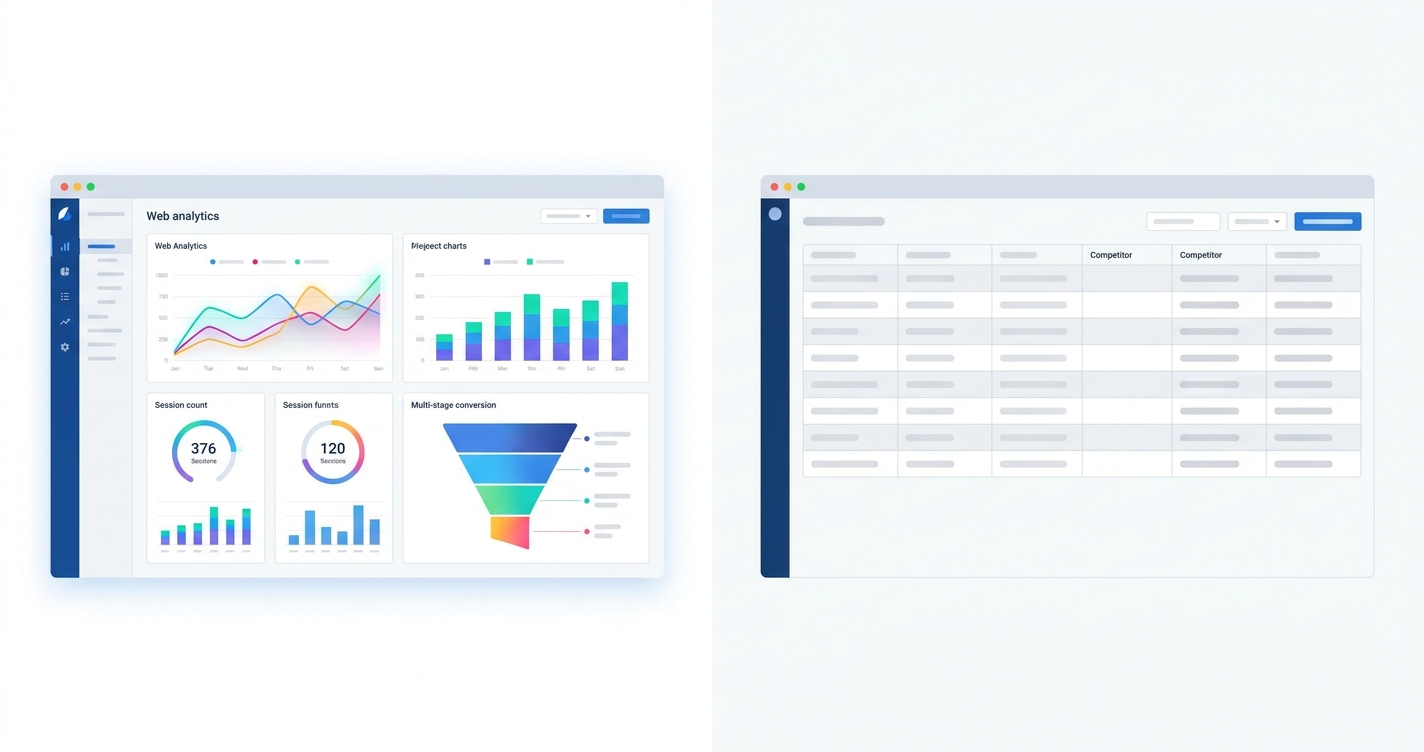
Open your web analytics dashboard. Every visitor, every session, every click, every conversion, captured automatically, structured consistently, and completely independent of whether anyone on your team remembered to log it. The data is objective. You trust it. You make decisions from it.
Now open your CRM forecast.
The numbers there represent what your sales reps chose to enter, when they chose to enter it, framed the way they want their pipeline to look. Close dates are optimistic. Competitor fields are blank. Stage progression reflects a conversation that happened three weeks ago and never got logged. As a CRO at a B2B software company told us during a discovery conversation: "I'll go into a 1-on-1 with a manager, and I'm seeing opportunities that haven't been touched in three weeks, or at least they look that way. Then the AE says, 'Oh, I've had three calls with them, I just haven't updated the notes yet.' It makes forecasting a nightmare."
Your revenue data has an instrumentation problem. Your website has a pixel. Your go-to-market team does not.
Your GTM Team Has No Pixel
Revenue activity happens constantly. None of it gets captured unless a rep logs it manually, and reps reliably do not.
A tracking pixel is a small piece of code that fires automatically every time a user takes an action on your website. It does not ask the user to describe what they did. It does not rely on a marketing manager to log the session after the fact. It captures the event, writes it to a structured schema, and makes it available for reporting.
Your revenue team's equivalent events (a discovery call, an email exchange, a calendar meeting, a proposal conversation) generate no equivalent data unless a human manually enters it. And humans, reliably, do not. According to the Salesforce State of Sales report, reps spend just 28% of their time actually selling. The rest is administrative overhead, and CRM data entry sits at the top of the list of work reps most want to eliminate.
The result is a CRM that stops functioning as a reliable source of truth the moment it depends on rep memory instead of captured activity. A Head of RevOps at a compliance software company shared during a product evaluation: "We've invested a lot in custom fields for our discovery process, but the adoption is low because the AEs feel like they're doing data entry instead of selling. I spend about 20% of my week just cleaning up data so our reports aren't completely wrong."
That 20% of a RevOps leader's week is not the full cost of the problem. It is the visible cost. The invisible cost is every business decision made from a forecast that was, a story a sales rep wanted to tell. When GTM Engine removes that manual data entry burden, that time shifts back to analysis, coaching, and the work that actually moves revenue.
How the Pixel Works
Every call, email, and calendar event is a data event. GTM Engine captures it, structures it, and writes it into your CRM schema without asking anyone to log anything.
GTM Engine is the instrumentation layer your go-to-market team has been missing. Every call, every email, every calendar event is a data event, and GTM Engine captures it, processes it, and writes the results into your structured CRM schema automatically.
The pixel for calls is the call recorder. GTM Engine includes its own, and if you already use another call recording platform, you can bring it. GTM Engine integrates with more than a dozen existing call recording tools, so there is no rip-and-replace. For email and calendar, there is a full native integration. Every interaction your team has with a prospect or customer becomes a structured input.
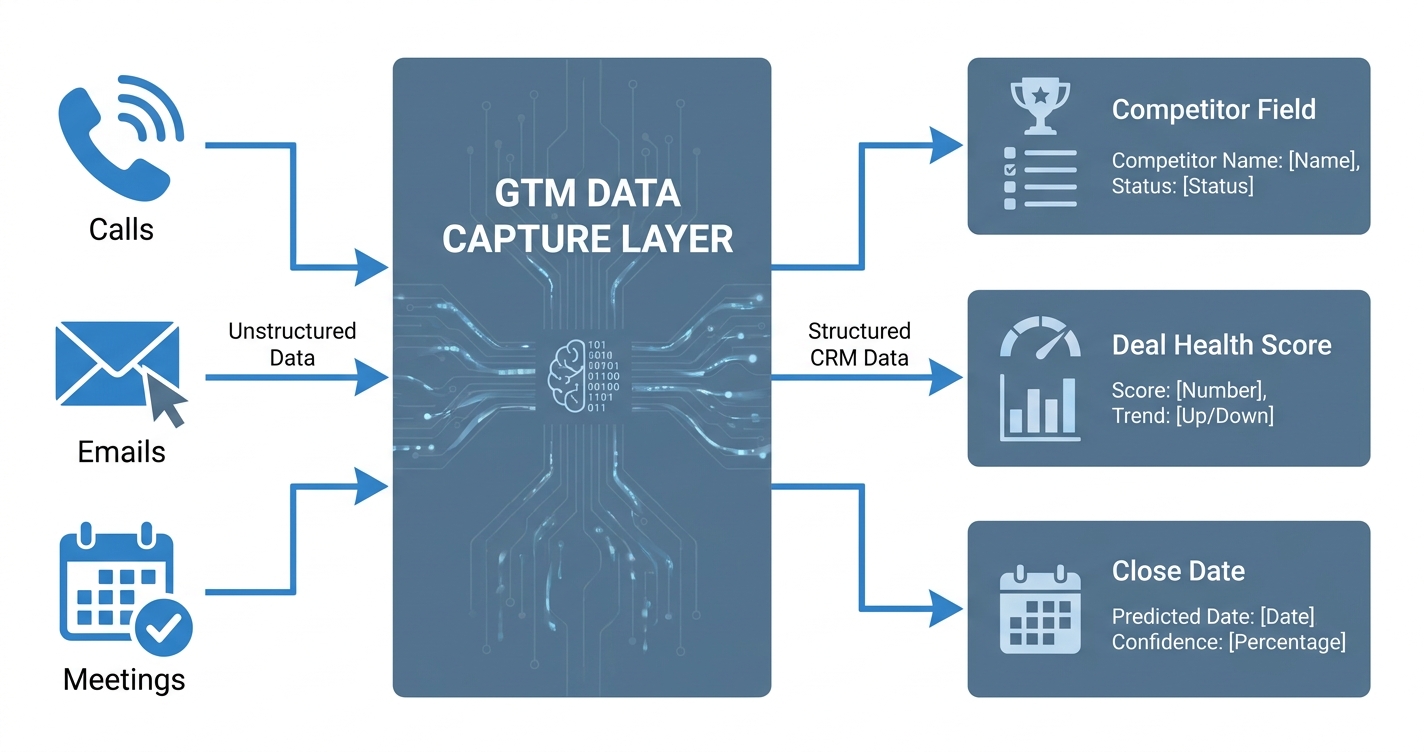
Here is what that looks like in practice. A rep finishes a 45-minute discovery call. The prospect mentioned they use a named competitor, run procurement through their intake platform, and that their typical paper process takes about a month. The rep moves on to their next call. Without touching anything, GTM Engine processes the transcript and writes to the CRM:
| CRM Field | Before the call | After GTM Engine processes the transcript |
|---|---|---|
| Competitor (picklist) | Blank | [Competitor name, matched to existing picklist value] |
| Procurement platform | Blank | [Platform name, extracted from transcript] |
| Paper process duration | Blank | ~30 days |
| Deal health score | Stale / not recalculated | Refreshed based on current transcript signals |
| AI-forecasted close date | Rep estimate from 2 weeks ago | Updated from actual conversation context |
The AI flags its reasoning alongside each extracted value before any field is committed, so a rep or RevOps admin can see exactly why a close date shifted or why a competitor field was populated. Picklist fields match only against your defined values. The system does not invent entries that do not exist in your schema.
For CFOs and CEOs, the mechanism is the same. You are not asking your marketing team to manually log every website visit. You should not be asking your sales team to manually log every discovery call, pricing discussion, or procurement conversation. The data should capture itself.
For teams that want an additional review layer during rollout, a human-in-the-loop mode lets reps approve field updates with a single click before they write to the CRM. Teams can turn that off once they have reviewed extraction accuracy against a sample of real deals.
The Backfill: Raw Activity Data Makes Any CRM Field Backfillable
RevOps only knows what it thought to track when the CRM was first configured. The minute the business asks a new question, that data is gone unless the raw activity was retained.
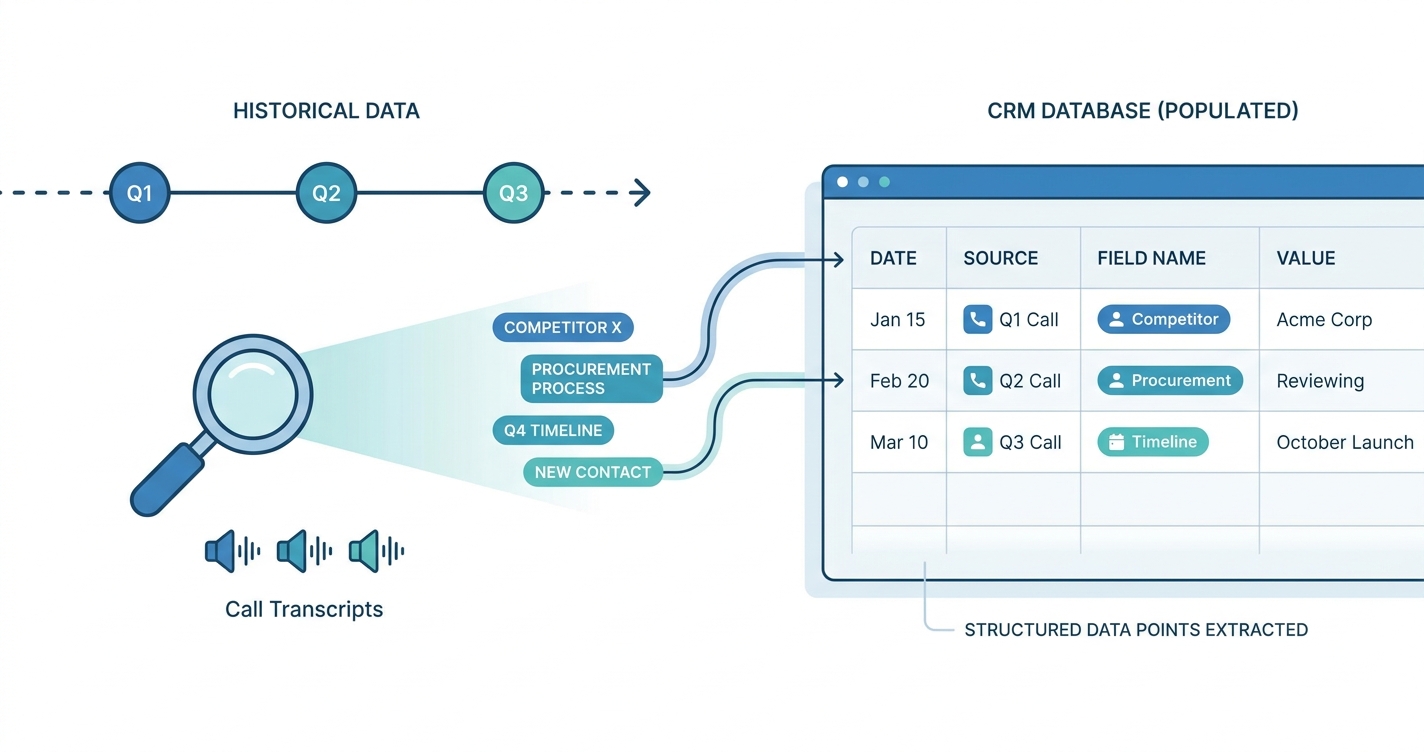
GTM Engine retains the raw, unstructured activity data behind every summary, score, and CRM field update.
Some activity-capture tools write only a summary or a score, which leaves RevOps without source material for later field backfill. GTM Engine keeps everything. That design decision creates a capability that changes how you think about your reporting infrastructure: you can add a new field at any time, describe what you want it to track in plain language, and GTM Engine will backfill it across every historical record in your system.
Say you decide in Q3 that you want to track which prospects mentioned a specific compliance requirement during discovery. That insight is buried in call transcripts from Q1 that no one tagged at the time. With a traditional CRM, those data points are gone. With GTM Engine, you describe the field, and the system looks back across all existing activity data and populates it.
A RevOps leader at an investment data company, evaluating the platform, shared during a product evaluation: "We do a lot of reporting based on those fields. We want to just run a report and say, based on all the opportunities we lost last month, who are they using? To have those static fields just saying [Competitor A] or [Competitor B] is more helpful than having that full overview."
Your reporting infrastructure is not frozen at the moment you first deployed it. You can build new reports on data you already have, from conversations that already happened, without going back to the field.
Beyond Reporting: What Clean Data Makes Possible
When a contact's record has tech stack, competitors evaluated, procurement process, and a live deal health score, that data becomes the input for every downstream workflow. Most CRMs have none of it.
Trusted, structured revenue data does not just improve the accuracy of your dashboards. It changes what your go-to-market team can do.
When a contact's record is populated with the tech stack they mentioned, the competitors they evaluated, the procurement process they described, and a live deal health score, that data becomes the input for every downstream workflow. A contact who mentioned a specific competitor during discovery can be automatically enrolled in a targeted competitive campaign. A rep preparing for a follow-up call can have a personalized email drafted by GTM Engine's AI, referencing the actual context from prior conversations, built from the structured data already captured on that account.
For sales leaders, a clean deal health score and AI-forecasted close date derived from actual activity means the weekly forecast call is about strategy, not archaeology. When activity captures itself, that time shifts to analysis and workflow development: the work RevOps was actually hired to do. For CEOs and CFOs, the shift is more fundamental: you get the same relationship with your revenue data that you already have with your product analytics or your financial reporting. Field completeness goes from a best-guess to a measured baseline. Forecast calls shift from fact-finding to decision-making. When the board asks what is in the pipeline, you hand them a number built from captured activity, not a figure that someone massaged before the meeting.
What This Looks Like in Your Stack
What is a GTM pixel? A GTM pixel is an instrumentation layer for revenue teams that automatically captures calls, emails, and calendar events as structured CRM data, the same way a website tracking pixel captures clicks and sessions without requiring a human to log them. GTM Engine is that layer: it connects to your call recorder, email, and calendar, processes every interaction, and writes the results into your existing CRM schema fields.
GTM Engine is built to fit into your existing infrastructure, not replace it.
If you use a major CRM (Salesforce and HubSpot are fully supported), GTM Engine syncs bidirectionally. Your structured data writes back into the CRM fields you already have, and your team keeps working in the tools they know. If you already have a call recorder, you almost certainly do not need to change it. GTM Engine integrates with more than a dozen recording platforms, including all major call recording tools.
Implementation maps GTM Engine to your specific CRM schema: your fields, your picklist values, your business logic. The AI learns your terminology, your sales methodology, and your data structure. It is configured to reflect how your business actually works.
Implementation typically starts with a RevOps-led schema mapping session: you walk through your existing CRM fields, picklist values, and business logic with a GTM Engine solutions engineer, who configures the extraction layer to match. No fields are created or overwritten without your approval. A pilot period lets you validate field accuracy against real deals before the configuration is locked. Live activity data starts flowing into CRM fields once the call recorder and email integrations are connected and schema mapping is complete.
A few honest constraints worth knowing before you start. GTM Engine extracts structured data from calls, emails, and calendar events. It does not infer fields that were never discussed in a recorded interaction. If a rep takes a call on a personal mobile phone without a recorder active, that conversation produces no data. Fields that require human judgment (close probability, relationship temperature, custom deal notes) remain rep-owned; the system surfaces what was said, not what it means strategically. On privacy: call recording requires participant consent under applicable law, and email capture requires mailbox access granted by your IT or security team. GTM Engine does not access mailboxes or record calls without explicit integration authorization.
For RevOps teams, there is also a built-in CRM health assessment: a full audit of field completeness, data freshness, contact coverage, and pipeline integrity. It gives you a baseline before deployment and a benchmark to measure improvement against afterward.
After the schema mapping session, live activity data flows into CRM fields as soon as integrations are connected. The baseline CRM health assessment gives RevOps a before-state to measure against. RevOps time shifts from record cleanup to analysis and workflow development: the work the role was hired to do.
Frequently Asked Questions
What is a GTM pixel? A GTM pixel is an instrumentation layer for revenue teams that automatically captures calls, emails, and calendar events as structured CRM data, the same way a website tracking pixel captures clicks and sessions without requiring a human to log them. GTM Engine is that layer.
How does GTM Engine update CRM fields from sales activity? GTM Engine connects to your call recorder, email inbox, and calendar. When a rep completes a call, the transcript is processed and extracted values (competitor names, procurement details, timeline signals) are matched against your existing CRM picklist values and written to the correct fields. The AI flags its reasoning before any field is committed, so a rep or RevOps admin can see why each value was populated.
Does GTM Engine require reps to do anything differently? No. Capture is automatic. Reps can optionally review field updates in a single-click approval flow during rollout, but most teams disable that once they have validated extraction accuracy against a sample of their own deals.
What CRMs does GTM Engine support? Salesforce and HubSpot are fully supported with bidirectional sync. GTM Engine writes structured data back into the CRM fields you already have.
What does GTM Engine not capture? GTM Engine cannot infer fields that were never discussed in a recorded interaction. Calls on personal mobile phones without an active recorder produce no data. Fields requiring human judgment (close probability, relationship notes, strategic context) remain rep-owned.
About the Author

Robert Moseley IV is the Founder and CEO of GTM Engine, a pipeline execution platform that’s changing the way modern revenue teams work. With a background in sales leadership, product strategy, and data architecture, he’s spent more than 10 years helping fast-growing companies move away from manual processes and adopt smarter, scalable systems. At GTM Engine, Robert is building what he calls the go-to-market nervous system. It tracks every interaction, uses AI to enrich CRM data, and gives teams the real-time visibility they need to stay on track. His true north is simple. To take the guesswork out of sales and help revenue teams make decisions based on facts, not gut feel.


