
Give Every AE a Live, Actionable View of Their Pipeline
TL;DR: CRMs were built for reps to log activity by hand, and reps have never done it reliably. Automating that capture does two things at once: it gives AEs a pipeline view that is already filled in, so they can see every deal's gaps and next moves without reconstructing anything from memory, and it gives CROs a forecast built on data they can actually trust instead of rep recall. Same underlying fix, two different payoffs.
CRMs were built on a bad assumption: that reps would faithfully type in what happened after every call, every email, every meeting. They don't. They never did. As a CRO, I've never once trusted a forecast completely, because I knew part of the pipeline data underneath it was a rep's best guess, reconstructed from memory after the fact.
By Craig Witt, CRO
Flip the usual pitch for a minute. Salesforce's own State of Sales research puts reps at just 28 percent of their week on actual selling, with admin tasks consuming nearly half the workweek. Gartner's research on seller time finds AI tools already save sellers close to five hours a week, evidence that a meaningful share of that admin load is addressable. Most pipeline tools respond to that by asking reps to log into Salesforce or HubSpot to update the record, the exact task reps are worst at and resent most. Instead, give them an environment where that record is already built for them: every call, email, and meeting already reflected against the right deal, before the rep opens anything.
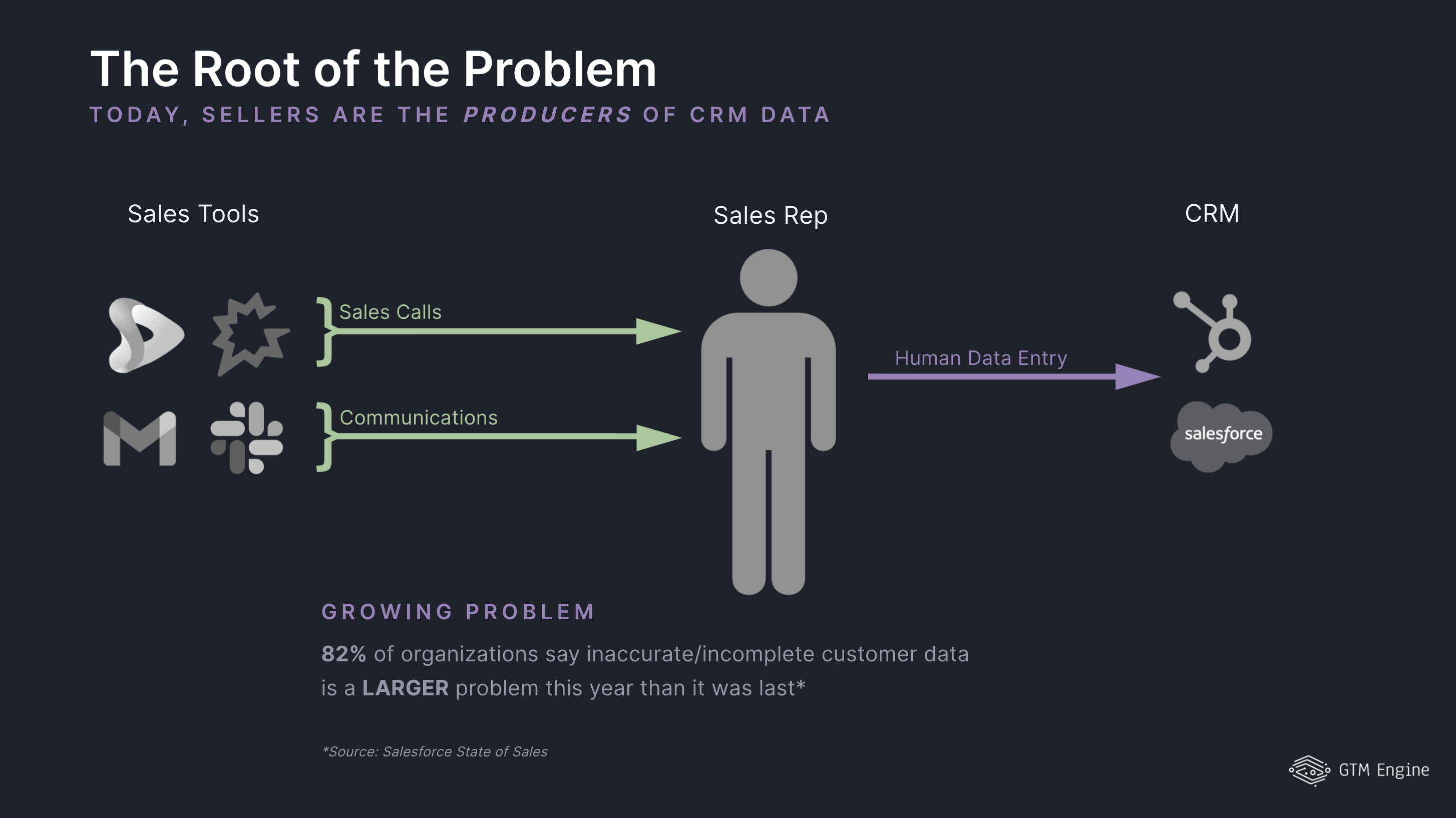
That changes what the rep is doing when they log in. They are not entering data anymore. They are looking at a full view of their pipeline: which deals have gaps, which stakeholders haven't been reached, what the next action is on each one. The system also surfaces the contacts still missing from a deal and hands the rep a one-click action to find, enrich, and reach them, and it can execute the next step directly, whether that is a task, an email, or an outreach sequence. The rep spends their login sustaining momentum on deals, not typing up what already happened.
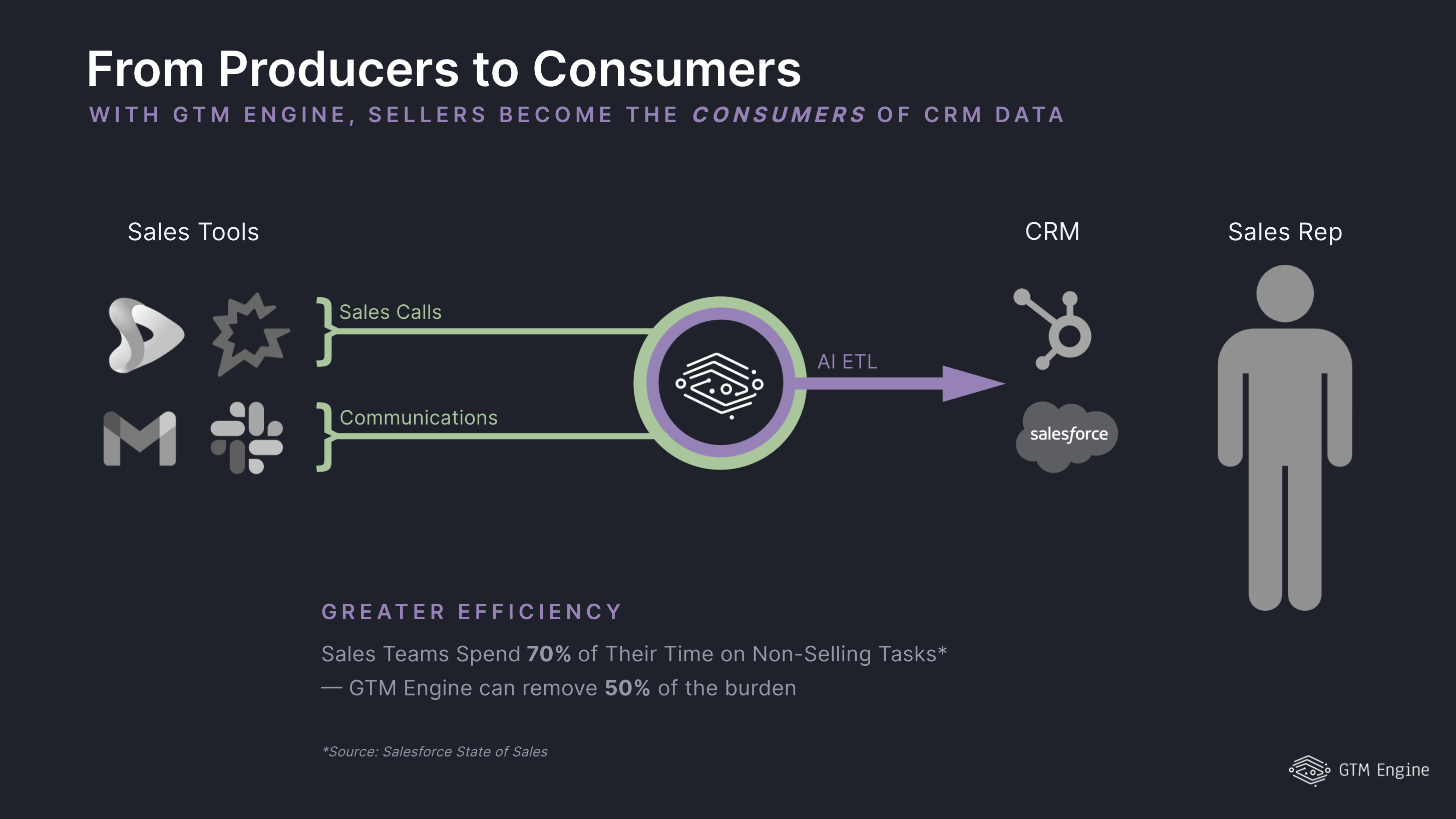
That is the AE side of the trade. The CRO side is the same data used differently. Activity captured automatically is activity you can guide reps with, stage by stage, deal by deal, instead of auditing after the fact. It is also the first forecast input in a long time that was not reconstructed from someone's memory of a call.
One activity record produces both payoffs at once. Reps get their selling time back and a more complete view of their own pipeline. CROs get pipeline data they can actually trust and a forecast that does not require chasing every rep for a status update. Both sides are downstream of the same fix: stop asking reps to be the data entry system.
What changes for the AE and what changes for the CRO
Both roles are stuck auditing a record nobody trusts, from opposite ends. The AE reconstructs what happened last week from memory before they can act on it. The CRO audits pipeline hygiene before they can forecast on it. Automating activity capture removes the reconstruction step for both.
For the AE, the pipeline view stops being a form and starts being a briefing. Every call, email, and meeting is already logged against the right deal. GTM Engine's Activity Hygiene catches any call or meeting that hasn't been linked to an opportunity yet, and the Path to Close action plan flags stage-progress gaps, agreed next steps that haven't happened, and stakeholders still missing from the deal, so the gaps are visible without the rep reconstructing anything. Before a call, Meeting Prep turns that same activity into a briefing: deal summary, open blockers, and suggested talking points, so the rep walks in already caught up. After the call, the system drafts the follow-up email. And when a deal has gone quiet, the same system flags it as stuck against its expected stage duration and can trigger a re-engagement sequence instead of letting it die silently.
For the CRO, the same captured activity becomes the basis for guidance instead of a reporting input you find out about too late. You can direct a rep at the stage they are actually in, on the deal that is actually slipping, because the underlying activity is current instead of a rep's best recollection. Less time auditing pipeline hygiene, more time acting on what the data already shows.
This does not mean more dashboards or more change management
"We already have Salesforce dashboards." Dashboards report on data reps typed in. If that data is thin or late, the dashboard is thin or late too. This does not add a dashboard. It changes what is feeding the one you already have.
"A new pipeline tool means change management for reps." Reps do less data entry, because the system captures what already happened in calls, emails, and meetings automatically, leaving less to type and no new screen to learn.
"I won't trust AI guidance if the underlying data is incomplete." That is the actual argument here, not an objection to it. Fix the data problem first by capturing activity automatically. Guidance built on data reps typed from memory was never trustworthy either. Guidance built on what actually happened is a different starting point.
FAQ
How does automatic activity capture work without reps entering anything? A call recorder (Gong, Sybill, Fathom, Grain, and others, or the built-in GTM Engine recorder) and each rep's own email and calendar sync bring calls, emails, and meetings in automatically. AI then reads that activity and fills in the CRM fields, deal summaries, health scores, and next steps, and Activity Hygiene catches any call or meeting that hasn't been linked to an opportunity yet.
Can it find the stakeholders a rep is missing on a deal, so they can multithread? Yes. The Path to Close action plan includes a Multi-Threading item that identifies additional contacts to engage on a deal, and can find, enrich, and surface their contact details with a one-click action. Reps can also pull buyer-persona contacts directly from a high-propensity account.
Does this replace Salesforce or HubSpot? No. It connects to whichever CRM the team already runs, Salesforce or HubSpot, through the existing integration. The pipeline structure and stages stay owned by that CRM. What changes is what is feeding the records, not the system of record itself. Think of GTM Engine doing the work inside the CRM that you've always wanted reps to do.
Does it just surface recommendations, or can it act on them? It acts on them. Each item in the action plan, whether it is an agreed next step or a multithreading contact, has a "Do this" button that executes immediately: creating a task, opening a pre-filled email, finding and enriching a contact, or enrolling someone in a campaign.
Does this mean more change management for reps? Reps have less change management work, not more. They do not learn a new system of record or a new logging habit. The activity that already happened in calls, emails, and meetings gets captured and matched to the right deal automatically, so there is less manual entry, not an additional tool to adopt.
What does the CRO get out of this that a dashboard does not already show? A dashboard reports on whatever reps typed in. If reps under-report or reconstruct activity from memory, the dashboard inherits that gap. Automated capture changes the input, so the forecast and coaching conversation use captured deal activity instead of a rep's recollection or telling of it.
Can it tell a rep which accounts are most ready to buy right now? Yes. Propensity scoring evaluates every account against buying signals, and Target Accounts ranks non-customer accounts by that score with the reasoning behind it. That is a separate view from the pipeline itself: it points reps at where to prospect next, not just where an open deal already stands.
About the Author

Craig Witt is a seasoned revenue executive and GTM advisor with more than three decades of experience building, scaling, and leading enterprise software sales organizations. He has held senior revenue leadership roles across companies including Compliance & Risks, MotionPoint, Ventiv Technology, VersionOne, TIBCO, Software AG, Business Objects, Quest Software, and OpenText. Throughout his career, Craig has led global sales teams, owned full revenue P&Ls, and helped organizations strengthen go-to-market strategy, sales execution, forecasting, and operational discipline.
As a consultant to GTM Engine, Craig brings a CRO’s perspective to helping revenue teams turn data, process, and customer intelligence into better outcomes. He is especially focused on practical ways to improve pipeline quality, seller productivity, account prioritization, and forecast confidence without adding unnecessary complexity for reps or RevOps teams. Craig is known for his direct, execution-oriented approach and his belief that strong culture, clear strategy, and consistent accountability create elite results.


