

Your CRM is only as clean as what goes into it.
TL;DR: GTM Engine syncs bidirectionally with HubSpot, with RevOps approval on every property mapping, staged imports before anything touches your CRM, and Slack-based hygiene workflows for ambiguous activity. You control what goes in, what direction it flows, and who can change it. Nothing auto-creates in HubSpot without your sign-off.
Most AI tools treat HubSpot like a dump site. They push every transcript, every inferred property, every AI-generated insight directly into your CRM the moment it's produced. Suddenly you've got dozens of custom properties, half of them redundant, all of them requiring someone to decide what to do with them. Your data hygiene goes sideways, your reporting becomes unreliable, and your RevOps team is cleaning up a mess they didn't make.
According to Gartner, poor data quality costs companies an average of $15 million per year. A 2024 Salesforce State of CRM report found that 47% of CRM users say data quality issues significantly impact their satisfaction. The numbers hold whether you're on Salesforce or HubSpot. Bad CRM data isn't a minor inconvenience; it's a budget line item.
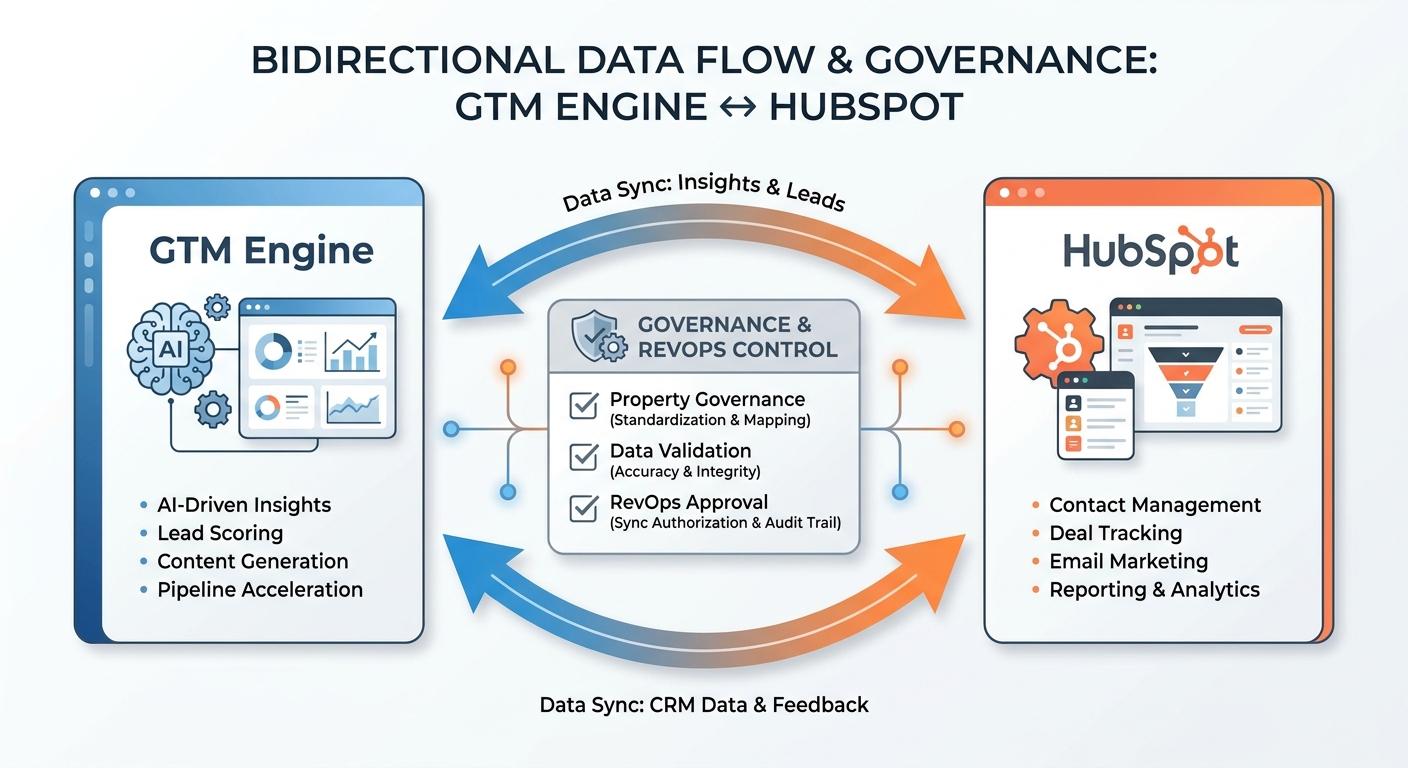
How GTM Engine's HubSpot sync actually works
GTM Engine captures unstructured activity data from calls, emails, and calendar events, extracts structured insights (next steps, contact roles, deal signals, risk flags), and maps them to the right HubSpot objects and properties. What it does not do: dump raw transcripts into HubSpot, auto-create properties without your approval, or make irreversible changes to your data model.
How does GTM Engine prevent HubSpot property bloat during bidirectional sync?
Every property GTM Engine proposes is staged inside GTM Engine first — it never touches your HubSpot schema until a RevOps admin explicitly approves the mapping. You control directionality per property (read-only, write-only, or bidirectional), and properties can be locked so no one downstream can change them. Nothing auto-creates in HubSpot. No properties appear in your CRM that you haven't reviewed.
Configurable sync, not default sync. Your pipeline stages don't match the template. Your custom deal properties don't map to anything standard. GTM Engine works with your existing HubSpot configuration rather than layering a generic schema on top of it.
Staged imports with RevOps approval. Before any new contact, company, or property goes into HubSpot, RevOps reviews it. No bulk imports. No surprise records. As one operations leader described the ideal: "A DevOps-style process, so the RevOps team doesn't accidentally load the wrong accounts."
Activity hygiene with Slack-based approvals. When GTM Engine can't confidently match a meeting or email to an existing deal, it surfaces the ambiguity in Slack instead of making a guess. One click associates the activity, creates a new record, or dismisses it. Your CRM stays clean because unresolved activity never silently writes.
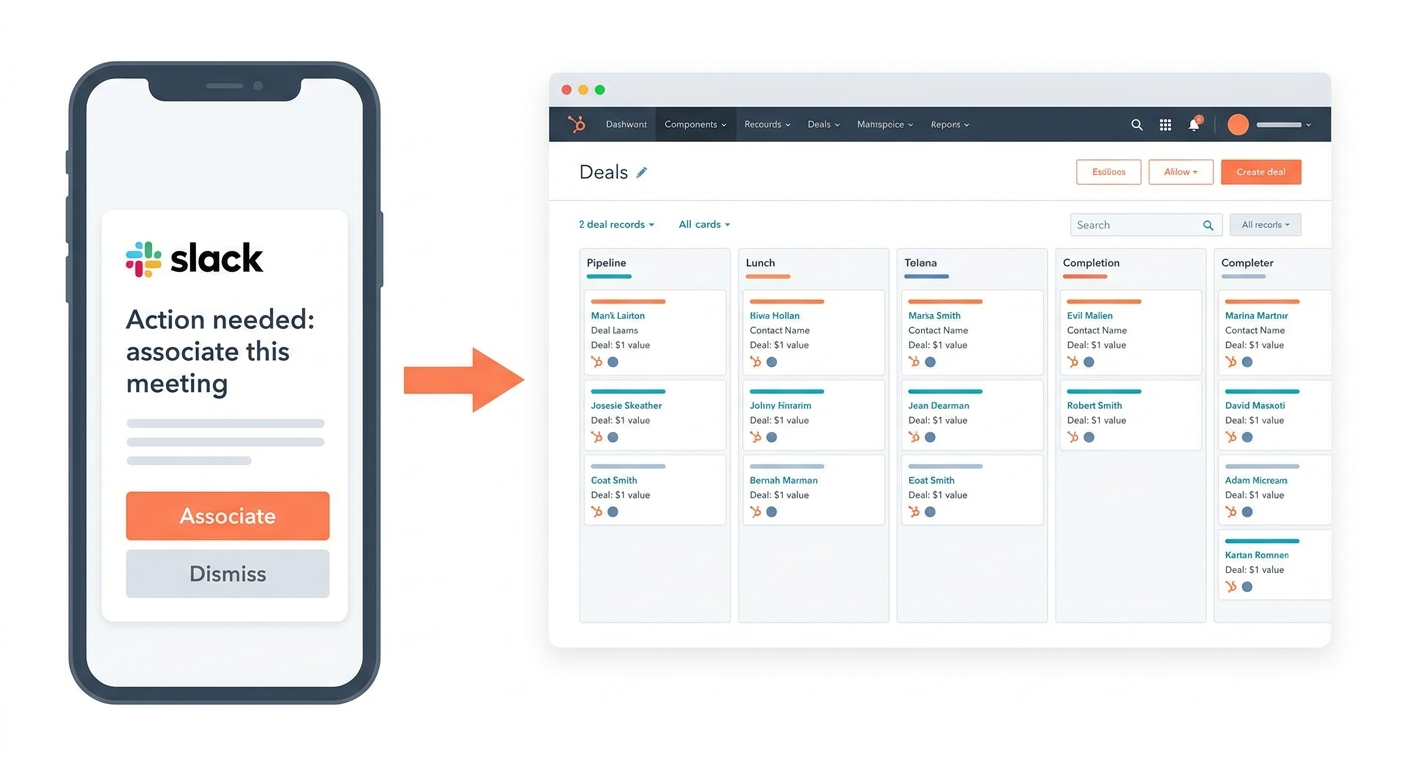
Agent reaches out to rep in Slack to get association approval on unmatched activities before processing any data.
Near real-time sync. Data moves within 60 seconds for standard activity types (calls, emails, calendar meetings) tied to matched deals. Latency is higher during initial backfill, for activities pending Slack approval, or in high-volume batch processing. Nightly reconciliation catches anything missed in the real-time window.
What gets synced
GTM Engine tracks and syncs the data RevOps and sales leadership actually care about:
Activity capture: calls, emails, and calendar meetings automatically logged and associated with the right deal
Next steps and follow-ups: extracted from transcripts and pushed to HubSpot tasks or deal properties
Contact and company updates: new contacts discovered in calls, role assignments updated based on conversation context
Deal health signals: AI-identified risk indicators, stall patterns, and engagement gaps surfaced as deal properties
Forecast inputs: close date confidence, AI-predicted close date divergence from rep forecast, deal progression timeline
All of it sourced from what your reps actually said and did, not what they typed into HubSpot.
What implementation actually looks like
Most HubSpot integrations fail because implementation is treated as a technical task rather than a RevOps design decision. GTM Engine approaches it the other way.
Who owns it: RevOps or Sales Ops configures the sync. Reps have no access to property mappings or sync settings. A GTM Engine implementation specialist works directly with your team, including on-site if needed.
Before anything touches your CRM:
1. Sync assessment: existing properties mapped, highest-value insights identified, full schema designed
2. Sandbox testing: all configurations validated before any write to your live HubSpot instance
3. RevOps approval: directionality, write permissions, and object associations reviewed and locked
4. Slack hygiene setup: ambiguous records routed to the right reviewers
5. Historical backfill: Gong calls, email, and calendar processed oldest to newest; typically completes over a weekend
2. Sandbox testing: all configurations validated before any write to your live HubSpot instance
3. RevOps approval: directionality, write permissions, and object associations reviewed and locked
4. Slack hygiene setup: ambiguous records routed to the right reviewers
5. Historical backfill: Gong calls, email, and calendar processed oldest to newest; typically completes over a weekend
Timeline: Standard orgs go live within hours. Custom pipeline stages or non-standard objects take 1 to 3 days. Large backfills (12+ months of Gong, 100+ active deals) run over a weekend.
HubSpot permissions: GTM Engine connects via a private app integration with least-privilege scopes, limited to the specific objects and properties configured
Built for teams that can't afford CRM chaos
GTM Engine is GDPR, SOC II, and HIPAA compliant. Property-level permissions ensure only the right people can change sync configurations. RevOps owns the schema; reps never touch it.
Salesforce's own research warns against rushing AI into CRM workflows without guardrails, recommending that AI outputs write to separate, reviewable properties rather than directly mutating canonical records. That applies equally to HubSpot. Every AI-extracted insight stages in GTM Engine first. Nothing touches your HubSpot schema until RevOps approves it.
How GTM Engine compares
| GTM Engine | Native HubSpot AI sync | Generic AI note-taker | |
|---|---|---|---|
| Property approval before sync | RevOps approves every mapping | Auto-creates properties | Typically none |
| Ambiguous activity handling | Slack approval workflow | Best-guess match or drops | Not applicable |
| Directionality control | Per-property (read/write/bidirectional) | Limited | None |
| Sandbox testing | Yes, before any CRM write | No | No |
| Least-privilege permissions | Scoped private app | Broad portal access | Not applicable |
| Historical backfill | Yes, with RevOps review | Partial | No |
The goal isn't more data in HubSpot. It's the right data, maintained automatically, with governance built in from day one.
Request a HubSpot sync assessment
We'll map your existing property configuration, identify the highest-value insights to capture from your sales conversations, and show you exactly what sync would look like in your environment before anything touches your CRM.
About the Author

Robert Moseley IV is the Founder and CEO of GTM Engine, a pipeline execution platform that’s changing the way modern revenue teams work. With a background in sales leadership, product strategy, and data architecture, he’s spent more than 10 years helping fast-growing companies move away from manual processes and adopt smarter, scalable systems. At GTM Engine, Robert is building what he calls the go-to-market nervous system. It tracks every interaction, uses AI to enrich CRM data, and gives teams the real-time visibility they need to stay on track. His true north is simple. To take the guesswork out of sales and help revenue teams make decisions based on facts, not gut feel.


