

If Salesforce is your source of truth, your AI sales workflow can't be a side database with stale deal notes.
Your CRM Is Only as Good as What's Actually in It
Most Salesforce instances tell a story that's weeks out of date. Reps update fields before the pipeline review, not after the call. Opportunity stages reflect what someone typed on a Friday afternoon, not what the buyer said on Tuesday. When you build reports on top of that data, you're forecasting against fiction.
One Head of RevOps at a compliance software company told us she spends roughly 20% of her week cleaning up CRM data so reports aren't completely wrong. Not building reports. Not analyzing pipeline. Cleaning up fields.
GTM Engine connects directly to Salesforce and keeps it current, automatically. Every call, email, and calendar event is ingested, structured, and written back to the right fields, in the right format, in near real time. No manual entry. No Sunday night CRM cleanup.
How the Bidirectional Sync Actually Works
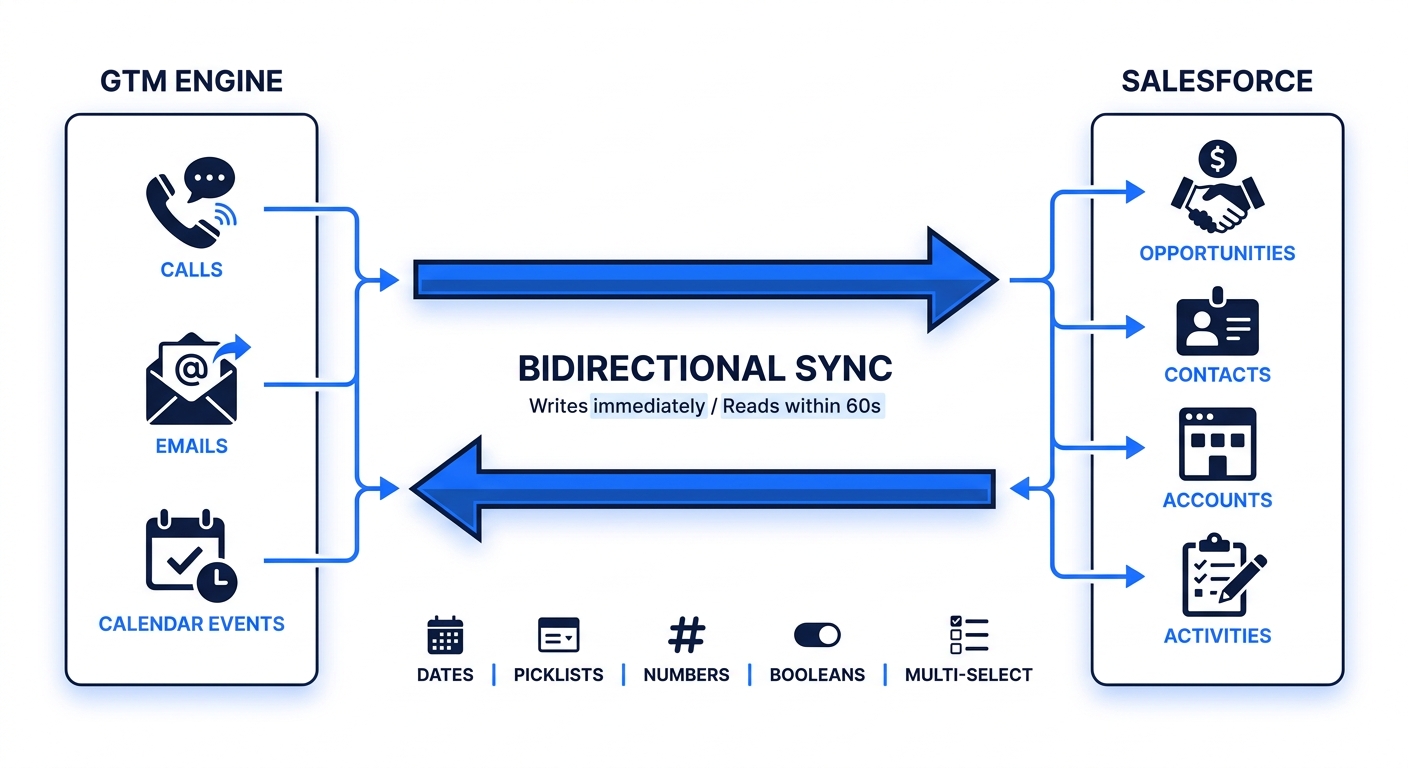
GTM Engine reads from Salesforce and writes back to it. Both directions matter.
What GTM Engine reads from Salesforce:
• Existing opportunities, accounts, and contacts
• Stage definitions, entry/exit criteria, and average stage durations
• Custom fields, picklist values, and field data types
• Your sales methodology (MEDDICC, MEDDPICC, SPICED, or custom)
• Stage definitions, entry/exit criteria, and average stage durations
• Custom fields, picklist values, and field data types
• Your sales methodology (MEDDICC, MEDDPICC, SPICED, or custom)
What GTM Engine writes back to Salesforce:
• Updated field values on opportunities, accounts, and contacts — including custom fields of any type: dates, picklists, numbers, booleans, multi-select
• Contact roles on opportunities, with reasoning cited
• New contact and account records created automatically from call and email context
• Activity records tied to the correct object
• Predicted deal stage, next steps, deal health scores, interest levels, and promoter scores — all with cited evidence
• Contact roles on opportunities, with reasoning cited
• New contact and account records created automatically from call and email context
• Activity records tied to the correct object
• Predicted deal stage, next steps, deal health scores, interest levels, and promoter scores — all with cited evidence
Sync frequency: Changes in GTM Engine push to Salesforce immediately. Changes in Salesforce appear in GTM Engine within 60 seconds.
Field-Level Controls: You Decide What Gets Written
GTM Engine doesn't override your Salesforce config without permission. You map fields explicitly during setup and set the sync direction for each one:
• Bidirectional — GTM Engine and Salesforce stay in sync in both directions
• GTM Engine writes only — GTM Engine updates the field; manual changes in Salesforce are preserved
• Salesforce as source of truth — GTM Engine reads but never overwrites
• GTM Engine writes only — GTM Engine updates the field; manual changes in Salesforce are preserved
• Salesforce as source of truth — GTM Engine reads but never overwrites
You can also configure domain blocklists so GTM Engine doesn't create account records for vendors, partners, or internal domains.
Data Hygiene: Consistency That Makes Reports Actually Work
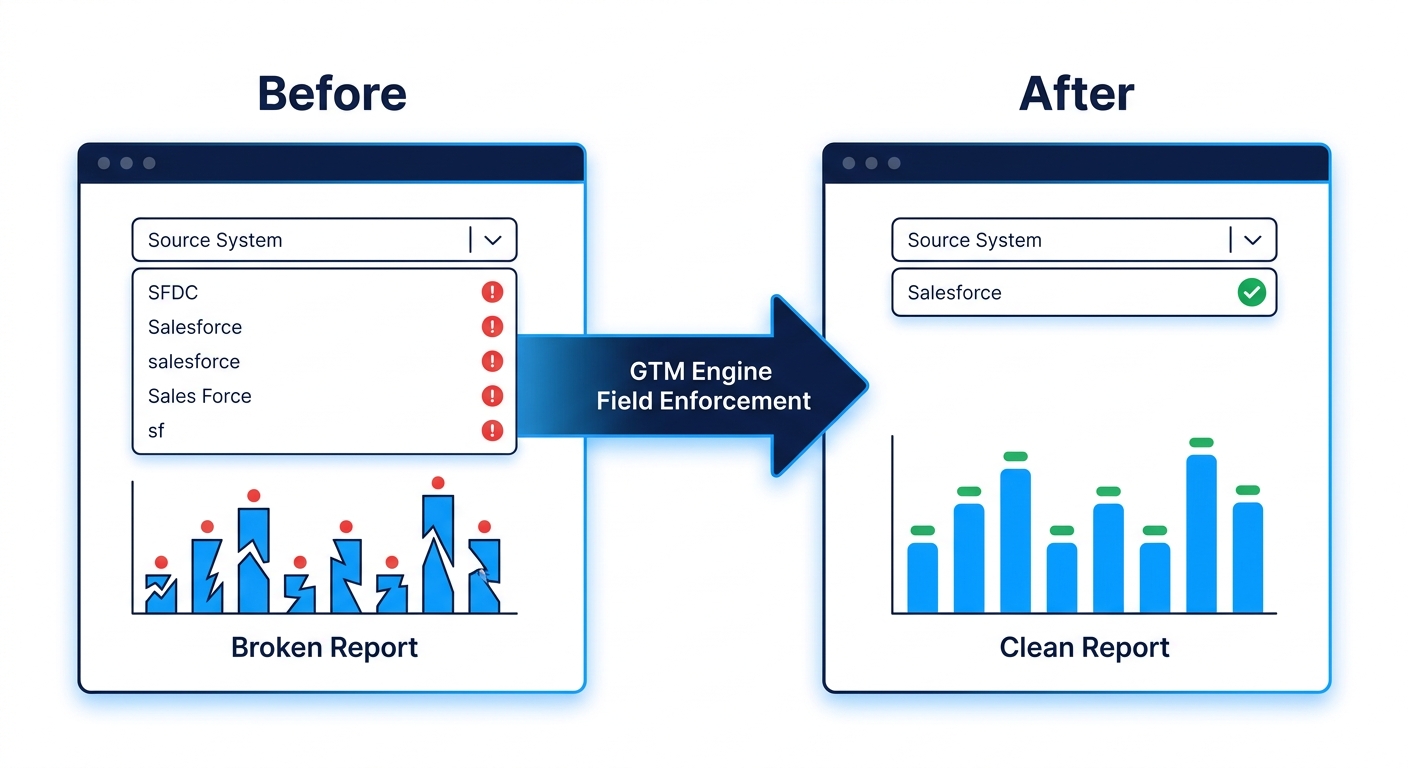
The most common RevOps headache with Salesforce isn't missing data — it's inconsistent data. "SFDC" and "Salesforce" and "salesforce" mean three different filter values to a report.
GTM Engine enforces type-correct, format-consistent data on every field it writes. Picklist fields always receive valid picklist values. Date fields get dates. The data we generate is reportable data, not free-text noise attached to an activity record.
Beyond individual fields, GTM Engine also handles:
• Duplicate prevention: New records are checked against existing accounts and contacts before creation.
• Record merging: Existing duplicate accounts and contacts can be identified and merged.
• Opportunity contact roles: Automatically populated from call context, with role reasoning cited.
• CRM health tracking: Monitor data quality over time and watch it improve.
• Record merging: Existing duplicate accounts and contacts can be identified and merged.
• Opportunity contact roles: Automatically populated from call context, with role reasoning cited.
• CRM health tracking: Monitor data quality over time and watch it improve.
What Implementation Actually Looks Like
Setup takes about 30 minutes to connect your systems and map your fields. After that, GTM Engine runs a backfill of your historical data — past emails, call transcripts, and meeting records — processed against your current Salesforce configuration. Most teams kick off the backfill on a Friday and it's done by Monday.
What's required:
• Salesforce admin access to configure field permissions
• Connected email and calendar (Google or Microsoft 365)
• Call recording integration (Gong, Chorus, or GTM Engine's native recorder)
• One configuration session to map fields, define your sales methodology, and set record creation rules
• Connected email and calendar (Google or Microsoft 365)
• Call recording integration (Gong, Chorus, or GTM Engine's native recorder)
• One configuration session to map fields, define your sales methodology, and set record creation rules
Timeline: 2 to 4 weeks from kickoff to full operation, including backfill.
Security and Governance
• SOC 2 Type II certified
• Role-based access controls with audit logging
• Field-level write permissions configurable per field, per direction
• Zero data retention after you disconnect
• Encryption in transit and at rest
• Admin override: Any field GTM Engine writes can be locked, restricted, or reversed at any time
• Role-based access controls with audit logging
• Field-level write permissions configurable per field, per direction
• Zero data retention after you disconnect
• Encryption in transit and at rest
• Admin override: Any field GTM Engine writes can be locked, restricted, or reversed at any time
Full documentation available on request: SOC 2 report, architecture overview, data flow diagrams, and incident response plan.
How GTM Engine Differs from Gong, Clari, People.ai, and Salesforce Native
Every tool in this space claims to "improve CRM data quality." Here's how the approaches actually differ:
| Tool | What it does with Salesforce data |
|---|---|
| Salesforce native automation | Rules-based field updates triggered by stage changes or user actions. Can't interpret unstructured call or email content. |
| Gong | Records and transcribes calls. Syncs transcript summaries as activity notes. Does not write structured field values back to Salesforce objects. |
| Clari | Reads Salesforce data to produce forecast overlays. Surfaces risk in its own interface. Does not write back to Salesforce fields or create/update records. |
| People.ai | Logs activity data to Salesforce. Maps activities to accounts and opportunities. Does not extract structured field values from call content or auto-populate custom fields. |
| GTM Engine | Reads and writes. Extracts structured values from calls, emails, and calendar context and writes them directly to Salesforce opportunity, account, contact, and activity fields — including custom fields of any type. Creates records, populates contact roles, enforces type-consistent data. |
Tools like Gong and People.ai make conversation data accessible. GTM Engine makes it actionable in Salesforce, where your reports, forecasts, and downstream workflows already live.
FAQ
Does GTM Engine overwrite fields my team has already manually set in Salesforce?
Only if you configure it to. Each field sync direction is set during implementation. Fields you want protected are marked read-only in the field mapping.
What if a rep updates a field directly in Salesforce?
If the field is bidirectional, GTM Engine reflects that update. If it's Salesforce-as-source-of-truth, GTM Engine reads it but won't touch it.
Can GTM Engine create Salesforce records we don't want?
You configure creation rules during setup, including domain blocklists for vendors and partners.
How does GTM Engine handle duplicate accounts already in Salesforce?
We identify duplicates during the initial sync and flag them for review. New records created after setup are checked against existing records before creation.
What Salesforce permissions does GTM Engine require?
Standard read/write API access scoped to the objects and fields you configure. Full permissions documentation is provided during implementation.
Do you support custom Salesforce objects?
Custom fields on standard objects are supported out of the box. Custom objects are available via configuration.
What call recorders does GTM Engine integrate with?
Gong, Chorus/ZoomInfo Sales, and GTM Engine's native recorder — included at no additional cost.
What's the sync latency?
GTM Engine to Salesforce: immediate. Salesforce to GTM Engine: within 60 seconds.
Ready to see exactly how GTM Engine maps to your Salesforce instance?
Book a 20-minute Salesforce sync walkthrough. We'll show you the field mapping interface, walk through a live bidirectional update, and answer your ops team's integration questions before you move to evaluation.
Book the walkthrough — learn more at gtmengine.ai
About the Author

Robert Moseley IV is the Founder and CEO of GTM Engine, a pipeline execution platform that’s changing the way modern revenue teams work. With a background in sales leadership, product strategy, and data architecture, he’s spent more than 10 years helping fast-growing companies move away from manual processes and adopt smarter, scalable systems. At GTM Engine, Robert is building what he calls the go-to-market nervous system. It tracks every interaction, uses AI to enrich CRM data, and gives teams the real-time visibility they need to stay on track. His true north is simple. To take the guesswork out of sales and help revenue teams make decisions based on facts, not gut feel.


