
Everyone is talking about AI agents. Vendors are slapping the word on everything from a simple chatbot to a fully autonomous system that books your meetings, updates your CRM, and negotiates your contracts while you sleep. The hype has made a genuinely important distinction almost impossible to see clearly.
Here's the truth: most of what companies are running in production today aren't agents. They're workflows, and that's not a bad thing. According to Menlo Ventures' 2025 state of enterprise AI report, only 16% of enterprise AI deployments qualify as true agents. The other 84% are workflow-based systems. The organizations getting the most out of AI in 2025 largely share one trait: they understand when to use each tool, and why.
This article breaks down the real difference: architecture, cost, reliability, debuggability, and scale. It ends with a practical framework for choosing the right tool for the job.
TL;DR
• Workflows follow a fixed, human-designed path. Every step is defined in advance. Your rules decide what happens next.
• Agents follow a goal, not a path. The AI decides what to do next, at runtime.
• Both can use AI. The difference is who controls the decisions.
• Workflows win on cost, reliability, debuggability, and scale. Use them for high-volume, repeatable operations.
• Agents win when the task is open-ended, ambiguous, or requires judgment. Keep a human in the loop.
• The best production systems use both: workflows as the backbone, agents at the judgment-heavy steps.
• Agents follow a goal, not a path. The AI decides what to do next, at runtime.
• Both can use AI. The difference is who controls the decisions.
• Workflows win on cost, reliability, debuggability, and scale. Use them for high-volume, repeatable operations.
• Agents win when the task is open-ended, ambiguous, or requires judgment. Keep a human in the loop.
• The best production systems use both: workflows as the backbone, agents at the judgment-heavy steps.
What Is the Difference Between an AI Workflow and an AI Agent?
Think of it this way: a workflow is a recipe. Every step is defined in advance. If condition A is true, do step 1. If condition B is true, do step 2. The path through the process is explicit, predictable, and human-designed. The system follows it exactly every time.
An agent is more like a junior employee you hand a goal to. You say "research this account and draft an outreach plan." The agent decides what to look up, which tools to use, how many steps to take, and when it thinks it's done. It loops, reasons, and adapts on its own.
Both can use AI. A workflow can call an LLM to classify a support ticket or summarize a call. An agent uses an LLM as its decision-making engine. The AI is what controls the next move, not a predefined rule.
That's the architectural dividing line: who controls what happens next? In a workflow, your rules do. In an agent, the AI does.
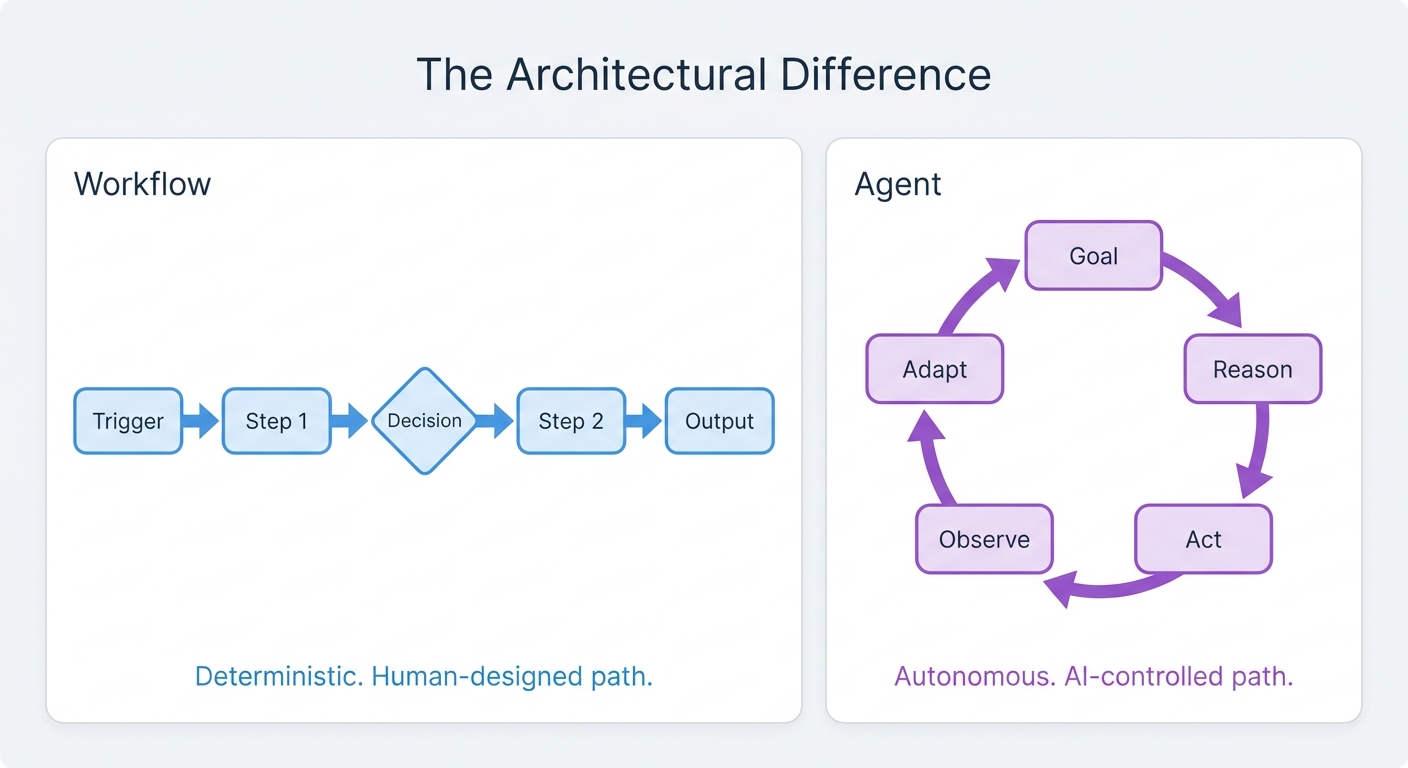
Diagram comparing AI workflows (linear step chain) versus AI agents (autonomous reasoning loop) to illustrate the architectural difference between the two approaches
How Do Costs Compare Between Workflows and Agents?
Workflows have predictable costs. Each run follows a defined path with a known number of steps. You can model your per-run cost before you build and forecast what 10,000 runs a month looks like.
Agents are variable by nature. An agent tasked with researching a prospect might make 3 tool calls or 15, depending on what it finds along the way. Token usage scales with task complexity and the depth of reasoning the agent applies. According to Anthropic's research cited by Towards Data Science, agents consume roughly 4x more tokens than simple workflow steps — and multi-agent systems can reach 15x. In practice, that math compounds fast: one benchmark puts basic workflows at roughly $500/month for 100,000 interactions, single-agent systems at $2,000/month for the same volume, and multi-agent systems at $7,500/month. Intuition Labs notes that some agent architectures can run 10x more expensive than traditional API workflows at scale.
For high-volume, repeatable operations, the kind that define most RevOps work, cost predictability matters a lot. If your process is well-defined, a workflow will almost always be the cheaper, faster, and more auditable choice.
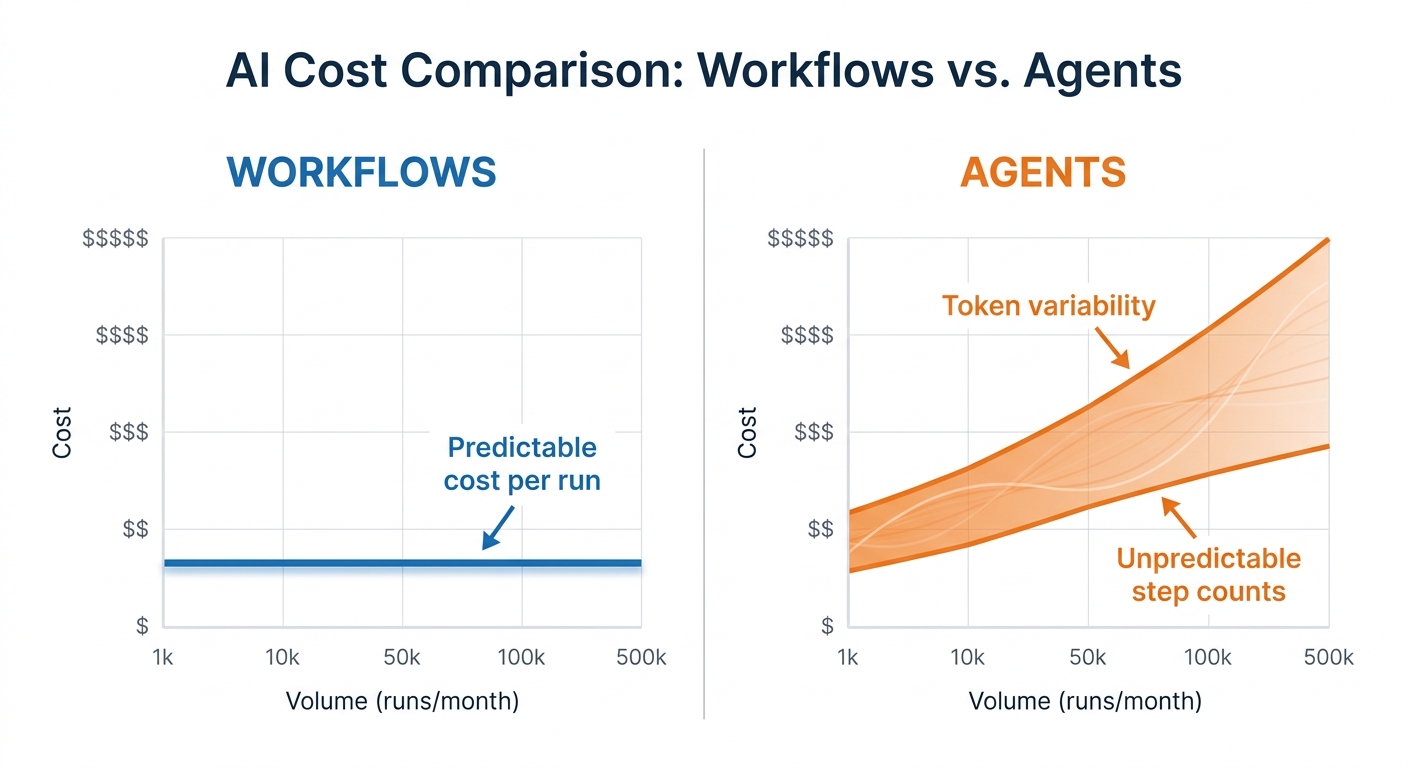
Side-by-side cost comparison chart: Workflows show a flat predictable cost line across volume; Agents show a variable, rising cost range with wide confidence bands, labeled with notes on token variability and unpredictable step counts
How Easy Is It to Debug a Workflow vs. an Agent?
When a workflow breaks, you have a step-by-step execution log. You can see every decision point, every input and output, and trace the exact path from trigger to failure. Debugging is mostly a matter of reading the log.
When an agent produces a bad result, you're often staring at a reasoning chain asking "why did it do that?" The agent's logic is opaque in ways a workflow's isn't. You can see what it did; understanding why it chose that path requires significantly more effort and often isn't fully explainable.
Retool describes workflows as "easy to audit, debug, and maintain, because the process is transparent and composed of sequential steps... ideal for scenarios demanding a high level of reliability and compliance."
For teams that need to audit, explain, or comply with decisions — finance, legal, regulated industries — this is a serious operational constraint, not a minor inconvenience.
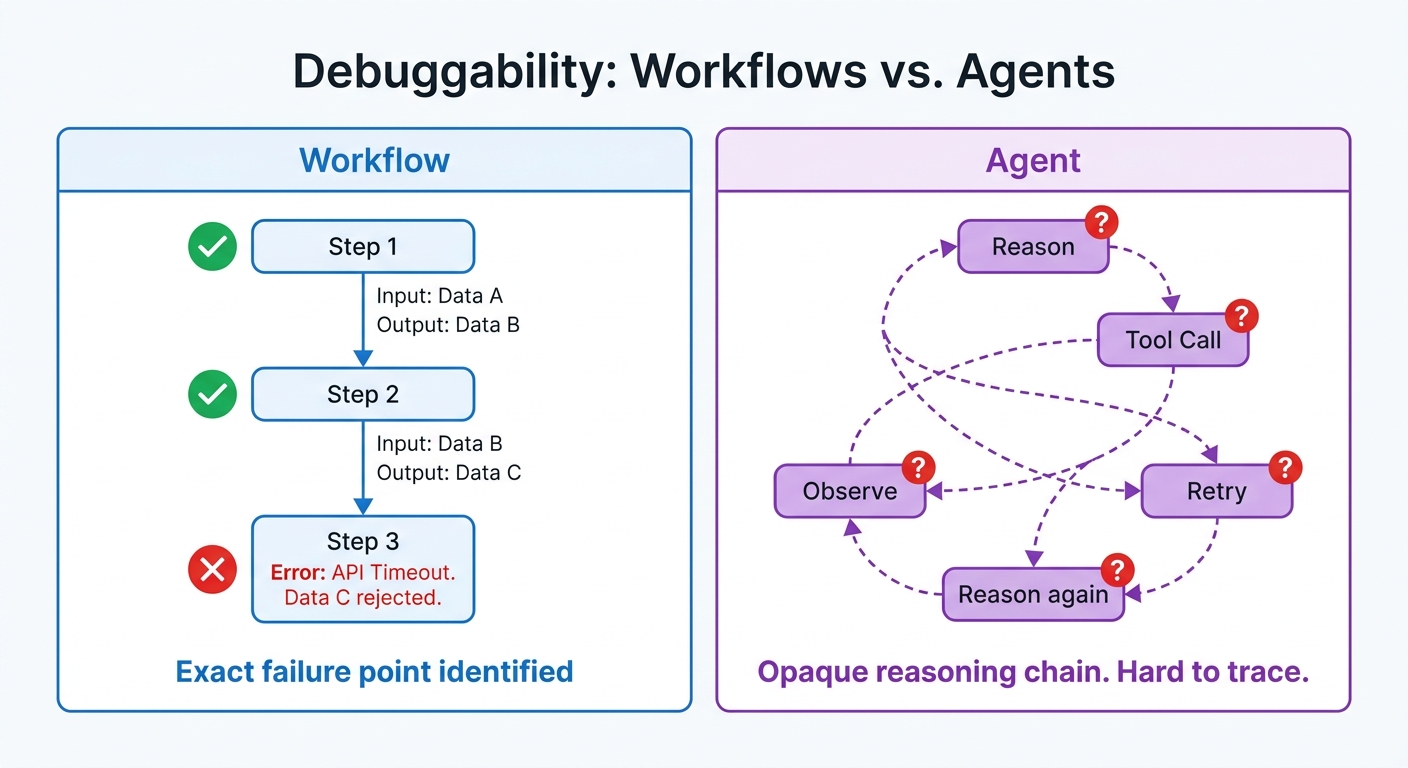
Split diagram: left side shows a workflow execution log as a clean vertical timeline with labeled steps, inputs, and outputs; right side shows an agent reasoning chain as a tangled web of nodes labeled Reason, Tool Call, Observe, Retry, with question marks at key decision points
How to Choose: A Practical Decision Framework for RevOps Teams
Before you build or buy, ask these five questions:
1. Is the process well-defined? If yes, start with a workflow.
2. Is the volume high? If yes, workflows will be more cost-effective and reliable.
3. Does a human need to review the output? If yes, an agent may be appropriate, with a workflow picking up after approval.
4. Does failure need to be auditable? If yes, workflows. Full stop.
5. Is the task open-ended or research-heavy? If yes, an agent is the right tool. Keep it scoped and supervised.
2. Is the volume high? If yes, workflows will be more cost-effective and reliable.
3. Does a human need to review the output? If yes, an agent may be appropriate, with a workflow picking up after approval.
4. Does failure need to be auditable? If yes, workflows. Full stop.
5. Is the task open-ended or research-heavy? If yes, an agent is the right tool. Keep it scoped and supervised.
Workflows vs. Agents at a Glance
| Workflow | Agent | |
|---|---|---|
| Who controls next step | Your rules | The AI |
| Predictability | Deterministic | Variable |
| Cost model | Fixed per run | Variable by task complexity |
| Failure mode | Visible, traceable | Opaque, hard to reproduce |
| Auditability | High — full execution log | Low — reasoning chain only |
| Best use cases | Enrichment, routing, approvals, sync | Research, drafting, triage, synthesis |
| Governance | Standard logging and alerting | Requires explicit guardrails |
A Real RevOps Example: From Inbound Lead to Booked Meeting
Here is what this looks like in practice for a mid-market RevOps team handling inbound leads. This pattern — workflows for volume, agents for judgment, workflows again for handoff — reflects what top-performing RevOps teams are actually deploying. According to a 2025 survey of 300+ RevOps leaders, teams that go deep on a small number of high-value workflows like lead routing and enrichment report significantly stronger ROI than those spreading AI thinly across many use cases.
Step 1: Lead capture and enrichment (workflow)
A new lead submits a demo request. A workflow fires immediately: it enriches the record with firmographic data, scores it against your ICP, and checks for existing account matches in the CRM. No AI judgment needed. The path is fixed, the volume is high, and the output needs to be consistent every time.
Step 2: Personalized outreach research (agent)
The lead scores as high-fit. Before the AE reaches out, an agent researches the account: recent funding, hiring signals, tech stack, and news. It drafts a short briefing and a personalized first-touch email. A human — the AE or an SDR — reviews and approves before anything is sent. This is the judgment-heavy step where an agent adds real value and a human stays in the loop.
Step 3: Sequence enrollment and routing (workflow)
Once the AE approves the outreach, a workflow picks back up: it enrolls the contact in the correct sequence, assigns the opportunity to the right rep based on territory rules, and logs all activity in the CRM. Back to deterministic territory.
Step 4: Meeting booked (workflow)
The prospect books. A workflow sends the confirmation, creates the opportunity record, sets the stage, and notifies the AE. No agent needed.
The handoff point is clear: the agent handles the open-ended research and drafting step. Workflows handle everything before and after. That boundary is where most well-designed RevOps systems live.
What Guardrails Should You Put on Agents?
Agents are not set-and-forget. If you deploy one without guardrails, you will eventually get runaway token spend, unintended actions, or outputs that bypass your normal review process. Before you ship an agent into production, define:
• Tool permissions: Which systems can the agent read from, write to, or call? Scope it to the minimum needed. An account research agent should not have write access to your CRM.
• Approval thresholds: Any action that touches a customer record, sends an external communication, or modifies revenue data should require a human approval step before execution.
• Budget caps: Set hard limits on token spend per run and per day. At scale, a single uncapped agent loop can generate the cost equivalent of thousands of workflow runs. Know your ceiling before you hit it.
• Fallback paths: What happens when the agent is unsure or hits an unexpected state? It should escalate to a human or fail gracefully, not improvise.
• Logging requirements: Every agent run should produce a log that shows what it did, what tools it called, and what it decided. Treat this as non-negotiable, especially if any downstream workflow acts on the agent's output.
• Approval thresholds: Any action that touches a customer record, sends an external communication, or modifies revenue data should require a human approval step before execution.
• Budget caps: Set hard limits on token spend per run and per day. At scale, a single uncapped agent loop can generate the cost equivalent of thousands of workflow runs. Know your ceiling before you hit it.
• Fallback paths: What happens when the agent is unsure or hits an unexpected state? It should escalate to a human or fail gracefully, not improvise.
• Logging requirements: Every agent run should produce a log that shows what it did, what tools it called, and what it decided. Treat this as non-negotiable, especially if any downstream workflow acts on the agent's output.
The hype cycle around agents is real, and the technology is genuinely improving fast. But the most productive teams in 2025 are not choosing between agents and workflows. They are using both, deliberately, with a clear-eyed understanding of what each is actually good for.
About the Author

Robert Moseley IV is the Founder and CEO of GTM Engine, a pipeline execution platform that’s changing the way modern revenue teams work. With a background in sales leadership, product strategy, and data architecture, he’s spent more than 10 years helping fast-growing companies move away from manual processes and adopt smarter, scalable systems. At GTM Engine, Robert is building what he calls the go-to-market nervous system. It tracks every interaction, uses AI to enrich CRM data, and gives teams the real-time visibility they need to stay on track. His true north is simple. To take the guesswork out of sales and help revenue teams make decisions based on facts, not gut feel.


