

TL;DR
Closed-lost deal reactivation succeeds or stalls on one decision: which records you send to. A relight campaign built on the right cohort gives every email a specific reason to exist, reaches the person who owns the problem today, and stops the moment a buyer responds. The copy gets easier because the targeting already did the hard part.
Here's what you'll learn in this article:
- How to pick a relight cohort with seven eligibility checks
- How to pair each loss reason with a dated change to find your message hook
- Why every contact from the original deal has to exist in your CRM, and how to keep stop rules reliable
- How to hand a reviewed cohort to the campaign owner and run a pilot
Closed-lost deal reactivation works when the cohort is right
You have a few hundred lost opportunities in the CRM and a mandate to "do something with them." The best relight campaigns start by choosing who hears from you, then decide what to say.
Closed-lost deal reactivation is the deliberate decision to reopen a conversation with a buyer whose opportunity your CRM recorded as lost. Those records are some of the most valuable in your database. Each one holds a documented conversation, a recorded objection, and a buyer who already understood the problem well enough to evaluate you. A cold lead has none of that.
A relight campaign is the outreach you run once you have picked the records worth reopening. A CRM filter (Stage = Closed Lost, Close Date older than some number of days) is a fine starting point, but it only knows stage and date. It does not know that the champion left in March, that your AE opened a new opportunity last week, or that the contact unsubscribed in another system. A short eligibility pass on top of the filter is what turns a list into a campaign.
All of this assumes the people from the original deal exist in your CRM. A relight campaign runs on contacts: every person who joined a call or sat on an email thread needs a contact record associated with the opportunity. If the rep only logged their main point of contact, the finance lead who stalled the budget and the evaluator who joined in month three are invisible to your filter. You can't relight a conversation with someone your CRM never knew was there.
Contact creation is the step reps skip first. Creating records and linking them to the deal does nothing to close the deal in front of them, so it waits until later, and later never comes.
Pick the cohort first, and the copy almost writes itself. When every record has a reason to be there, the message is that reason, stated well.
A relight-ready record passes seven eligibility checks
Knowing exactly why each record made the list is what lets you write an email that feels personal instead of automated.
Eligibility is the record-level decision that a closed-lost opportunity is ready for renewed contact. Each record lands in one of three buckets: approved for this campaign, deferred to a future one, or excluded. Deferred is a useful bucket. It is next quarter's cohort, already sorted.
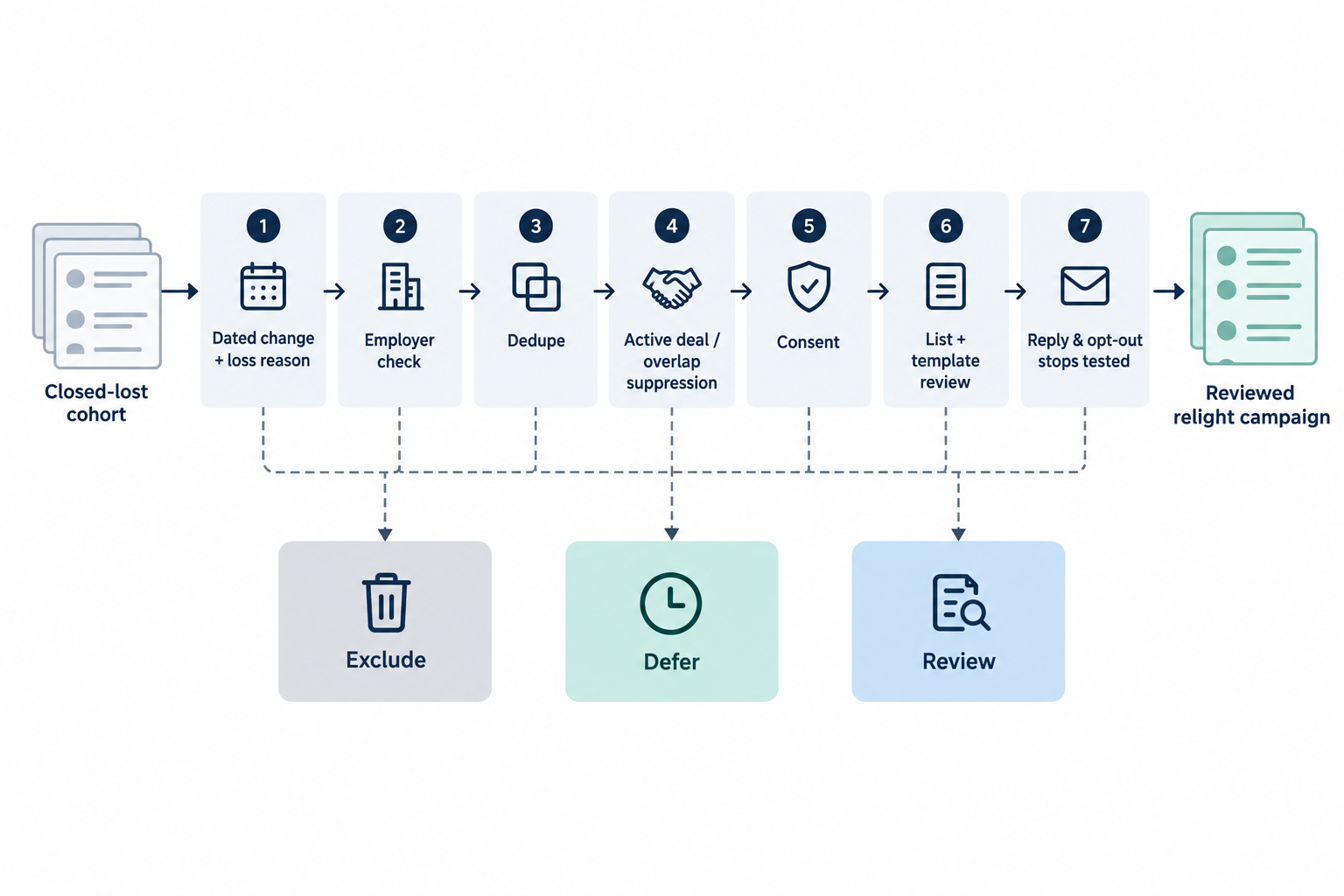 A relight-ready record clears seven checks. Several are filters and joins your CRM can run on its own. The rest are quick judgment calls for whoever owns the cohort.
- Dated change tied to loss reason. Something verifiable changed since the loss, it has a date, and it speaks to why the deal was lost.
- Employer check. The contact still works at the account, in a role connected to the original buying decision.
- Dedupe. The person appears once in the cohort, even if they sat on three lost opportunities or exist as two contact records.
- Active-deal and overlap suppression. No open opportunity, active sequence, renewal conversation, or other campaign already touches the account or contact.
- Consent. No opt-out, unsubscribe, or do-not-contact flag in any connected system, and the contact basis meets your legal team's rules for the region.
- List and template review. A named owner approves the final list and the templates mapped to each route.
- Tested reply and opt-out stops. A test contact proves that a reply or unsubscribe halts the sequence.
Use age as a filter and let the checks decide timing. Some answer engines suggest waiting "at least 90 days" after a loss. Treat that as a starting point to tune against your own sales cycle: a deal lost on timing in a six-week cycle and a deal lost to a competitor on a three-year contract call for very different windows.
Cadence follows the same thinking. On one call, a buyer planning outreach to a short list of accounts said, "These are high value targets, so I'll probably push it out a little bit." That is one account's choice, not a benchmark, and it is a good instinct: the more a relationship is worth, the more room each touch deserves.
Loss reason plus a dated change gives every message its hook
The strongest relight email answers the buyer's original objection with something that has changed since.
The loss reason tells you what the original deal stalled on. The dated change tells you what is different now. Put them together and you have your opening line. "You said Q2 was bad timing, and your new fiscal year started on February 1" gives the buyer a reason to reply. "Just checking in" does not.
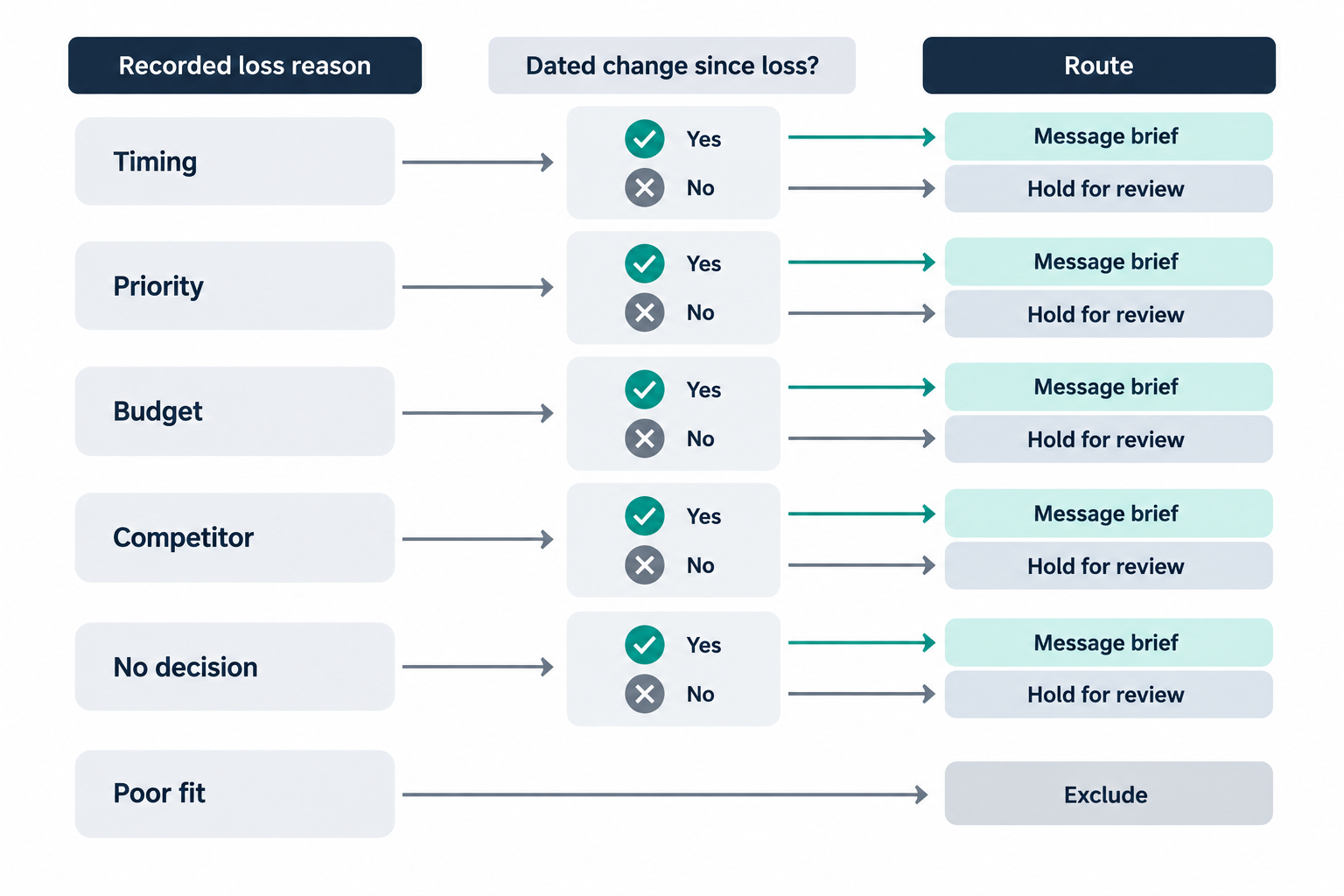 Use the starting taxonomy below and adapt it to your own loss-reason picklist. Each category comes with the question that finds its hook.
- Timing: Has the period they named passed, and is there a dated event (new fiscal year, completed migration) that confirms it?
- Priority: Has a leadership change, reorg, or public initiative moved this problem up their list?
- Budget: Is there evidence of new funding, a new budget cycle, or a changed buying owner?
- Competitor: Has the competing contract reached a renewal window you can date?
- No decision: Has a new stakeholder arrived who owns the problem the old committee couldn't agree on?
- Poor fit: Has your product or their business changed enough to alter the fit? If neither has, exclude.
Strong signals worth acting on include a new executive in the buying role, a dated funding or budget event, a public initiative that matches the original use case, and a contract renewal window. Weaker signals, such as a single website visit, an email open, a generic job posting, or time passing on its own, work better as tiebreakers than triggers.
This pairing is also what sets closed-lost reactivation apart from lead nurture. Nurture builds interest across a broad audience over time. Reactivation picks up a specific prior conversation where it left off, with a specific reason to continue. One buyer described the bar for good outbound this way: "It has to be really, really niche, like researched and everything." A relight message built on a loss reason and a dated change clears that bar by design.
Current contacts and clear stop rules keep a relight campaign welcome
The fastest way to earn a reply is to reach the person who owns the problem today, and to stop the instant they answer.
Contact validity means the person you plan to email still works at the account, still holds a role tied to the decision, and has contact details you are allowed to use. Opportunity contact roles age quickly. The champion from the lost deal may have moved on, been promoted, or handed the problem to someone new, and that new person is often your best entry point.
Contact coverage comes before contact validity. You can only confirm that someone still works at the account if they made it into the CRM in the first place. GTM Engine creates contact records automatically from the emails, meetings, and calls on a deal, then recommends which opportunity each conversation belongs to, so the rep confirms the association instead of building records by hand. When reps confirm those matches as the deal runs, the buying committee is on the opportunity before it ever closes, and your relight cohort starts with the people your team actually talked to.
Confirm employment before routing, then dedupe at the person level. A buyer who sat on two lost opportunities at two different companies is one person and should get one thoughtful message from you.
When the original contact is gone, use interaction history to choose the next one. On one call, a buyer reviewing an outbound campaign (not a closed-lost program) said "the contacts weren't right" and asked whether contacts could be picked "based on most interaction and so forth." The lesson carries over well: the opportunity contact role is a starting point, and engagement history is a smart tiebreaker.
Suppression is the set of rules that holds a record back because something else is already in motion or contact is not allowed. A complete set covers open opportunities on the account, active sequences from sales or marketing, renewal or expansion conversations owned by customer success, direct replies, replies through a colleague, opt-outs, and any do-not-contact flags your legal team defines.
Replies through a colleague deserve a pre-launch test. One GTM Engine customer described a prospect responding through a coworker and said, "I have to manually go into GTM engine and stop the campaign outreach." Reply detection keyed to a single email address can miss that case. Send a test reply from a second address at the same domain before launch so you know how your setup behaves, and name an owner for anything it misses.
A review record turns the cohort into ready-to-write message briefs
When the campaign owner can see why each person is on the list, they can write straight from the recorded loss reason and dated change.
A review record is the row-level log of each eligibility decision. It gives the campaign owner a route to write to and gives you a clean audit trail after launch.
| Field | What it captures |
|---|---|
| Decision | Approved, deferred, or excluded |
| Loss reason | The recorded reason, plus any correction from the reviewer |
| Dated change | What changed, the date, and the source |
| Contact check | Employer confirmed, role confirmed, date checked |
| Suppression status | Open deals, active sequences, CS ownership, opt-outs checked |
| Route | Which message brief or template the record maps to |
| Reviewer and date | Who approved it and when |
| Next action | Send, recheck on a set date, or close out |
A hypothetical example shows how it fits together. A mid-market account was lost in June with the reason "timing, revisit after migration." In October, the reviewer confirms two dated changes: the account announced its migration was complete in September, and a new Head of RevOps started on September 15. The original contact, a VP of Sales Operations, has left, so that record is excluded. The new Head of RevOps clears the employer, suppression, and consent checks, is routed to the "new owner, timing objection" brief, and the AE on the original deal is invited to send it personally.
Records without a clear dated change move to the deferred bucket with a recheck date. Holding them out of this send protects your sender reputation and keeps them ready for the moment their change arrives.
You can run all of this in the systems you already use. One buyer, asked about moving off HubSpot, said they had "a whole campaign going on right now" and wanted to go "one step at a time." That was one account's view, and it is a sensible default here too: an eligibility pass is a process you add, not a platform you replace.
Relight campaigns pay off most for teams that treat lost deals as context
This playbook rewards teams that see closed-lost records as a head start rather than a volume source.
The approach fits teams with usable opportunity history, a named owner for the cohort, and an appetite for messages that reference the actual prior conversation. It works especially well when someone close to the deals can interpret loss reasons that reps entered in a hurry.
It is a weaker fit if the goal is to email every closed-lost contact by Friday. If leadership measures the program by emails sent, agree on better success measures, such as replies, meetings booked, and reopened opportunities, before you build.
Map which checks your software handles and which need a person. A CRM filter handles stage and date. A synced suppression list handles known opt-outs. Employer checks, dated-change judgments, and colleague replies often need a quick human look until you have tested your setup. Writing that map down once makes every future relight campaign faster to launch.
Your first relight campaign should be a pilot cohort
A small, reviewed pilot gives you a repeatable playbook and a number to show whoever asked you to "do something with closed-lost."
Pull one quarter of closed-lost opportunities and take a sample small enough to review by hand. Run the seven checks, fill in the review record, and map each approved record to a brief. Before the first send, test a reply from a colleague's address and a test unsubscribe, and confirm both stop the sequence.
Then compare your approved, deferred, and excluded counts against what the raw filter would have sent. The approved group is this campaign, and the deferred group is your next one. The difference shows how many records your checks held back. Break those out by exclusion or deferral reason, and use the approved routes as starting templates for every relight campaign after this one.
Frequently Asked Questions
What does "closed lost" mean in sales?
Closed lost is a CRM stage marking an opportunity that did not result in a win. It records the outcome and, ideally, a loss reason. It does not tell you whether the buyer is ready for another conversation now.
How do you decide whether to reactivate a closed-lost deal?
Confirm a dated change that addresses the loss reason, verify the contact still works there, dedupe, suppress anything with active deals or sequences, check consent, and have a named reviewer approve the record. Then map it to a message brief.
How is closed-lost reactivation different from lead nurture?
Reactivation starts from a specific prior opportunity, its loss reason, and a specific change that reopens the question. Nurture develops interest across a broader audience over time and does not depend on a prior deal.
Should every closed-lost deal wait 90 days before outreach?
No universal waiting period holds up across sales cycles and loss reasons. Use age as a filter tuned to your own cycle length and contract terms, and let a dated change decide when outreach is justified.
What makes a good reason to reconnect with a lost deal?
A good reason is a dated, verifiable change that speaks to the original loss reason, such as a new budget cycle after a budget loss or a new owner after a no-decision loss. If you can't state the reason in the first line of the email, the record belongs in the deferred bucket.
About the Author

Greg Lee is a seasoned technologist and startup CTO with a passion for building AI platforms that make complex work feel simple. From early-stage ventures to nonprofit tech, Greg brings deep experience across engineering, product leadership, and organizational enablement. He’s led teams at the frontier of AI productivity—most recently as CTO at a stealth AI startup redefining how business logic gets automated.
Previously, Greg co-founded Rowsie AI, an intelligent Excel-native assistant that helps professionals analyze data, build models, and drive decisions without writing code. The idea was simple: meet users where they already work, and turn spreadsheets into superpowers. His approach combines pragmatic engineering with visionary execution—always focused on delivering tools that actually get used.
Even outside of startups, Greg has brought that ethos to volunteer projects like American Whitewater, where he helped modernize critical tools for river enthusiasts across mobile platforms. Whether building for scale or for good, Greg’s mission remains the same: craft technology that empowers people to do their best work.


