

TL;DR
District contact enrichment is the process of finding, verifying, and structuring contact data for decision-makers at school districts, schools, and other educational institutions so a sales team can reach them. Selling into K-12 means solving two problems at once: finding the people, and knowing which districts to call first.
Here's what you'll learn in this article:
- Why district websites cover the smaller districts that contact databases miss
- How to scrape and enrich a district buying group into your CRM
- Which public district records reveal what a district is working on this year
- How propensity scoring turns those records into a ranked call list
District contact enrichment starts on the district website, not on LinkedIn
Your database has the superintendent of Dallas ISD. It has nobody at the small district two counties over.
District contact enrichment breaks down at the exact point where B2B prospecting usually works best: the professional profile. Districts don't operate like private businesses, where executives keep their LinkedIn profiles populated. The profile a rep would normally check for a superintendent or chief human resources officer is thin, outdated, or missing.
Contact databases share the same blind spot, just further down the list. They handle large districts reasonably well. Smaller school districts are a different story. They're probably not going to be in the list, but they're listed on the website.
That is the opening. Districts publish their own org charts in plain sight: staff directories, cabinet pages, department contact lists, often down to every teacher. For the long tail of districts, the public web is the most complete contact source available, even if it is the least convenient one.
Before you pull a single name, decide whose name you need. Districts don't buy things. People buy things. For an educator-preparation company, the chief human resources officer is a typical buyer. A curriculum vendor would look for curriculum and instruction leaders, and a security vendor would look for the technology director. Map the buying group to your offer first, then go find it.
Scraping and enrichment turn a district website into a CRM-ready buying group
Reps copying names off staff directory pages is not a prospecting strategy.
Scraping and enrichment are two separate jobs, and district prospecting needs both. Scraping finds the person. Enrichment makes the record usable: a verified email, a phone number, a LinkedIn profile where one exists, and the research that tells a rep why this person matters.
GTM Engine offers two paths to the same record. The first is a database search: filter contacts at the district by persona and seniority, enrich email, phone, and LinkedIn, then import. The second path covers the districts the database misses. An agent runs web searches and scrapes the district's site and any other pages it finds until it identifies the person you asked for, such as the chief human resources officer. It turns that finding into a structured contact on the district's account, which triggers enrichment and research on the new contact.
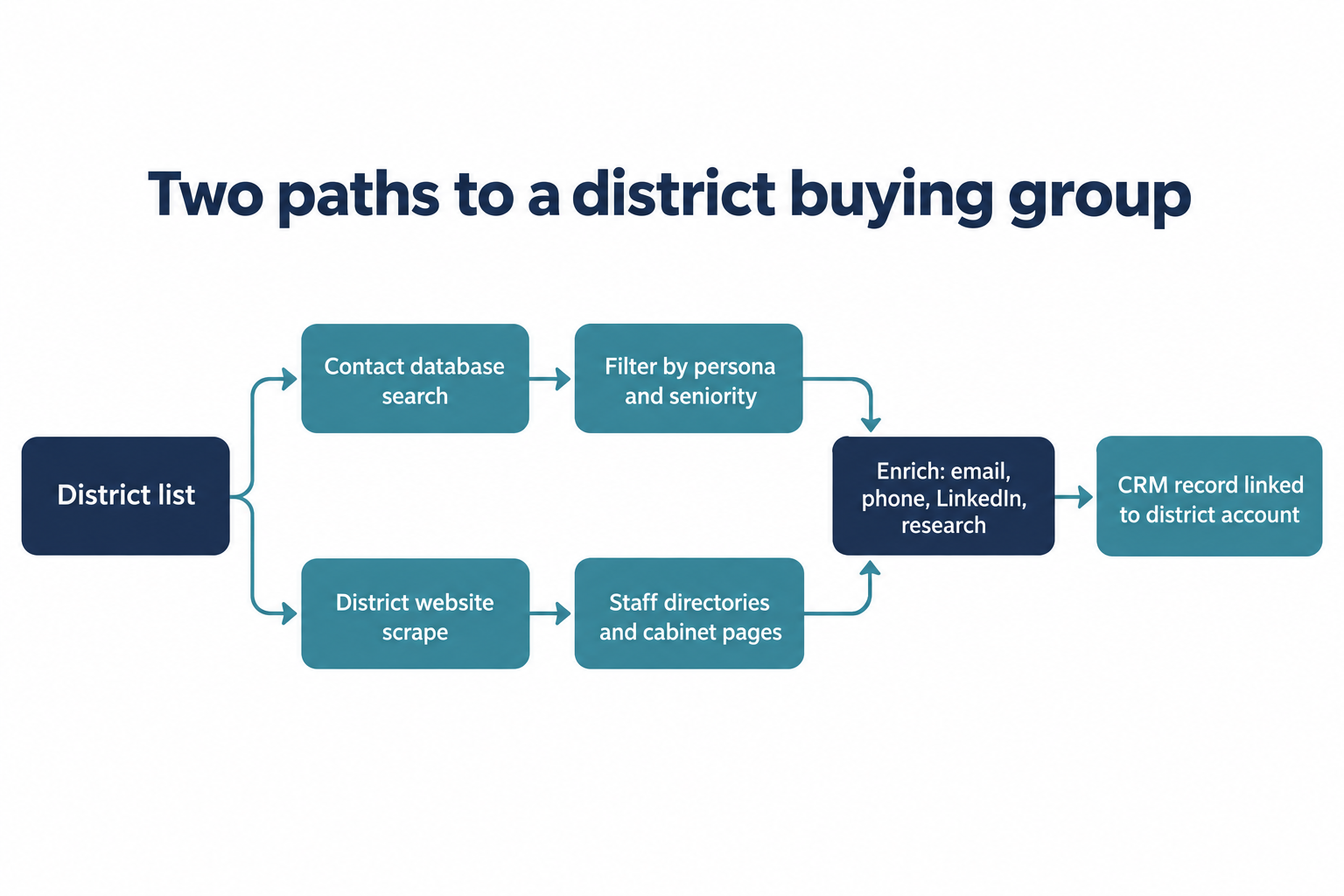 Both paths run automatically across your district list. If you'd rather plan the job in plain language first, Genie, GTM Engine's AI assistant, has a plan mode for that. As contacts land, GTM Engine infers each district's org chart and builds it visually, so a rep can see how the buying group fits together instead of scrolling a list of names.
Either way, the contact syncs to your CRM with its associations intact, whether that is HubSpot, Salesforce, Dynamics, or a homegrown system connected by API. The person, the district, and the research stay linked, so a rep opening the record sees who this is and why they were added.
Finding the people answers who to call. It says nothing about when.
Public records tell you which districts are ready to buy right now
A district that is discussing your problem in a board meeting is a better use of a rep's week than one that isn't.
Public records are the closest thing K-12 sales has to an intent feed, and districts are legally obligated to produce them. Under state public-records laws, district budgets, audits, board agendas and minutes, and district plans are open to the public unless a specific exemption applies (Chico Unified AR 1340; Caliente School District Regulation 1340). Availability is uneven. Disclosure rules, exemptions, and redactions vary by state, and posting habits vary by district: one district puts every board packet online, while its neighbor only answers a formal public records request, the state-law cousin of a federal FOIA request. Some districts maintain dedicated pages of required postings, and others archive board agendas, minutes, and meeting video.
[IMAGE PENDING: Irvine Unified School District 2026 board meeting archive screenshot (agendas, meeting video, and supporting documents such as the Measure E GO Bond and Unaudited Actuals presentations). Needs an embed-safe URL before publishing.]
Meeting notes are where districts discuss their issues and initiatives in their own words. Scrape them, and you can say something specific: this district has this initiative going on right now, so it's a good fit. The signals worth pulling:
- Initiatives raised in board agendas and minutes
- Goals in strategic and technology plans
- Local Control and Accountability Plans (LCAPs) in California
- Budget line items and fiscal reports
- RFPs and bids
- Federal grant spending plans such as ESSER
Job postings belong on the list too. Districts that are actually hiring teachers are telling you something about headcount, budget, and what they need next. Hiring is a public, dated, countable signal, which makes it easy to score.
Every one of these signals is configurable. If you're looking for a particular initiative or RFP, GTM Engine can find it, scrape it, and score it for every district in your territory.
Collecting the documents is half the job. The other half is turning them into something a sales leader can sort.
Propensity scoring turns a pile of evidence into a sorted call list
Research nobody can sort is just a longer reading assignment.
Propensity scoring is the step that turns district research into a number a sales leader can sort by. You don't want a blob of text on every account. You want to sort all 10,000 accounts by the ones that are most ready, because you found evidence they're ready to buy and ready for outreach. A paragraph can't be filtered, compared, or reported on. A score can.
In GTM Engine, you define the signals, either manually or from recommendations. Each signal is researched per account and produces three things: the raw research, a score with its reasoning, and citations to where the evidence was found. Signal scores roll up into an overall propensity score with its own reasoning, weighed against your products, ICPs, and CRM context. With automatic scoring turned on, new accounts are scored as they arrive, whether they were added directly or synced from your CRM. A refresh cadence of 7, 14, 30, 60, or 90 days rescores accounts as their evidence ages, and the score, reasoning, and signal fields can be mapped to CRM properties so reps sort on them where they already work.
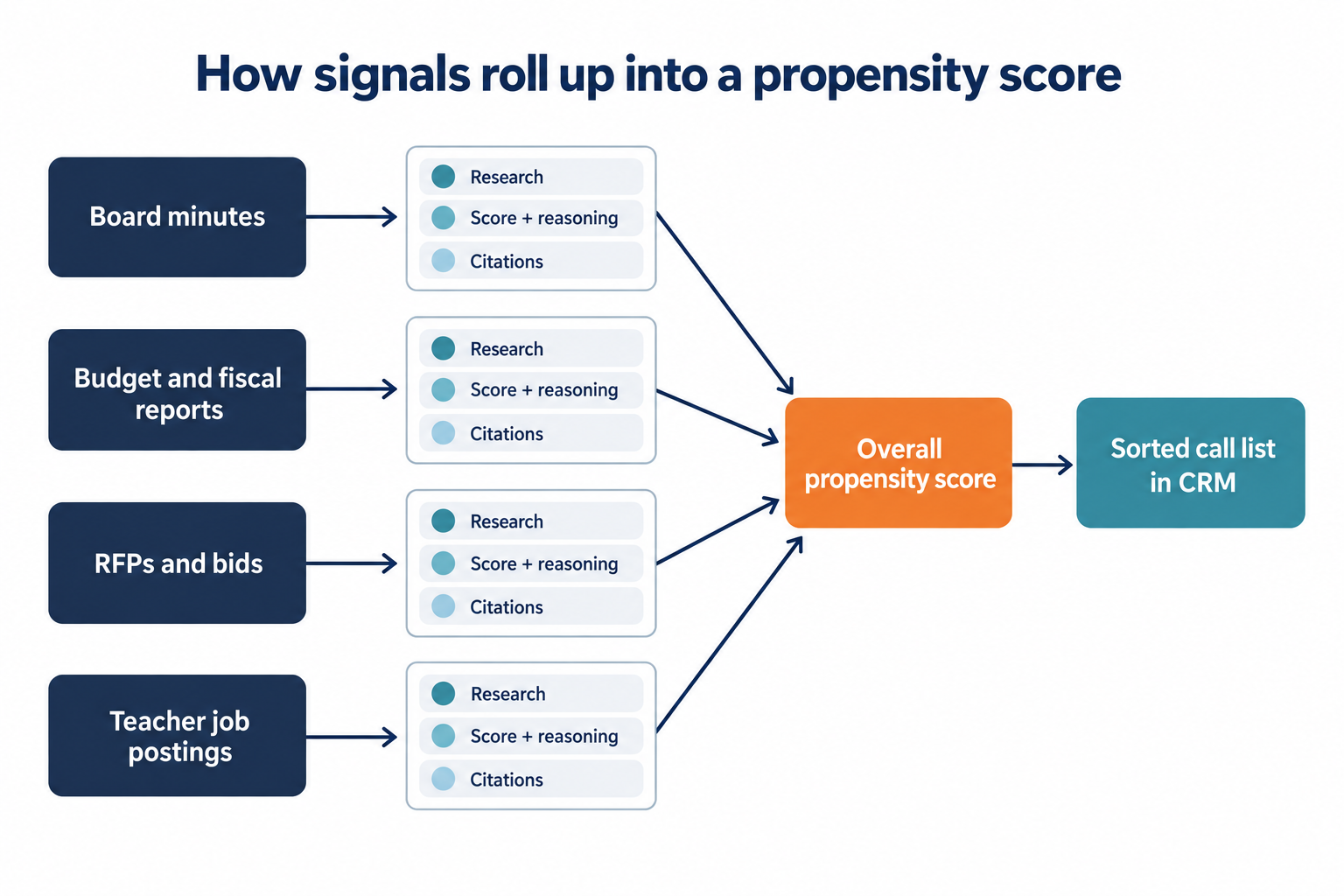 Teacher hiring shows how a single signal works. A district with no open teaching roles scores low on that signal. A district with a lot of openings scores high. The reasoning explains the number, and the citations let a rep check it before picking up the phone.
Weights are where your go-to-market opinion shows up. Here is an illustrative starting rubric for an educator-preparation offer, the kind of thing a sales leader would sketch before the first scoring run. It is an example to argue with, not a product default or a benchmark.
| Signal | What earns a high score | Example weight |
|---|---|---|
| Teacher job postings | Several open teaching roles posted in the last 60 days | 35% |
| Board agendas and minutes | Recent discussion of staffing, retention, or teacher pipeline | 30% |
| Budget and grant plans | Funds allocated to recruitment or professional development | 20% |
| RFPs and bids | An open or recently awarded solicitation in your category | 15% |
A security vendor would flip the order, putting technology plans and RFPs on top and job postings near the bottom. Same mechanics, different opinion about what readiness looks like.
Read low scores carefully. A low score doesn't mean a district isn't ready to buy. It means the research wasn't able to find evidence. You can still reach out, but spend your time first on the districts with more evidence. Think of the score as triage. It decides who gets seen first. Nobody gets sent home.
District buyers leave a public trail
The information exists. The question is whether your team reads it before a competitor does.
District contact enrichment works because school districts are unusually transparent buyers. Their people are listed on the district website. Their priorities are written into board minutes, budgets, and plans that the law requires them to publish. What has been missing is a way to connect the two at the scale of a full territory.
Try it by hand before you automate it. Pick ten districts in your territory, read their last two sets of board minutes, and count how many mention the problem you solve. That count is your case for scoring all of them.
Frequently Asked Questions
What is district contact enrichment?
District contact enrichment is the process of finding, verifying, and structuring contact data for decision-makers at school districts, schools, and educational institutions so sales teams can reach the right buyers.
Where can you find school district administrator contacts?
Start with contact databases for larger districts, then go to the district's own website. Staff directories and leadership pages cover the smaller districts that databases miss.
What public district information shows buying intent?
Board agendas and minutes, budgets, strategic and technology plans, California LCAPs, RFPs, federal grant spending plans, and job postings show buying intent. State public-records laws make most of these available, though what each district posts online versus releases on request varies.
How does propensity scoring work for school districts?
Propensity scoring researches each signal per district, scores it with reasoning and citations, and rolls the results into one sortable score in your CRM. A low score means the research found no evidence yet.
Can you score districts on a specific initiative or RFP?
Yes. Signals are configurable, so you can describe the initiative or RFP you care about, and GTM Engine finds it, scrapes it, and scores it for every district in your territory.
About the Author

Robert Moseley IV is the Founder and CEO of GTM Engine, a pipeline execution platform that’s changing the way modern revenue teams work. With a background in sales leadership, product strategy, and data architecture, he’s spent more than 10 years helping fast-growing companies move away from manual processes and adopt smarter, scalable systems. At GTM Engine, Robert is building what he calls the go-to-market nervous system. It tracks every interaction, uses AI to enrich CRM data, and gives teams the real-time visibility they need to stay on track. His true north is simple. To take the guesswork out of sales and help revenue teams make decisions based on facts, not gut feel.


