

TL;DR
A contact's title and champion flag tell you who someone is. CRM associations tell you who that person is to a specific account, deal and conversation, and when those links are wrong, every stakeholder coverage report, segment and forecast built on top of them is wrong too. Quietly.
Here's what you'll learn in this article:
- What CRM associations are, and why they carry more signal than the fields on a contact record
- How identity resolution decides which record a call, email or meeting belongs to
- Where account mapping, opportunity contact roles and activity matching break in predictable ways
- How bad associations fake multi-threading and push accounts into the wrong segments
CRM associations carry the signal your pipeline reports actually count
You can have a perfect title on every contact and still not know who is involved in a deal.
CRM associations are the links between records: which account a contact belongs to, which opportunities that contact plays a role on, and which calls, emails and meetings attach to each of them. A contact with "VP Operations" in the title field and a champion checkbox is a fact about a person. The association is the fact about the relationship, and the relationship is what your coverage dashboard, your segment filters and your forecast are counting.
Here is what that looks like in practice. On a recent call, a sales leader at one of our customers tried to add a buyer who had just changed companies to a new opportunity. Four attempts, four errors. The buyer already existed: our system had created a contact from a calendar invite, but the HubSpot contact name fields were set to read-only, so the sync wrote back an empty name. His emails and the previous day's call were sitting on that nameless record, nowhere near the new deal. The leader's verdict on the opportunity view: "I can't trust this right now because it doesn't have all the information."
Nobody had bad data about the person. Every field that mattered was available somewhere. The links between the person, the company and the deal were missing, and that was enough to make the deal record useless.
A champion attached to the wrong account is a rumor stored in a field.
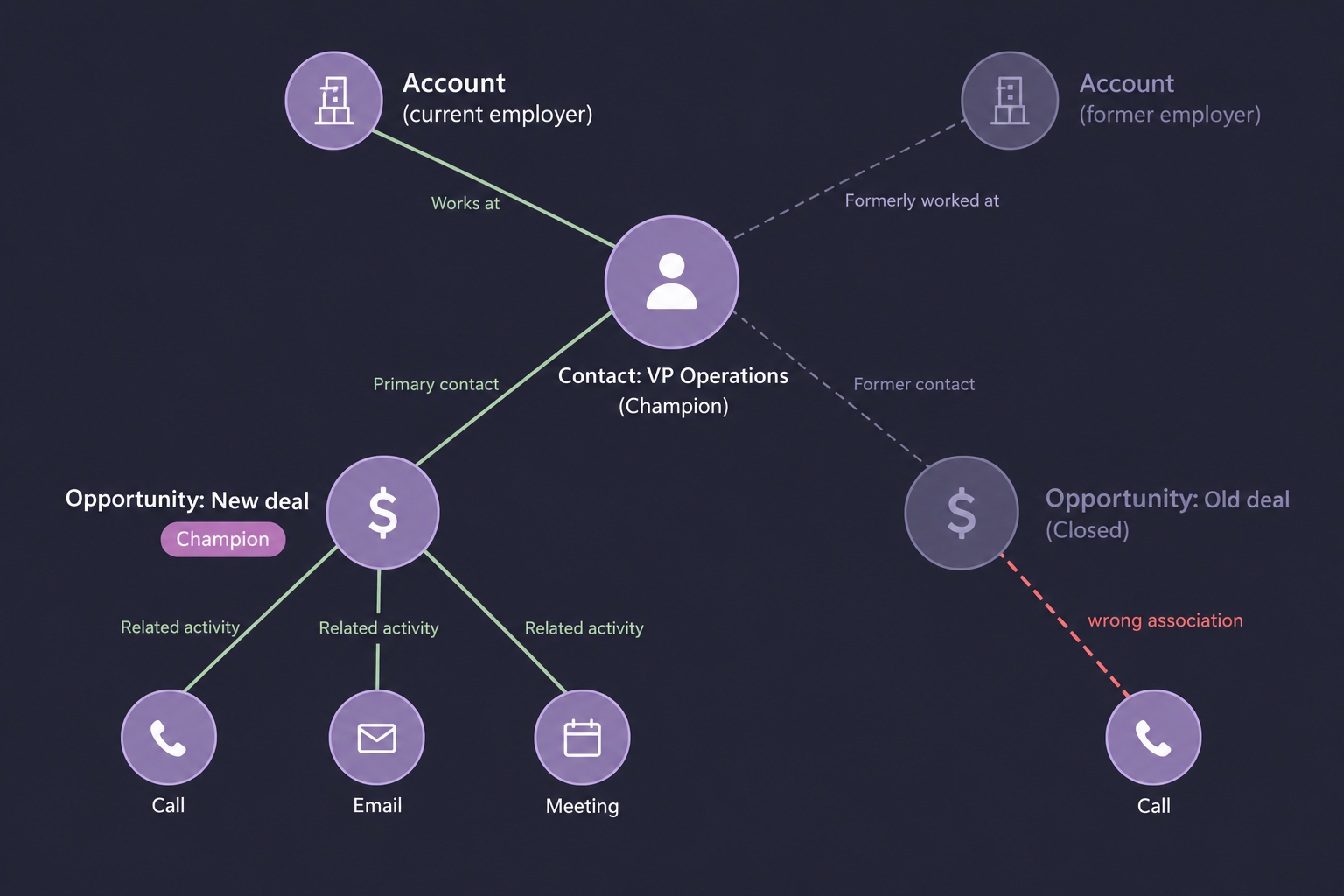
The graph above is illustrative, not a customer record. It shows the four layers every relationship depends on. Identity resolution decides which person and company records are real. Account mapping ties the person to a company. Opportunity contact roles tie the person to a deal with a job to do. Activity matching ties each call, email and meeting to the right combination of all three. Each layer points at the one beneath it, so an error at the bottom shows up as nonsense at the top.
Identity resolution decides which record everything else attaches to
If your system can't tell which Jamie this is, it can't tell which deal her call belongs to.
Identity resolution is the process of deciding that two or more records, or a bare email address on a meeting invite, refer to the same real person or company, then collapsing them into one canonical record. It comes first because every association downstream points at a record ID. Pick the wrong ID and the call lands on a ghost.
Our founder, Robert Moseley, put it bluntly to a RevOps team evaluating us: "If I have five copies of Jamie and four copies of Dana and 10 copies of Alex, because we don't necessarily know which one is it that it belongs to, we need the records merged first." That team's RevOps manager had already lived the consequence. Asked how many companies were in their HubSpot instance, she said, "I couldn't tell you how many companies we have because of the duplication issue."
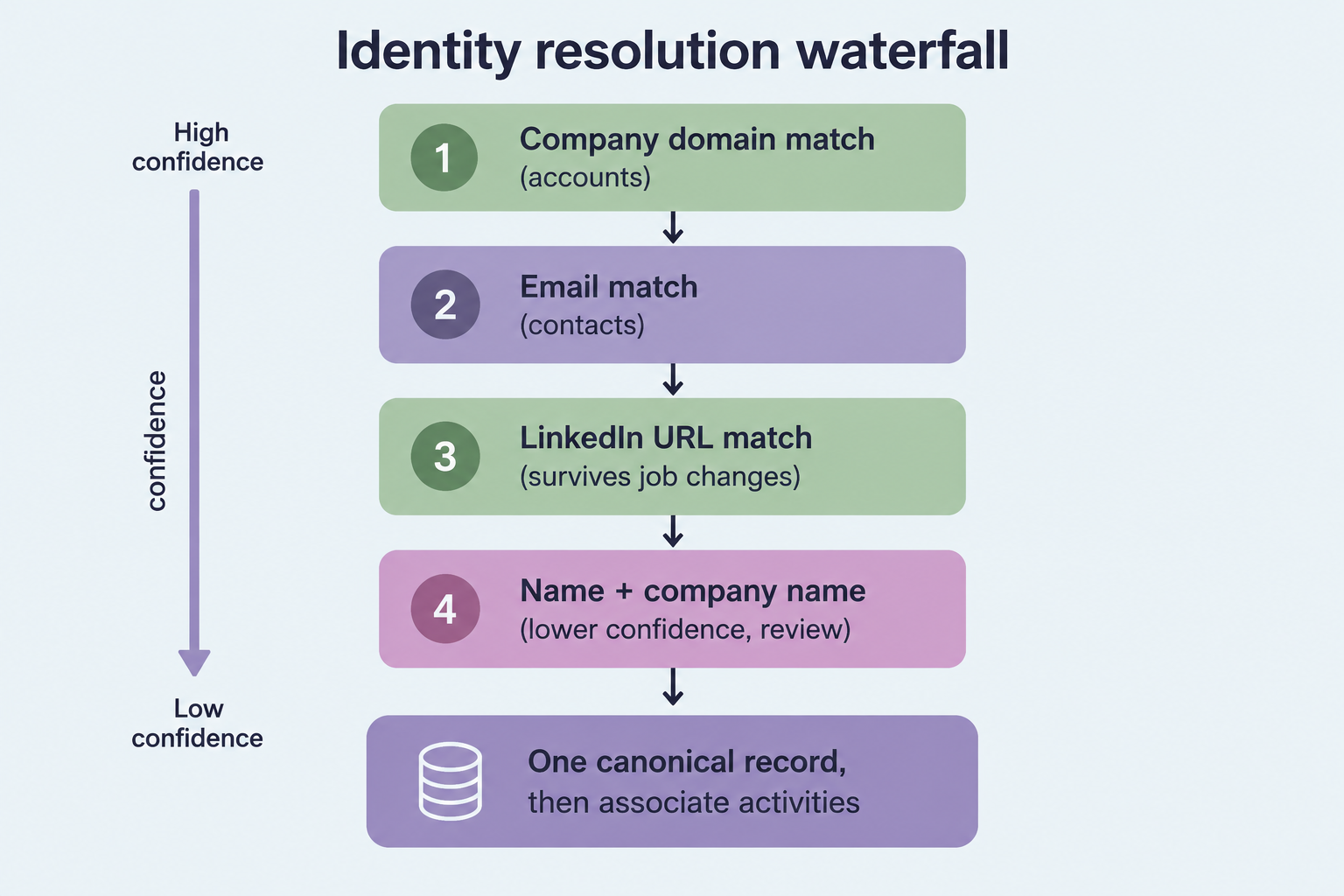
Good identity resolution runs as a waterfall, ordered by confidence. Company domain is the strongest signal for accounts. Email is strong for contacts, until the person changes jobs. LinkedIn URL survives job changes, which makes it the better tiebreaker for people. Name plus company name sits at the bottom, and anything matched only there deserves human review before a merge.
The tradeoff nobody puts on the slide: a false merge is worse than a duplicate. A duplicate is visible and annoying. A false merge silently welds one buyer's history onto another, and then every downstream association inherits the mistake. The same RevOps manager flagged exactly this risk for her business: "We have a lot of districts in schools with the same names but different states." Two hypothetical Lincoln County school districts in two states are two accounts, and your matching rules need to know that before they get aggressive.
Job changes should move the association, not create a new person
When a champion changes companies, the instinct is to create a fresh contact under the new account. That throws away the history. As Robert explained on the same customer call where the four errors happened, "you don't want a new record because then you're starting from scratch." The right move is one person record with a new primary account association. Old activities stay associated with the old account and the old opportunity. New activities attach to the new ones. Anyone who inherits the account later sees the whole relationship, including the two years of conversations that made this person a champion in the first place.
Account and contact mapping determines what "account" means in your reports
Lead-based data models scatter one buying group across a pile of unrelated records.
Account and contact mapping is the association between a person and the company they work for, usually expressed as a primary account on the contact. When it is missing, you get stray records: contacts with no account association at all. They still exist, they still receive campaigns, and they never show up when someone asks what is happening at the account.
Salesforce's lead object makes this worse for B2B teams. Leads are people at accounts, but the lead model treats them as free-floating until conversion. If 10 people from one company download your content, you want to see a hot account. The lead model shows you 10 separate leads. A seller on the customer team above hit a smaller version of the same problem: she couldn't find her prospect because, in her words, "his org isn't an account in our system. Even though two people from the org have downloaded info." The account existed under its web domain, which didn't match how the company names itself. Two engaged people, zero visible account interest.
Segments break the same way. Take an illustrative case: a buyer at a 40-person subsidiary gets mapped to the 5,000-person parent because the email domain is shared. That buyer now sits in your enterprise segment, gets enterprise messaging, rolls up to an enterprise territory, and pulls the subsidiary's deal into your enterprise win-rate math. Nothing in the contact record is wrong. The mapping is.
Opportunity contact roles are where stakeholder coverage lives or dies
A deal can list three contact roles and still be single-threaded in every way that matters.
An opportunity contact role is the association between a contact and a specific deal, labeled with the job that person does in the decision: champion, economic buyer, technical evaluator. Stakeholder coverage reports count these roles. "Which forecast deals are single-threaded?" is a question every CRO should be able to answer, and the answer is only as good as the role associations underneath it.
Those associations are thin to begin with. Robert said it plainly on that RevOps evaluation call: "Most reps don't associate contacts with the deals." The ones who do make three recurring mistakes, and none of them shows up on a dashboard.
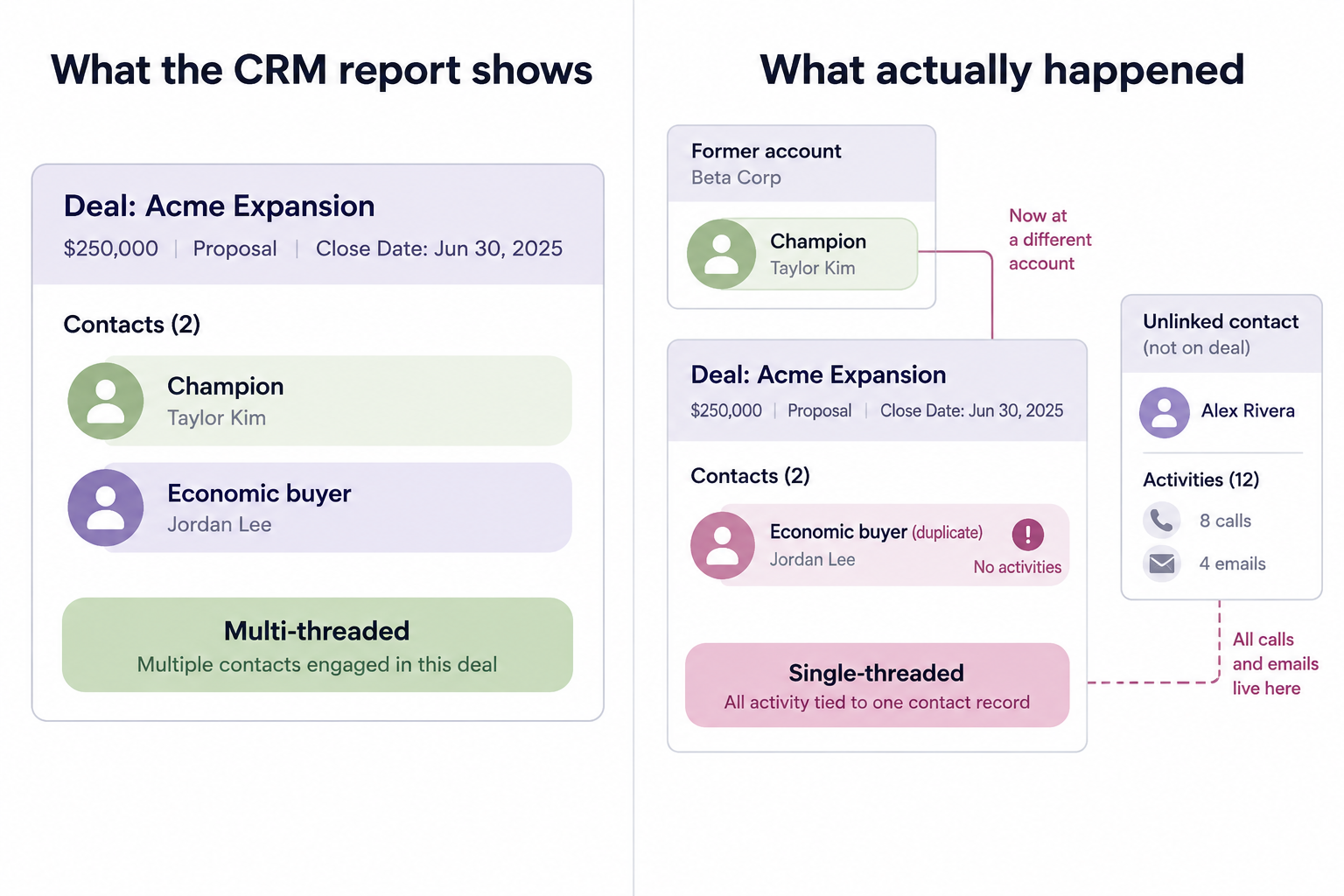
First, the role sits on the wrong opportunity, typically a closed deal at the champion's former employer. Second, the role sits on one copy of a duplicated contact while every call and email lands on the other copy. Third, the role was never added, so a buyer who has been on four calls is invisible to the coverage report. The dashboard says multi-threaded. The activity record says one person has been talking to you for six weeks.
A coverage metric worth trusting counts a stakeholder only when two conditions hold: the contact has a role on the opportunity, and recent activities are associated with that same opportunity. Role without activity is a name someone typed. Activity without role is engagement your forecast can't see.
Matching calls, emails and meetings to records needs rules about time and context
Attach everything and you pollute the deal. Attach nothing and the deal starts blank.
Activity matching is the process of deciding which contact, account and opportunity a call, email or meeting belongs to. A contact's activity is not automatically an opportunity's activity. If a buyer you've worked with for two years moves companies and you open a deal with the new employer, you don't want their old renewal calls inflating engagement on the new deal. You do want those calls kept on the person.
Pre-opportunity work is the hard case. On the customer call above, the sales leader estimated that for new opportunities, "95% of the time, the only interaction will be getting them to this point." That's his estimate, not a benchmark, but the workflow is familiar: outreach, a first conversation, discovery, maybe a second meeting, and only then does someone create the opportunity. His seller described the gap from the other side: "I have two calls with this dude, plus a few emails, shouldn't that all pull over?" She went looking in the activity log and found "8,000 activities in here."
Here is how GTM Engine handles it today, tradeoffs included. Once an opportunity exists, new calls, emails and meetings with its contacts associate to it automatically. Activities from before the opportunity existed stay associated with the contact and the account, and a rep has to attach them to the deal from the activity's related records. That's a deliberate choice, because auto-attaching a contact's entire history pollutes expansion deals at existing customers. It's also friction for new-logo deals, and we're building a step at opportunity creation that asks which prior activities to pull in. We also create activities for every email, but only create new contacts and accounts when there's an open opportunity, so vendor and newsletter traffic doesn't flood your database. The cost is that some early-stage people won't get records until a deal exists.
A defensible rule for your own team: on a new-logo opportunity, pull in prior activities from that account's contacts within a set window, such as the last 90 days. On an expansion opportunity, select prior activities by hand.
CRM sync permissions can quietly undo good associations
Your field permissions can erase the record your tools just built.
Sync rules are the least glamorous part of association quality, and they fail without telling anyone. In the customer case above, the root cause of the four errors was a HubSpot configuration where contact name fields were read-only to integrations. GTM Engine created the contact, tried to sync it, HubSpot rejected the write, and the next sync down nulled out the fields. Robert's diagnosis on the call: "the fact that we're unable to create the contacts properly means that when we're trying to associate, like, call records and email records, like, we're not able to do that."
The fix was a settings change, not a project. Identity fields (email, first name, last name, title, LinkedIn URL) should sync both ways, because they're what your matching depends on. System identifiers like the CRM record ID should be locked to sync down only. Audit this before you blame your reps for missing data.
Coverage metrics should rest on associations you can audit
If you can't trace a stakeholder count back to records and activities, you're reporting a guess.
Titles and champion flags will keep getting better, because enrichment vendors sell them by the row. Associations don't come in a CSV. They're built one link at a time from calendar invites, email threads, call participants and job changes, and they decay every time a buyer moves or a rep creates a duplicate. That's why two teams with identical contact data can produce completely different pipeline truth.
GTM Engine runs the identity waterfall before associating activities, creates and links records from calendars and email threads tied to open deals, and cites the source activity for every field it updates. It doesn't catch everything. Name-only matches still need review, and calls from reps' personal cell phones are, as Robert told one prospect, "legitimately hard" to capture. Those gaps belong in your coverage math too.
Start with three queries against your open pipeline this week:
- Find contacts with a role on an open opportunity whose primary account differs from the opportunity's account. This shows misattributed champions.
- Find opportunities where no role-holding contact has an associated activity in the last 30 days. This shows fake multi-threading.
- Find contact clusters that share a LinkedIn URL. This shows duplicates splitting your history.
Frequently Asked Questions
What is the difference between an account association and an opportunity contact role?
An account association says where a person works. An opportunity contact role says what that person does in a specific deal. A contact can have one primary account and roles on several opportunities, including closed ones at former employers, which is why coverage reports must check both.
Should a contact who changes jobs get a new CRM record?
No. Keep one person record and add the new account as the primary association. Past activities stay linked to the old account and opportunity, new activities link to the new ones, and the relationship history survives the move.
Doesn't HubSpot's built-in duplicate management handle this?
HubSpot flags duplicates, though the RevOps manager quoted above described it as not catching everything the first time, or "waiting six weeks before it tells you that duplicate is there." The more useful question is whether duplicates get resolved before calls and emails are associated. If matching runs on unmerged records, activities split across copies regardless of what gets flagged later.
Should every past activity attach to a new opportunity automatically?
Not for every deal type. New-logo opportunities usually benefit from pulling in recent pre-opportunity activity from the same account. Expansion opportunities at existing customers need selective attachment, or old support and renewal conversations will distort engagement scores on the new deal.
How do I measure stakeholder coverage honestly?
Count a stakeholder only when they hold a role on the opportunity and have recent activity associated with that same opportunity. Report role-only and activity-only contacts separately so reps can see which links to fix.
Run the three pipeline queries above against your open deals this week. If the results are uglier than your coverage dashboard suggests, bring them to a working session with the GTM Engine team and we'll walk your relationship graph with you, record by record.
About the Author

Robert Moseley IV is the Founder and CEO of GTM Engine, a pipeline execution platform that’s changing the way modern revenue teams work. With a background in sales leadership, product strategy, and data architecture, he’s spent more than 10 years helping fast-growing companies move away from manual processes and adopt smarter, scalable systems. At GTM Engine, Robert is building what he calls the go-to-market nervous system. It tracks every interaction, uses AI to enrich CRM data, and gives teams the real-time visibility they need to stay on track. His true north is simple. To take the guesswork out of sales and help revenue teams make decisions based on facts, not gut feel.


