
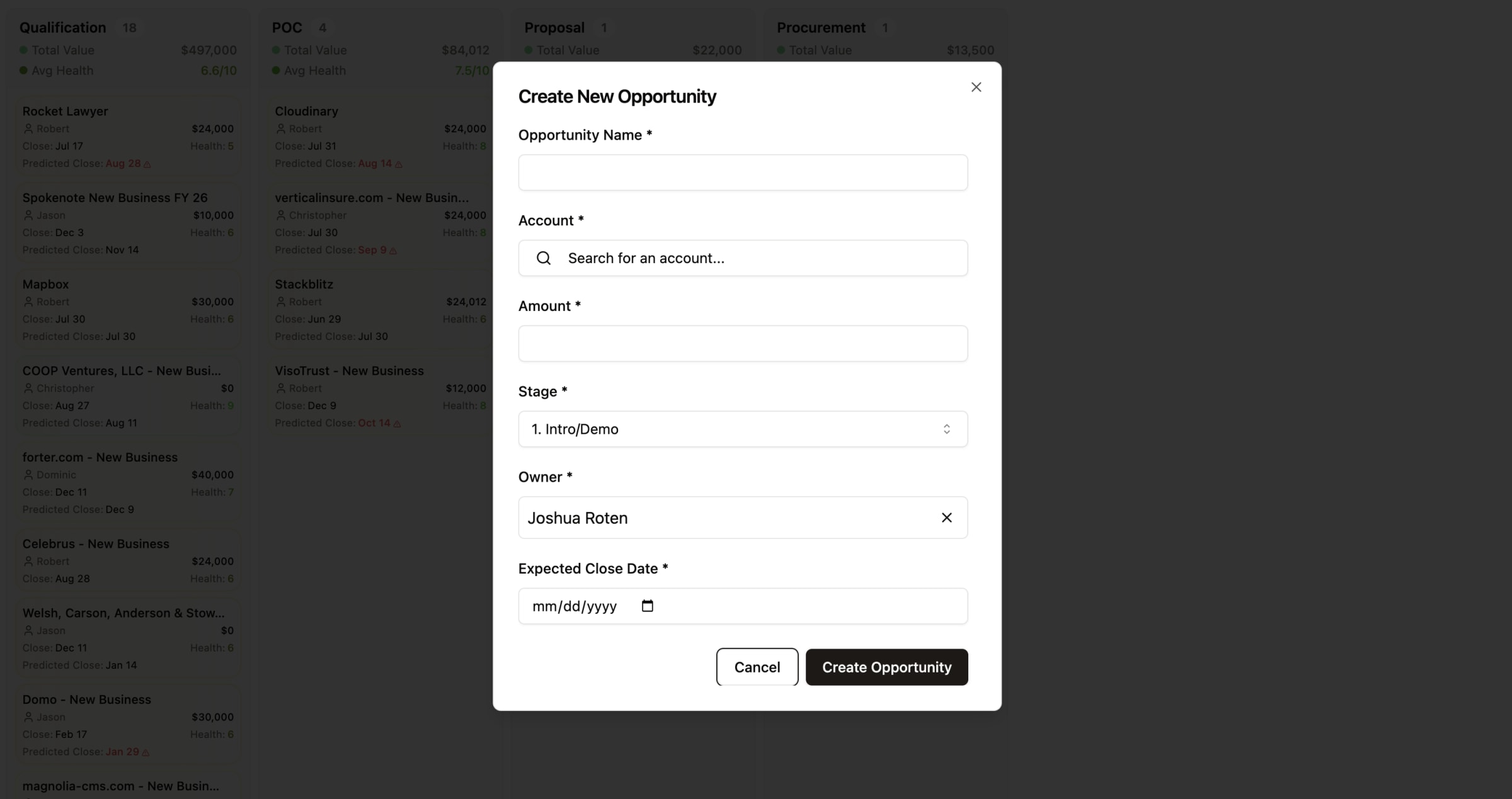
Feature Overview
The Create New Opportunity feature allows you to quickly add sales opportunities to your pipeline directly from the GTM Engine interface. This streamlined process captures essential deal information in one convenient modal, ensuring your pipeline stays current with minimal data entry effort.
Benefits to the User
- Simplified Data Entry: Add new opportunities with just a few clicks, reducing administrative burden
- Seamless Account Creation: Create new accounts on the fly without leaving the opportunity creation workflow
- Standardized Deal Tracking: Ensure consistent opportunity data across your sales organization
- Time Savings: Spend less time on data entry and more time on actual selling activities
- Improved Pipeline Visibility: Keep your pipeline up-to-date for more accurate forecasting
Accessing the Feature
- Navigate to the Pipeline page via the main navigation menu
- Look for the "Create Opportunity" button at the top of the page
- Click this button to launch the Create New Opportunity modal
Step-by-Step Usage Guide
Creating a New Opportunity
- Fill in Required Fields:
- Opportunity Name: Enter a descriptive name for your opportunity
- Account: Select an existing account or create a new one (see below)
- Amount: Enter the estimated contract value
- Stage: Select the appropriate sales stage from the dropdown menu
- Owner: Confirm or change the opportunity owner
- Expected Close Date: Select the anticipated closing date
- Selecting an Existing Account:
- Click in the Account field to activate the search function
- Begin typing the account name to see matching results
- Select the correct account from the dropdown list
- Creating a New Account (if needed):
- If the account doesn't exist, select "Create New Account"
- Fill in the required account information:
- Account Name
- Domain (company website)
- Account Owner
- Click the "Create Account" button
- The new account will automatically populate in the Account field
- Finalizing the Opportunity:
- Review all entered information for accuracy
- Click the "Create Opportunity" button at the bottom of the modal
- Your new opportunity will appear in your pipeline immediately
Tips and Best Practices
- Use Descriptive Opportunity Names: Include the account name and primary solution/product to make opportunities easily identifiable
- Be Realistic with Close Dates: Set expected close dates that reflect your actual sales cycle length
- Verify Account Information: Double-check account details when creating new accounts to avoid duplicates
- Update Stages Promptly: Select the most current stage to ensure accurate pipeline reporting
- Estimate Amount Thoughtfully: Provide your best estimate of contract value for forecasting purposes
- Batch Creation Process: Consider setting aside specific times to create multiple opportunities at once for efficiency
Note: The opportunity stages available in the dropdown menu are configured by your system administrator. If you need additional stages or have questions about the current configuration, please contact your GTM Engine administrator.
